01 / QUICK ANSWER
Is there a maximum video length?
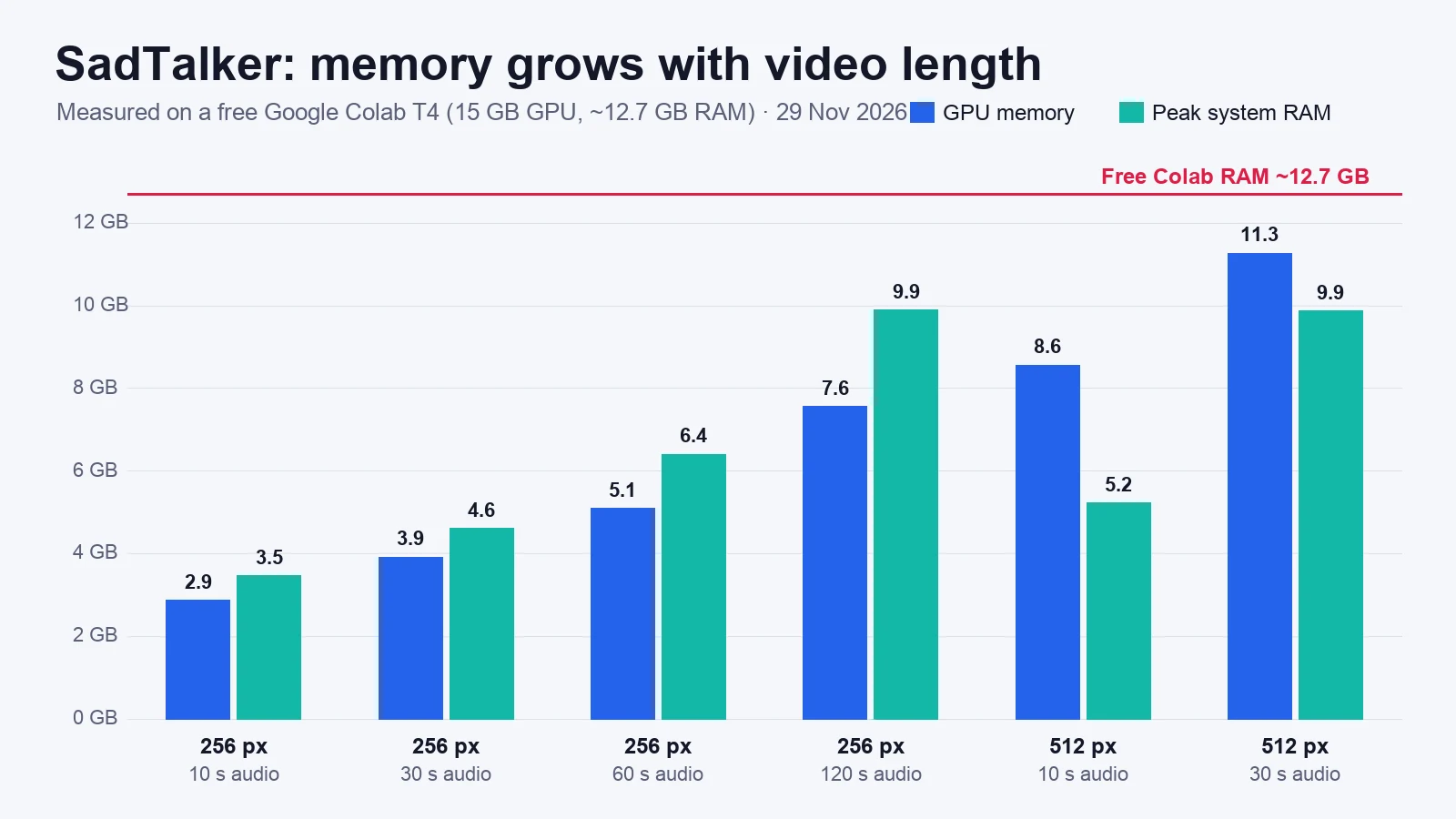
No fixed limit. SadTalker has no length setting; the limit is memory. It keeps every frame of the clip on the GPU until rendering ends, then copies the frames to system RAM, so longer audio needs more of both. 512 px needs about four times more per second than 256 px.
02 / ORIGINAL TEST
Length test on a T4
Same photo (SadTalker’s people_0.png example), English speech built from SadTalker’s own example clips, --preprocess crop, batch size 2, no enhancer, still mode off. One fresh process per run, so times include model loading.
On a small screen, swipe the table sideways.
| Size · audio length | Result | Time | GPU memory used | Peak RAM |
|---|---|---|---|---|
| 256 px · 10 s | OK | 1 min 47 s | 2.9 GB | 3.5 GB |
| 256 px · 30 s | OK | 4 min 12 s | 3.9 GB | 4.6 GB |
| 256 px · 60 s | OK | 8 min 17 s | 5.1 GB | 6.4 GB |
| 256 px · 120 s | OK | 16 min 25 s | 7.6 GB | 9.9 GB |
| 512 px · 10 s | OK | 5 min 19 s | 8.6 GB | 5.2 GB |
| 512 px · 30 s | OK | 15 min 26 s | 11.3 GB | 9.9 GB |
GPU memory is the peak above the idle baseline, sampled every 0.5 s with nvidia-smi. Peak RAM is the maximum resident memory of the SadTalker process. One run each on a shared free GPU. Raw numbers: results.json.

- Render time grows in a straight line: about 8 s of rendering per second of audio at 256 px and 30 s at 512 px on the T4.
- GPU memory grows too: about 43 MB per second of audio at 256 px and 139 MB at 512 px, on top of 2.6 GB and 7.2 GB to start.
- RAM grows fastest: about 60 MB per second at 256 px and 238 MB at 512 px.
Not run: 512 px at 60 s (we stopped it before it finished). We tested the split and join commands locally with ffmpeg, not on the GPU.
03 / WHY
Why longer clips need more GPU memory
The face renderer loops over every frame, appends each result to a list that stays on the GPU, and stacks the whole list into one tensor at the end. Until the clip finishes, nothing is released.
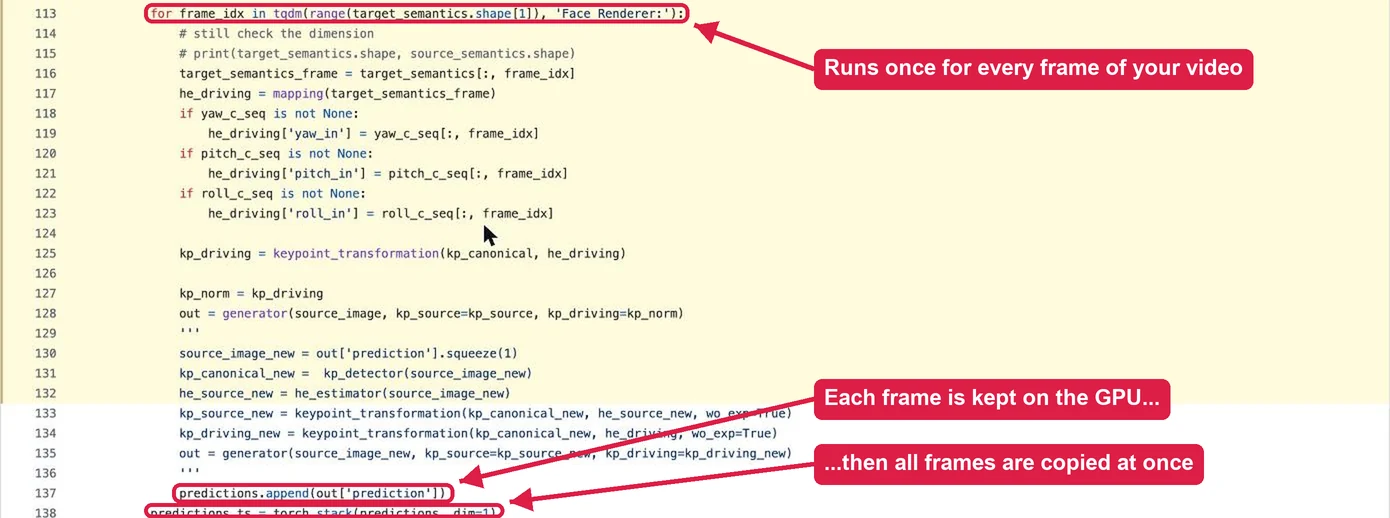
src/facerender/modules/make_animation.py in the official repository.- Per frame: one 256 × 256 frame is 0.75 MB on the GPU; a 512 × 512 frame is 3 MB. At 25 frames per second that is about 19 MB per second of audio at 256 and 75 MB per second at 512, and the final stack briefly doubles it.
- Measured slope: at 256 px our runs grew by about 43 MB of GPU memory per second of audio; at 512 px, about 139 MB per second.
- System RAM: the rendered frames are then copied to RAM. With GFPGAN on, the enhancer first loads every frame of the video into RAM, so long clips with the enhancer can fill a 12 GB Colab machine.
04 / LIMITS
Rough max length by GPU memory
On a small screen, swipe the table sideways.
| GPU memory | 256 px, one render | 512 px, one render | Use chunks of |
|---|---|---|---|
| 8 GB | ~1 min 51 s | Not even 10 s | 20–30 s at 256 px |
| 12 GB | ~3 min 16 s | ~26 s | 30 s (15 s at 512) |
| 15 GB (Colab T4) | ~4 min 20 s | ~46 s | 30 s |
| 24 GB | ~7 min 33 s | ~1 min 46 s | 30–60 s |
Estimated from a straight line through our measured runs, using 90% of the card; 512 px uses only two points. Other programs, drivers and settings change the numbers. If you hit CUDA out of memory, use shorter chunks or 256 px.
05 / STEP 1
Split the audio into chunks
Cut at pauses, not at fixed times. A fixed cut can land in the middle of a word and leaves a tiny last chunk: our 120.06-second file split every 30 seconds left a 0.06-second fifth chunk.
Best: cut at pauses (our script)
python split_on_pauses.py voice.wav 30Download split_on_pauses.py. It finds pauses with ffmpeg’s silencedetect and cuts at the pause nearest every 30 seconds. On our 2-minute test file it produced chunks of 30.54, 38.24, 30.58, 20.7 seconds, every cut in a pause.
Quick: fixed 30-second chunks
ffmpeg -i voice.wav -ar 16000 -ac 1 -f segment -segment_time 30 chunk_%03d.wavCheck the last chunk; if it is under a second long, merge it into the previous one or pick a different chunk length.
06 / STEP 2
Render each chunk with the same settings
for c in chunk_*.wav; do
  python inference.py --driven_audio "$c" --source_image face.png \
    --result_dir "results/${c%.wav}" --size 256 --preprocess crop --still
done- Keep the same photo, --size, --preprocess, --pose_style, --expression_scale and --enhancer for every chunk.
- Time stays about the same: render time grows in a straight line with length, so four 30-second chunks take about as long as one 2-minute render (4 min 12 s × 4 vs 16 min 25 s in our T4 test), but peak GPU memory stays at the 30-second level (3.9 GB instead of 7.6 GB) and RAM at 4.6 GB instead of 9.9 GB.
07 / STEP 3
Stitch the clips into one video
ls results/chunk_*/*.mp4 | sort | sed "s/.*/file '&'/" > parts.txt
ffmpeg -f concat -safe 0 -i parts.txt -c copy long_video.mp4
All chunks share SadTalker’s output format (H.264 at 25 fps, 16 kHz AAC), so -c copy joins them without re-encoding.
08 / CONSISTENCY
Keep pose and identity consistent across chunks
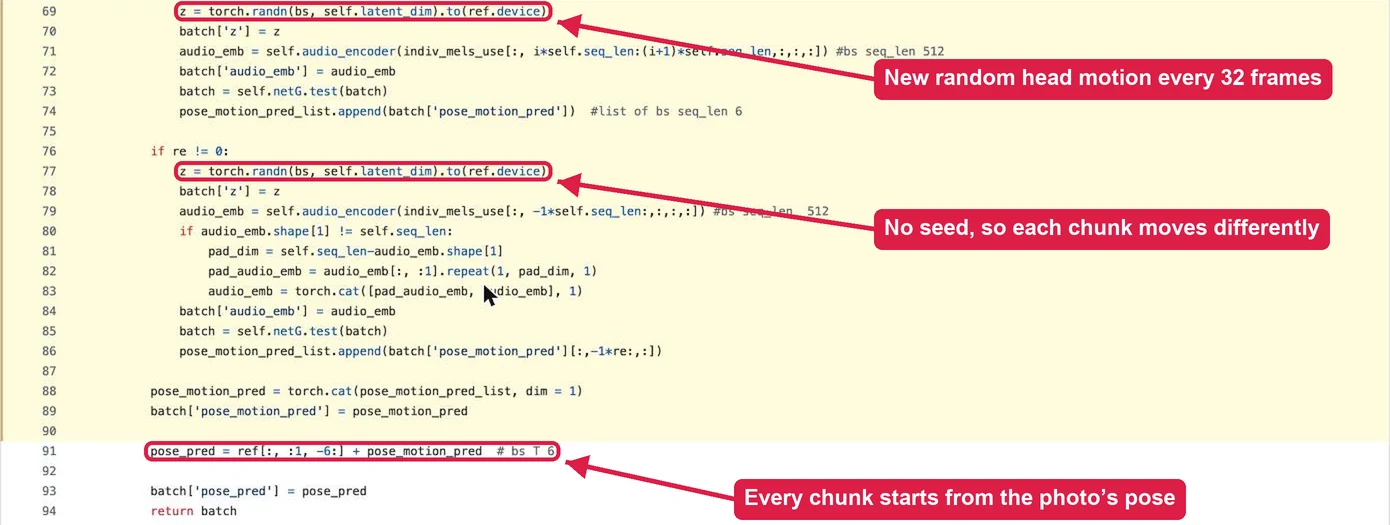
src/audio2pose_models/audio2pose.py in the official repository.- Use --still: it copies the photo’s head pose into every frame, so every chunk ends and starts in the same position and the joins are clean.
- Without still mode: head motion is random, redrawn every 32 frames with no seed, so each chunk moves differently. Every chunk starts from the photo’s pose, so expect a small jump back at each join.
- About --ref_pose: it adds a reference video’s head movement on top of SadTalker’s own random motion, and each chunk replays that video from its first frame. It does not make chunks match, and still mode overrides it. For clean joins, use --still.
- Identity: always use the exact same image file. Re-cropping or re-exporting the photo between chunks changes the face slightly.
- Cut in pauses: the mouth is closed at a pause, so the join is hard to see.
09 / QUICK HELP
Frequently asked questions
What is the maximum video length in SadTalker?
There is no length setting or hard cap in the code. The limit is memory: SadTalker keeps every rendered frame on the GPU until the clip finishes, then copies them to RAM. On a free Colab T4 a 2-minute clip at 256 px worked but used 7.6 GB of GPU memory and 9.9 GB of RAM; we estimate RAM runs out at about 2 min 48 s at 256 px and about 42 s at 512 px.
How do I make a long video with SadTalker?
Split the audio into 20–40 second chunks at pauses, render each chunk with the same photo and settings (still mode keeps the head steady), then join the MP4 files with ffmpeg’s concat demuxer and -c copy. In our ffmpeg test of a 2-minute track, the joined video stayed in sync.
Why does SadTalker run out of memory on long audio?
In the face renderer, each generated frame is appended to a list on the GPU, and the whole list is stacked into one tensor at the end, which briefly needs a second copy. Longer audio means more frames held at once. 512 px frames are four times larger than 256 px frames.
Does still mode help with long videos?
It does not lower memory, but it makes chunks join cleanly. Still mode copies the photo’s head pose into every frame, so each chunk ends and starts in the same position. Without it, SadTalker draws new random head motion for every chunk.
How long can audio be on the Hugging Face demo?
Free public Spaces are shared and slow; one Space we tested recommends no more than 30 seconds. For anything longer, use Google Colab or your own GPU and the split-and-stitch method on this page.
Why did my long video crash on Google Colab?
Usually system RAM, not the GPU. In our test a 2-minute clip at 256 px used 9.9 GB of RAM, and a 30-second clip at 512 px used 9.9 GB, close to the roughly 12.7 GB a free Colab machine has. Split the audio into 30-second chunks.
Does GFPGAN make long videos harder?
Yes, on RAM. The enhancer loads every frame of the rendered video into system memory before it starts, and it adds a lot of time. For long videos, render without it first and enhance only the final cut if you need to.
SOURCES
- Our length test on Google Colab (Tesla T4, 15360 MiB), 29 November 2026: results.json
- OpenTalker/SadTalker source (commit cd4c046): make_animation.py, audio2pose.py, generate_facerender_batch.py, face_enhancer.py
- Related: system requirements, GPU benchmark, still mode, Colab guide