The quick fix: check the filename and the launch folder
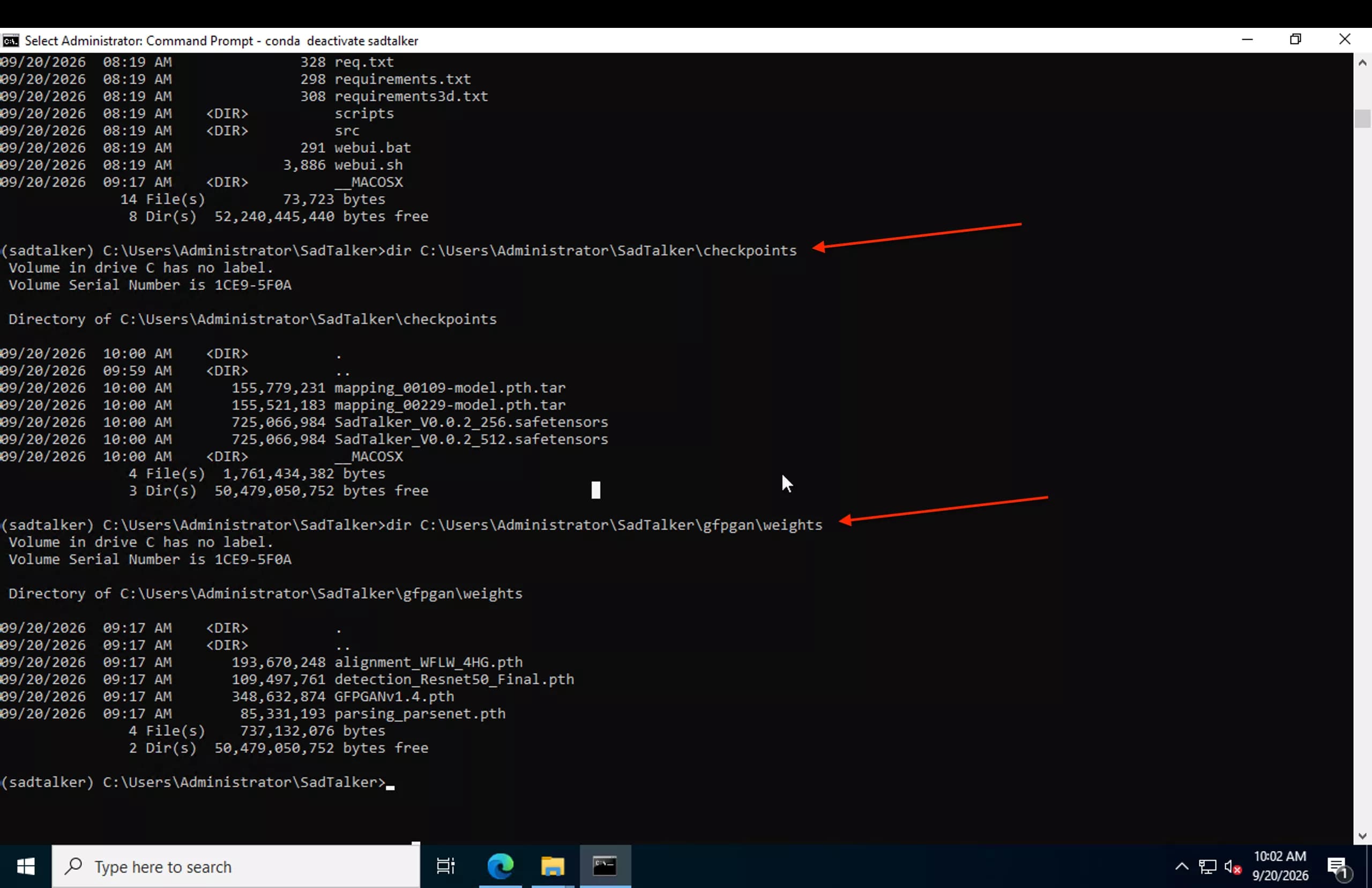
A checkpoint is a model-weight file. Cloning or unpacking the SadTalker source code does not include these large files. Read the last missing-file path in the terminal, then restore that exact filename under the folder SadTalker is using.
- Open the SadTalker folder containing
inference.py, then activate your existing Python environment. - For the current standalone release, put
SadTalker_V0.0.2_256.safetensorsincheckpoints/for--size 256, or the 512 file for--size 512. - Keep both mapping files alongside it. Full-image preprocessing uses
mapping_00109-model.pth.tar; crop and resize usemapping_00229-model.pth.tar. - Restart the WebUI or rerun inference. Do not rename a 256 model to 512 or extract a mapping
.pth.tarfile.
The upstream path selector chooses the main model by size and the mapping model by preprocessing mode. If no safetensors file is visible, it falls back to the older checkpoint layout.
Match the error to the missing file
The path in your own traceback takes priority over a generic folder example. These signatures cover the current standalone release and common older installations. Windows may display backslashes instead of forward slashes.
FileNotFoundError: [Errno 2] No such file or directory: 'checkpoints/mapping_00229-model.pth.tar'| Filename in the error | Correct location / action | Get asset |
|---|---|---|
| SadTalker_V0.0.2_256.safetensors | checkpoints/ — select size 256. | Get file |
| SadTalker_V0.0.2_512.safetensors | checkpoints/ — select size 512. | Get file |
| mapping_00229-model.pth.tar | checkpoints/ — crop or resize preprocessing. | Get file |
| mapping_00109-model.pth.tar | checkpoints/ — full or extfull preprocessing. | Get file |
| auido2pose_00140-model.pth / auido2exp_00300-model.pth | Legacy checkpoints/ — check the fallback explanation below. | Release assets |
| epoch_20.pth / wav2lip.pth / facevid2vid_00189-model.pth.tar | Legacy checkpoints/ — match the model set to your code version. | Release assets |
| BFM_Fitting/similarity_Lm3D_all.mat | Older layouts: extract BFM_Fitting.zip into checkpoints/; current code reads BFM assets from src/config. | Get file |
GFPGANv1.4.pth belongs in gfpgan/weights/, not checkpoints/. Obtain it from the official GFPGAN release. Missing alignment, detection or parsing weights belong in the same folder; the official model setup script lists their individual sources.
An EOF, invalid-header or archive-reading error usually means the file exists but is incomplete or is an HTML error page. Retrieve the affected asset again. A missing input image, audio file or output MP4 is a different problem; follow the actual missing path.
Use this folder structure on every OS
The names inside the repository are the same on Windows, Linux and macOS. Only the leading path and separators change. This layout supports both output sizes and both mapping modes:
SadTalker/
├── inference.py
├── src/
│   └── config/                 # configuration and BFM assets from the repo
├── checkpoints/
│   ├── SadTalker_V0.0.2_256.safetensors
│   ├── SadTalker_V0.0.2_512.safetensors
│   ├── mapping_00109-model.pth.tar
│   └── mapping_00229-model.pth.tar
└── gfpgan/
    └── weights/
        ├── alignment_WFLW_4HG.pth
        ├── detection_Resnet50_Final.pth
        ├── GFPGANv1.4.pth
        └── parsing_parsenet.pth
A common extraction mistake is checkpoints/checkpoints/. Move the actual model files up one level. Keep the exact spelling and capitalization, especially on case-sensitive Linux filesystems.
Windows: restore the missing model in PowerShell
Replace the example root with your installation folder. Run this in PowerShell, not Command Prompt. It fetches a missing 256 model and both mapping files; existing files are left in place. Wait for each transfer to finish.
Set-Location "C:\SadTalker"
New-Item -ItemType Directory -Force "checkpoints" | Out-Null
$base = "https://github.com/OpenTalker/SadTalker/releases/download/v0.0.2-rc"
$files = @("SadTalker_V0.0.2_256.safetensors", "mapping_00109-model.pth.tar", "mapping_00229-model.pth.tar")
foreach ($file in $files) {
  $dest = Join-Path "checkpoints" $file
  if (-not (Test-Path -LiteralPath $dest)) {
    Invoke-WebRequest -Uri "$base/$file" -OutFile "$dest.part" -ErrorAction Stop
    Move-Item -LiteralPath "$dest.part" -Destination $dest
  }
}
Get-ChildItem .\checkpoints | Select-Object Name, Length
For 512 output, replace the 256 filename in the list with SadTalker_V0.0.2_512.safetensors. If an existing model is truncated, move it aside first and rerun the transfer. Turn on “File name extensions” in Explorer to catch accidental .safetensors.txt names.
C:\SadTalker\checkpoints\SadTalker_V0.0.2_256.safetensorsFor environment activation and the launcher, follow the Windows WebUI guide.
Linux: fetch files into the repository you actually launch
Replace the example path below. This Bash loop uses curl, skips existing destination files and only gives a completed transfer its final filename. It also works inside WSL or a container when run in that environment.
cd "$HOME/SadTalker"
mkdir -p checkpoints
base="https://github.com/OpenTalker/SadTalker/releases/download/v0.0.2-rc"
for file in SadTalker_V0.0.2_256.safetensors mapping_00109-model.pth.tar mapping_00229-model.pth.tar; do
  if [ ! -f "checkpoints/$file" ]; then
    curl -fL --retry 3 "$base/$file" -o "checkpoints/$file.part" &&
      mv "checkpoints/$file.part" "checkpoints/$file" || break
  fi
done
ls -lh checkpoints//home/yourname/SadTalker/checkpoints/SadTalker_V0.0.2_256.safetensorsAlternatively, with wget installed, run bash scripts/download_models.sh from the repository root to fetch the upstream model set including face-processing weights. The script uses wget; installing curl alone does not supply it. See the Docker guide for container paths and persistent storage.
macOS: use the same models with your Mac folder path
Open Terminal and change to your checkout. Use the Linux curl loop above after this command; it works in macOS zsh too and avoids requiring wget.
cd "$HOME/SadTalker"
pwd
ls -lh checkpoints//Users/yourname/SadTalker/checkpoints/SadTalker_V0.0.2_256.safetensorsIf the folder does not exist yet, the fetch loop creates it. An extracted archive in your user folder or desktop is not automatically the folder used by a launcher elsewhere. Use the full path to your own installation and retain the original filenames.
Why does SadTalker ask for auido2pose or epoch_20.pth?
There are two model layouts. Current code can use a packaged safetensors model; legacy code loads separate .pth models. In the current loader, finding no safetensors files triggers the legacy branch, and --old_version explicitly selects it.
For a current installation, remove an unintended --old_version flag, restore the selected safetensors file and check --checkpoint_dir. For an intentionally older checkout or extension, use the complete model set expected by that version. Renaming a safetensors file to a legacy .pth filename does not convert it.
The unusual spelling auido2pose and auido2exp is present in upstream filenames: do not “correct” it to audio. An upstream missing-auido2pose report shows the same Windows symptom.
For similarity_Lm3D_all.mat, inspect the entire path. Older code may request checkpoints/BFM_Fitting/; current main uses src/config/. Restore the matching code assets instead of copying an old folder recipe blindly.
The file exists, but SadTalker still cannot find it
- Wrong working directory: relative paths start from the launch directory. Run from the folder containing inference.py or pass an absolute checkpoint directory.
- Wrong size: having the 256 model does not satisfy a 512 request. Use
--size 256or obtain the 512 model. - Nested folders or names: check for checkpoints/checkpoints, browser-added “(1)” suffixes, hidden extensions and capitalization differences.
- Incomplete file: compare the file with the official release asset. A tiny HTML page, zero-byte file or .part file is not a model. Keep any incomplete file separate before retrying.
- Colab reset: models under /content are temporary. Restore them in the current runtime using the Colab setup guide.
- Docker mount: a mounted empty directory can hide models stored in the image. Inspect the checkpoint folder inside the container.
- WebUI extension: use the path selected by your extension, not an unrelated standalone checkout. The official extension guide covers its model placement.
For the full model inventory, see Models & Checkpoints. The checkpoint verifier can help inspect files; the filename and path chosen by your installed version remain the deciding reference.
Restart SadTalker and generate a short clip
Activate your existing SadTalker environment, run from the repository root, and replace input.png and input.wav with a real portrait and short audio clip. Start without optional enhancement so the first run stays focused on the core model paths.
python inference.py --checkpoint_dir "./checkpoints" --size 256 --preprocess crop --source_image "input.png" --driven_audio "input.wav" --result_dir "results" --batch_size 1To keep the checkpoints elsewhere, replace ./checkpoints with an absolute path such as C:/SadTalker/checkpoints, /home/yourname/SadTalker/checkpoints or /Users/yourname/SadTalker/checkpoints. Restart a running WebUI after fixing its model folder.
If the next error is about video export, use the FFmpeg fix. If it reports GPU memory exhaustion, use the CUDA out-of-memory guide.
Frequently asked questions
Do I need both the 256 and 512 models?
Only the model for the size you select is needed for that run. Keep both if you switch sizes. Mapping selection is separate: full-image modes use 00109, while crop and resize use 00229.
Should I extract mapping_00229-model.pth.tar?
No. SadTalker loads the file directly with its full .pth.tar name. ZIP bundles are extracted; mapping checkpoint files are left intact.
Will reinstalling Python fix a missing checkpoint?
It will not put a model file in the missing location. Restore the file or correct the launch path first.
Can I skip all gfpgan/weights files?
Do not assume every file there is only for optional enhancement. Face alignment and detection also use pre-trained weights. For an offline setup, keep the full face-processing set from the upstream setup script.