SadTalker Google Colab Guide: Free T4 GPU Setup, Error Fixes & Notebook
Run SadTalker in the cloud using Google Colab's free Tesla T4 GPU. Learn how to resolve recent Python 3.13 NumPy 2.x breakages, auto-accept Conda Terms of Service, upload custom portraits and audio with interactive pickers, and access our tested, error-free notebook.
Google Compute Engine Backend (GPU) Resources
Recorded during active inference session on Google Colab (Duration: 19:13 to 19:33 • 20 minutes)
Lightweight host overhead. Ample system memory headroom for audio decoding and video buffering.
Peak VRAM during 512px Face Renderer and GFPGAN neural network super-resolution pass.
Includes Miniconda environment, PyTorch CUDA wheels, SadTalker weights, and GFPGAN models.
Real Video Output Generated on Google Colab T4
This exact MP4 video was generated on Google Colab using the working sequence detailed below with 512px resolution, still mode, and GFPGAN face enhancement enabled.
Result File: ./results/2026_09_12_13.03.47.mp4
Clean, frontal corporate presenter portrait with natural lighting and neutral head orientation.
Crystal-clear 16-bit 16kHz mono WAV voiceover recording providing phonetic landmarks for lip synchronization.
- • --size: 512
- • --still: True (steadier head pose; framing depends on preprocess)
- • --preprocess: crop
- • --enhancer: gfpgan
How to Run SadTalker on Google Colab (Free T4 GPU)
Follow this sequential procedure to initialize your environment, resolve upstream library bugs, upload files, and produce realistic talking head videos.
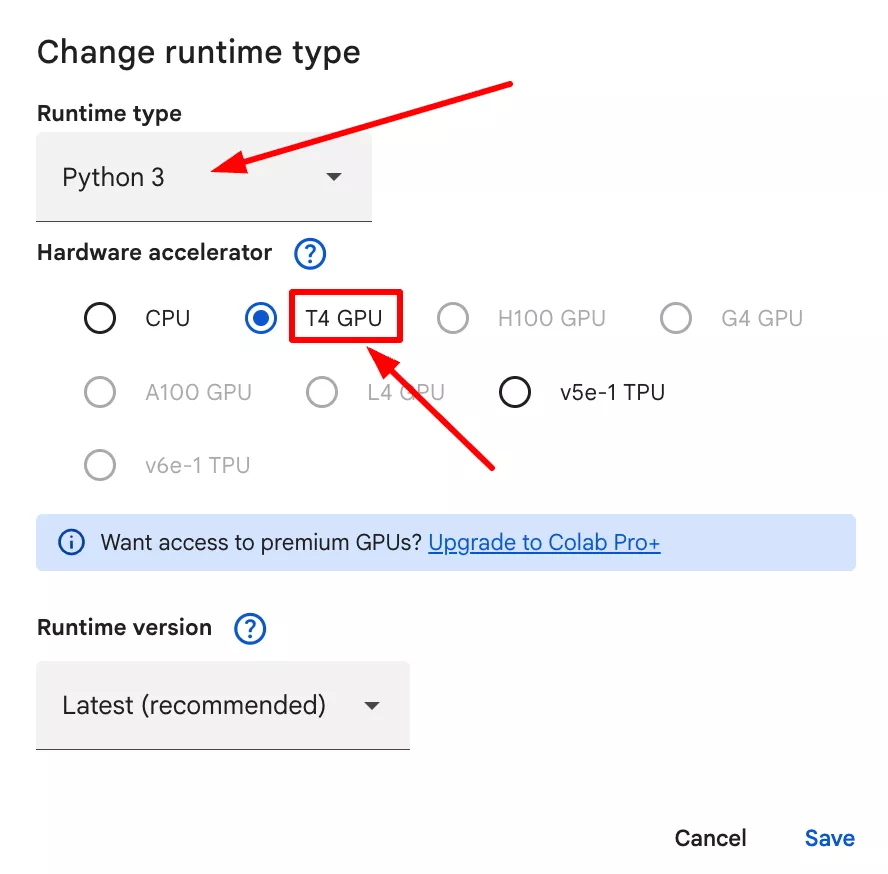
Step 1: Switch Runtime to Hardware Accelerator (T4 GPU)
Select Google Compute Engine backend with GPU acceleration
In Google Colab, open the top menu bar, click on Runtime > Change runtime type, select T4 GPU as the Hardware accelerator, and click Save. Running SadTalker on CPU will fail due to CUDA tensor operations.
Step 2: Verify GPU Allocation with nvidia-smi
Check driver version, CUDA version, and dedicated VRAM
Execute !nvidia-smi in the first cell. This verifies your allocated GPU is a Tesla T4 with 15,360 MiB total VRAM running NVIDIA Driver 580.82.07 and CUDA 13.0.
!nvidia-smi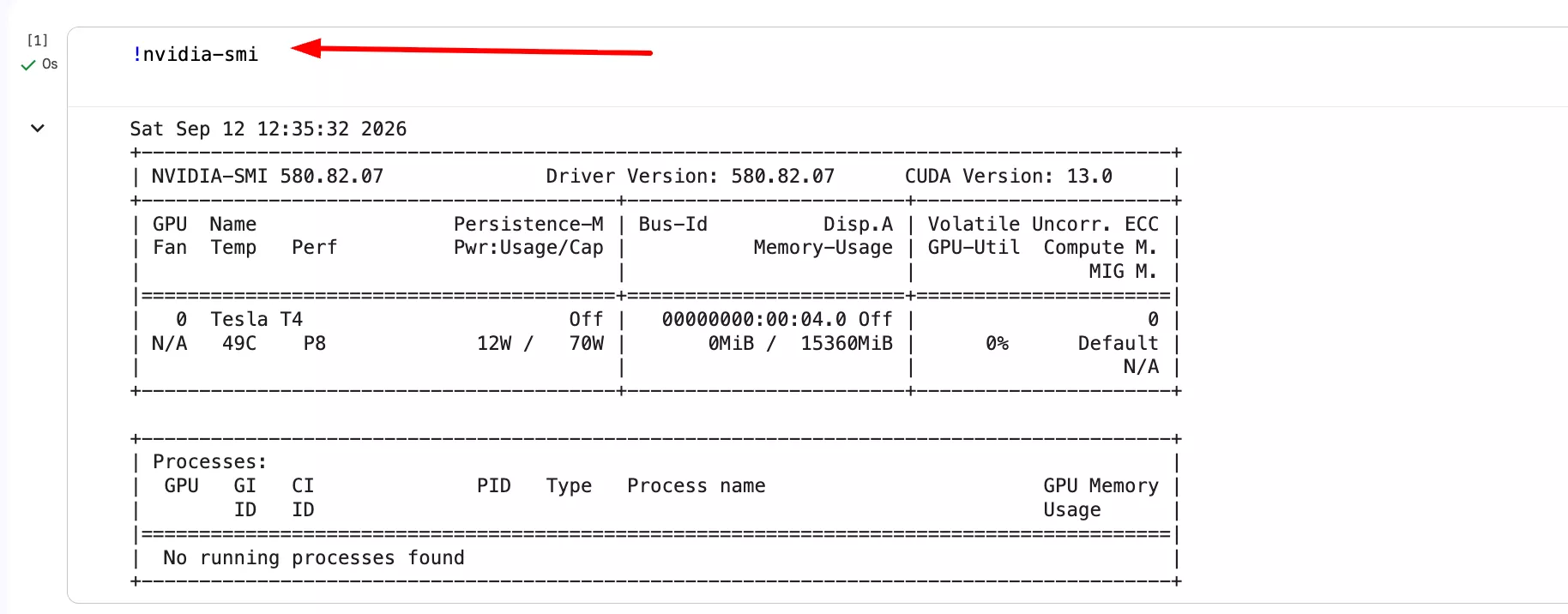
Step 3: Install System Libraries & Clone SadTalker Repository
Install FFmpeg, Git, and pull OpenTalker/SadTalker
SadTalker requires system-level FFmpeg for audio extraction and video stream muxing. Run apt-get update to install FFmpeg, then clone the official SadTalker repository into /content/SadTalker.
!apt-get update -qq && apt-get install -y -qq ffmpeg git wget
!git clone https://github.com/OpenTalker/SadTalker.git /content/SadTalker
%cd /content/SadTalker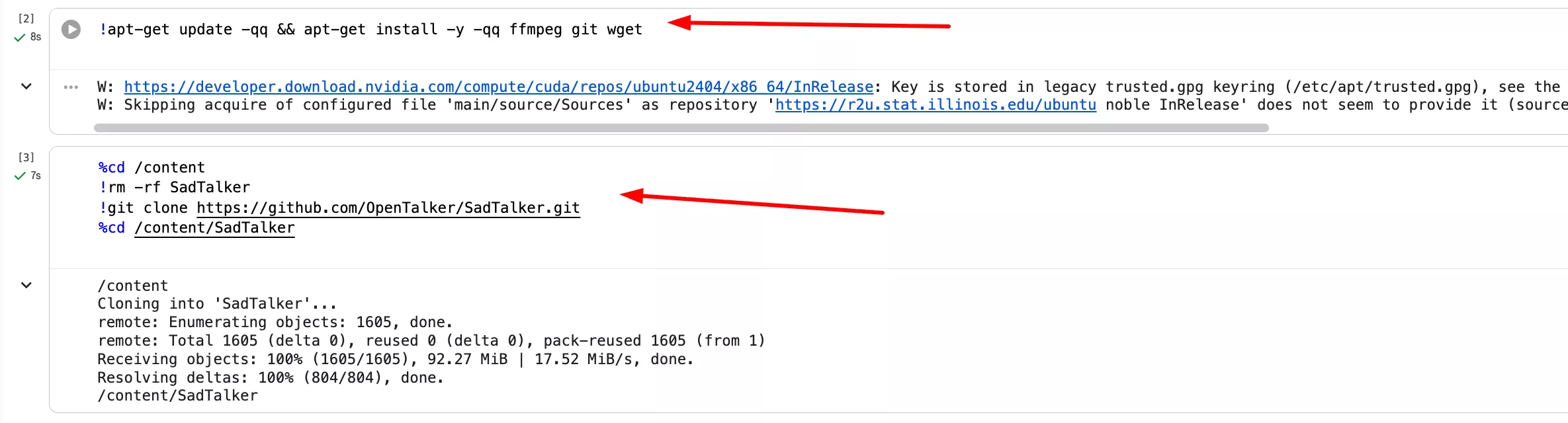
Step 4: Deploy Python 3.8 Environment & Accept Conda Terms of Service
The crucial fix for Python 3.13 / NumPy 2.x breakages in modern Google Colab
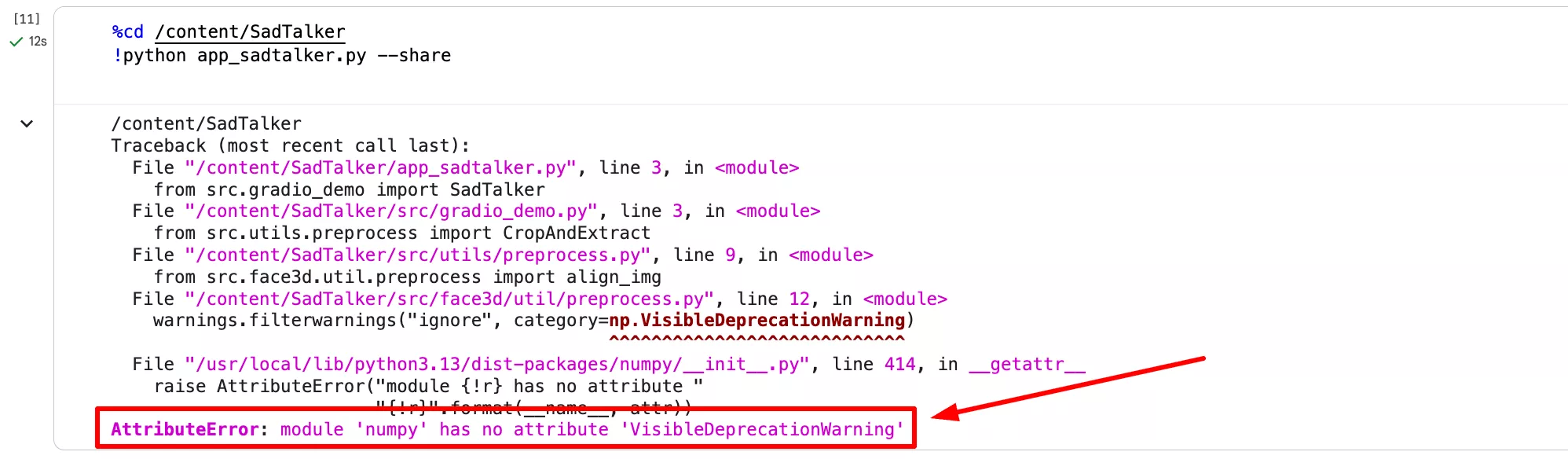
Google Colab recently upgraded to Python 3.13 with NumPy 2.x. When running SadTalker directly, it crashes with AttributeError: module 'numpy' has no attribute 'VisibleDeprecationWarning'. Furthermore, running conda in Colab halts unless Terms of Service are accepted. The cell below sets export CONDA_PLUGINS_AUTO_ACCEPT_TOS=true, deploys Miniconda, creates a Python 3.8 environment, and installs tested wheels.
%%bash
# Auto-accept Conda Terms of Service for non-interactive execution
export CONDA_PLUGINS_AUTO_ACCEPT_TOS=true

# Install Miniconda quietly if not already installed
if [ ! -d "/content/miniconda3" ]; then
  wget -q https://repo.anaconda.com/miniconda/Miniconda3-latest-Linux-x86_64.sh
  bash Miniconda3-latest-Linux-x86_64.sh -b -p /content/miniconda3
  rm -f Miniconda3-latest-Linux-x86_64.sh
fi

# Create dedicated Python 3.8 environment
source /content/miniconda3/bin/activate
if ! conda info --envs | grep -q "sadtalker"; then
  conda create -n sadtalker python=3.8 -y
fi

# Activate and install validated compatible packages
source /content/miniconda3/bin/activate sadtalker
pip install --quiet --upgrade pip
pip install --quiet numpy==1.23.5 torch==2.0.1 torchvision==0.15.2 torchaudio==2.0.2 \
  facexlib==0.3.0 gfpgan insightface onnxruntime moviepy \
  opencv-python-headless imageio[ffmpeg] yacs kornia gtts \
  safetensors pydub librosa

# Apply BasicSR Torchvision compatibility patch
sed -i 's/from torchvision.transforms.functional_tensor import rgb_to_grayscale/from torchvision.transforms.functional import rgb_to_grayscale/' /content/miniconda3/envs/sadtalker/lib/python3.8/site-packages/basicsr/data/degradations.py 2>/dev/null || true

echo "Conda environment configured and ready!"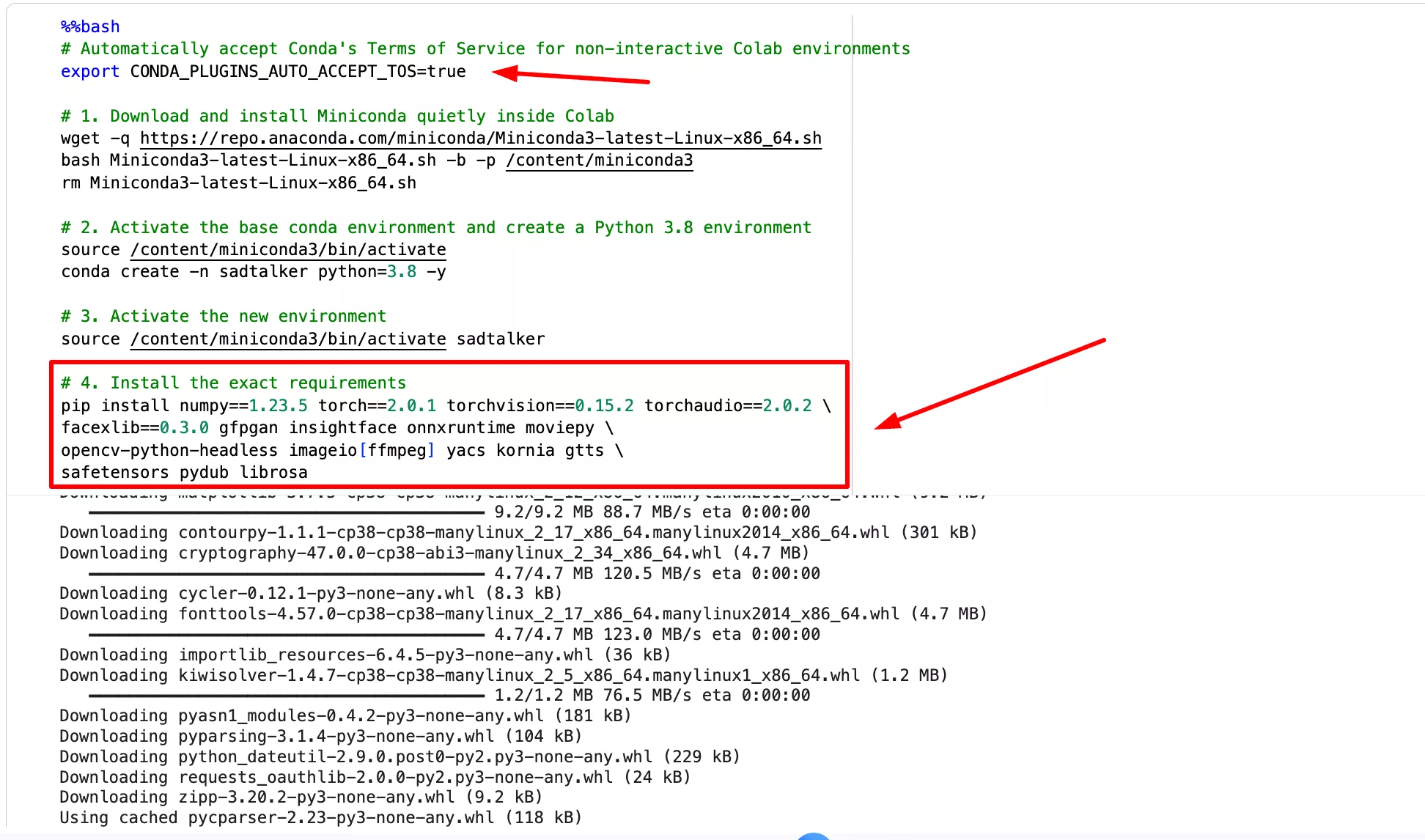
Step 5: Fetch Pre-Trained Checkpoints & GFPGAN Weights
Acquire 256/512 safetensors, mapping weights, and face alignment models
SadTalker relies on pre-trained checkpoints (SadTalker_V0.0.2_256.safetensors, SadTalker_V0.0.2_512.safetensors) and GFPGAN weights. Fetching them directly with wget -nc prevents redundant network transfers if the cell is rerun.
%%bash
cd /content/SadTalker
mkdir -p ./checkpoints ./gfpgan/weights

# Core SadTalker models
wget -nc https://github.com/OpenTalker/SadTalker/releases/download/v0.0.2-rc/mapping_00109-model.pth.tar -O ./checkpoints/mapping_00109-model.pth.tar
wget -nc https://github.com/OpenTalker/SadTalker/releases/download/v0.0.2-rc/mapping_00229-model.pth.tar -O ./checkpoints/mapping_00229-model.pth.tar
wget -nc https://github.com/OpenTalker/SadTalker/releases/download/v0.0.2-rc/SadTalker_V0.0.2_256.safetensors -O ./checkpoints/SadTalker_V0.0.2_256.safetensors
wget -nc https://github.com/OpenTalker/SadTalker/releases/download/v0.0.2-rc/SadTalker_V0.0.2_512.safetensors -O ./checkpoints/SadTalker_V0.0.2_512.safetensors

# GFPGAN & face enhancement models
wget -nc https://github.com/xinntao/facexlib/releases/download/v0.1.0/alignment_WFLW_4HG.pth -O ./gfpgan/weights/alignment_WFLW_4HG.pth
wget -nc https://github.com/xinntao/facexlib/releases/download/v0.1.0/detection_Resnet50_Final.pth -O ./gfpgan/weights/detection_Resnet50_Final.pth
wget -nc https://github.com/TencentARC/GFPGAN/releases/download/v1.3.0/GFPGANv1.4.pth -O ./gfpgan/weights/GFPGANv1.4.pth
wget -nc https://github.com/xinntao/facexlib/releases/download/v0.2.2/parsing_parsenet.pth -O ./gfpgan/weights/parsing_parsenet.pth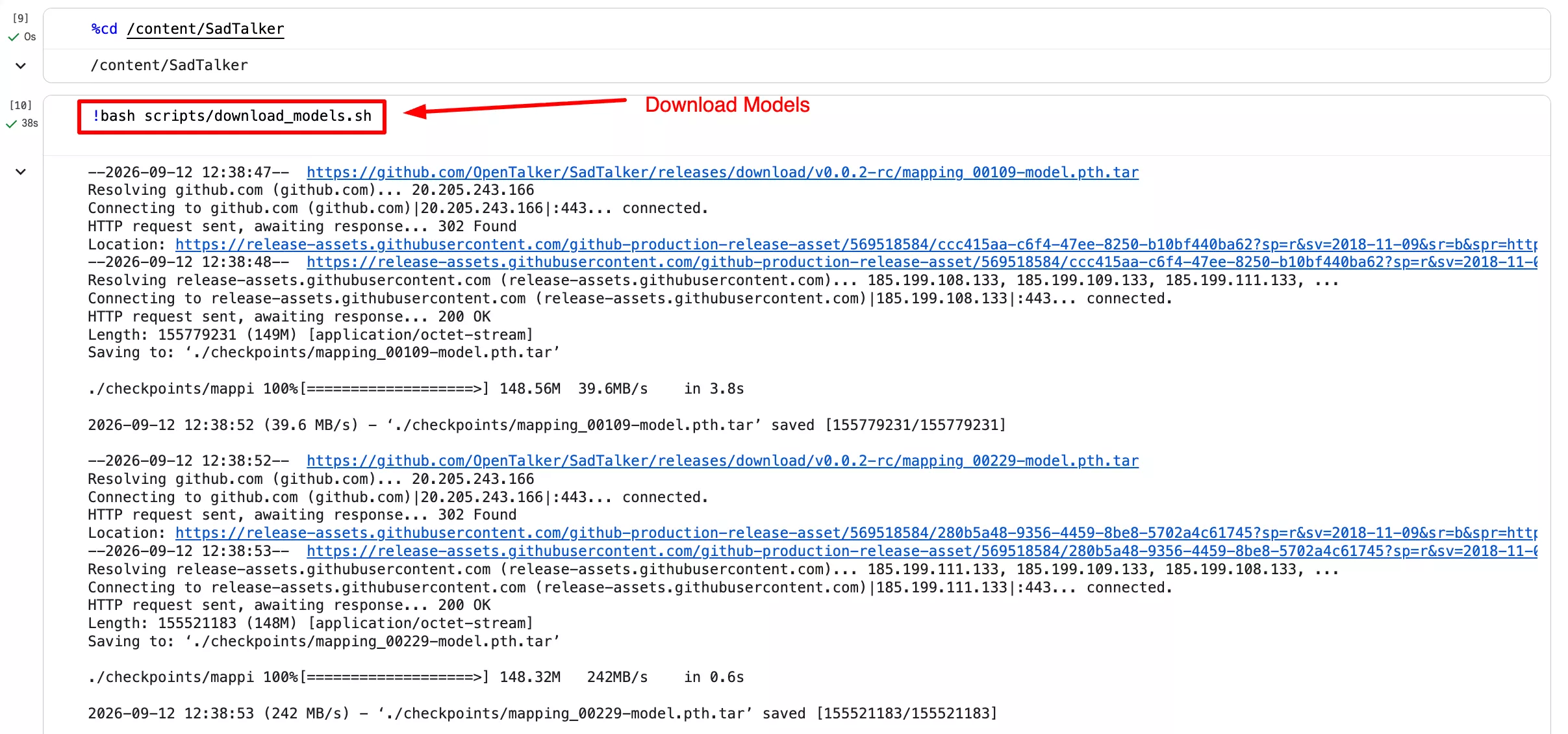
Step 6: Upload Custom Image and Audio with Google Colab Picker
Interactive file upload buttons right inside your Colab notebook
Rather than having to mount Google Drive or manually move files via the sidebar, use Google Colab's native files.upload(). This presents a "Choose Files" button directly under the cell for both your image and audio. If skipped, the notebook falls back to demo assets automatically.
from google.colab import files
import os

print("=== Select Source Portrait Image (PNG, JPG, WEBP) ===")
uploaded_img = files.upload()
if uploaded_img:
    img_name = list(uploaded_img.keys())[0]
    source_img_path = f"/content/{img_name}"
    print(f"Source Image loaded: {source_img_path}")
else:
    source_img_path = "/content/SadTalker/examples/source_image/full_body_1.png"
    print(f"No image selected. Using demo portrait: {source_img_path}")

print("\n=== Select Driven Speech Audio (WAV, MP3) ===")
uploaded_aud = files.upload()
if uploaded_aud:
    aud_name = list(uploaded_aud.keys())[0]
    driven_audio_path = f"/content/{aud_name}"
    print(f"Driven Audio loaded: {driven_audio_path}")
else:
    driven_audio_path = "/content/SadTalker/examples/driven_audio/bus_chinese.wav"
    print(f"No audio selected. Using demo audio: {driven_audio_path}")

# Persist environment variables for bash execution
with open("/content/sadtalker_inputs.env", "w") as f:
    f.write(f"export SOURCE_IMAGE='{source_img_path}'\n")
    f.write(f"export DRIVEN_AUDIO='{driven_audio_path}'\n")

print("\nInputs saved successfully! Proceed to generation.")Step 7: Execute SadTalker Inference Command
Generate lip-synced talking head video with GFPGAN enhancement
Activate the conda environment, source the input file paths, and launch python inference.py. The cell runs landmark extraction, 3DMM coefficient generation, face rendering across all 155 frames, and GFPGAN face enhancement.
%%bash
source /content/miniconda3/bin/activate sadtalker
cd /content/SadTalker
source /content/sadtalker_inputs.env

echo "Processing Source Image: $SOURCE_IMAGE"
echo "Processing Driven Audio: $DRIVEN_AUDIO"

python inference.py \
  --driven_audio "$DRIVEN_AUDIO" \
  --source_image "$SOURCE_IMAGE" \
  --result_dir ./results \
  --size 512 \
  --still \
  --preprocess crop \
  --enhancer gfpgan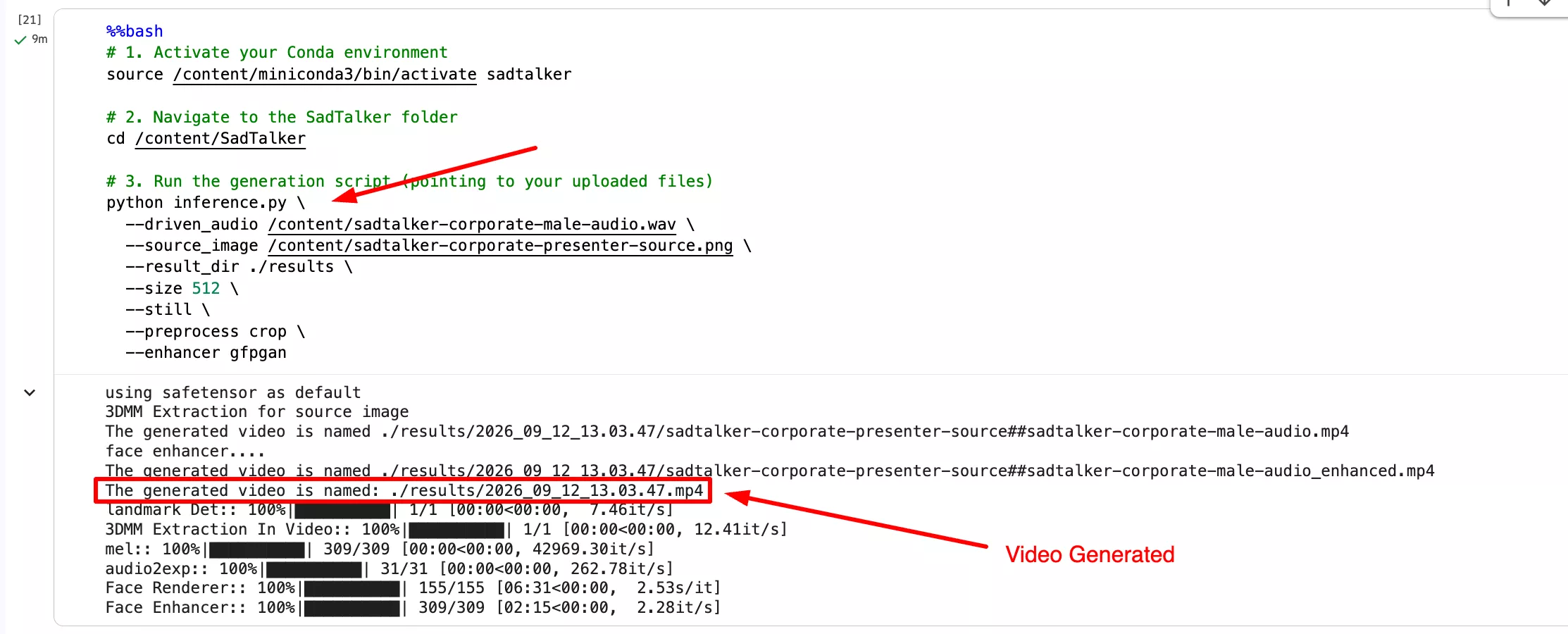
Step 8: Inline Video Player & Automatic Local Saving
View your talking head video and transfer it to your local device
This final cell scans the ./results folder for the latest generated MP4 file, embeds an autoplaying HTML5 video player directly inside Colab, and initiates browser file saving to your local machine.
import glob
import os
from IPython.display import HTML, display
from base64 import b64encode
from google.colab import files

mp4_files = glob.glob("/content/SadTalker/results/*.mp4") + glob.glob("/content/SadTalker/results/*/*.mp4")
if mp4_files:
    latest_video = max(mp4_files, key=os.path.getctime)
    print(f"Generated Video: {latest_video}")

    # Render HTML5 video player
    video_data = open(latest_video, 'rb').read()
    data_url = "data:video/mp4;base64," + b64encode(video_data).decode()
    display(HTML(f"""
    <div style="text-align: center; margin: 16px 0;">
      <video width="512" height="512" controls autoplay loop style="border-radius: 12px; box-shadow: 0 8px 24px rgba(0,0,0,0.15); max-width: 100%;">
        <source src="{data_url}" type="video/mp4">
        Your browser does not support the video tag.
      </video>
    </div>
    """))

    # Download to local device
    print("Downloading video to your local device...")
    files.download(latest_video)
else:
print("No generated video found in /content/SadTalker/results/")Errors Encountered in Google Colab & Verified Working Fixes
Running SadTalker out-of-the-box on Google Colab encounters several breaking errors caused by recent Colab infrastructure updates. Here is the technical breakdown of each error and its working resolution.
NumPy 2.x & Python 3.13: AttributeError: module 'numpy' has no attribute 'VisibleDeprecationWarning'
The Root Cause: Google Colab upgraded its default Linux runtime to Python 3.13 and installed NumPy 2.0+. In NumPy 2.0, legacy attributes such as np.VisibleDeprecationWarning were removed. When SadTalker initializes src/face3d/util/preprocess.py at line 12, Python immediately halts.
Do not attempt to downgrade NumPy inside the host Python 3.13 environment, as Colab's system libraries break. Instead, create an isolated Miniconda environment pinned to Python 3.8 and install numpy==1.23.5.
# Create and activate Python 3.8 environment
conda create -n sadtalker python=3.8 -y
source /content/miniconda3/bin/activate sadtalker
pip install numpy==1.23.5CondaToSNonInteractiveError: Terms of Service have not been accepted
The Root Cause: In recent Miniconda builds, Anaconda enabled mandatory Terms of Service acceptance for default repository channels (repo.anaconda.com/pkgs/main). In headless Colab bash cells, conda halts with exit code 1 because no interactive prompt is available.
Export the auto-acceptance environment variable at the top of your bash cell before executing any conda commands.
export CONDA_PLUGINS_AUTO_ACCEPT_TOS=trueERROR: No matching distribution found for TTS==0.13.3
The Root Cause: The official SadTalker Colab notebook previously included pip install TTS==0.13.3. Coqui TTS 0.13.3 requires Python >=3.7, <3.11 and fails completely on modern Python.
TTS is only used for optional text-to-speech generation. SadTalker's core talking head generation only requires a driven audio WAV file. Removing the TTS==0.13.3 dependency from pip eliminates the failure completely.
ModuleNotFoundError: No module named 'torchvision.transforms.functional_tensor'
The Root Cause: BasicSR 1.4.2 imports rgb_to_grayscale from torchvision.transforms.functional_tensor, which was moved to torchvision.transforms.functional in newer TorchVision versions.
Apply a fast in-place regex patch using sed directly to BasicSR's installed degradations.py file inside the conda environment.
sed -i 's/from torchvision.transforms.functional_tensor import rgb_to_grayscale/from torchvision.transforms.functional import rgb_to_grayscale/' /content/miniconda3/envs/sadtalker/lib/python3.8/site-packages/basicsr/data/degradations.py 2>/dev/null || trueGoogle Colab SadTalker FAQ
Get SadTalker Google Colab Notebook
Select your preferred notebook version below. Choose the clean notebook ready for fresh runs, or inspect the full notebook containing all cell outputs, logs, and execution traces.
Clean Notebook (Without Output)
Lightweight, error-free notebook configured to run from scratch. Includes Google Colab interactive file pickers to upload your own portrait and speech audio, automated Python 3.8 conda environment setup, model weight fetching, and automatic video player.
- Zero leftover cache or memory clutter
- Interactive file pickers ready for your custom portrait
- Pre-patched for NumPy 2.x and Conda Terms of Service
Full Notebook (With Output & Logs)
Complete working notebook containing all execution outputs, live terminal logs, step-by-step progress bars, error investigations, and the final generation telemetry from our verified test run.
- Includes full nvidia-smi & system logs
- Shows error tracebacks and corresponding working commands
- Contains raw frame rendering speeds and timings
.ipynb file → Ensure runtime is set to T4 GPU → Run the cells sequentially.For the upstream project notebook, open the upstream SadTalker notebook in Colab. This is separate from the tested downloads above; its dependencies and runtime availability can differ.