Create Talking Avatars with SadTalker
SadTalker is an open-source AI tool that generates realistic talking head videos from a single image and audio input. Experience perfect lip-sync, natural expressions, and controllable animations for various applications.
Advanced Talking Head Generation
SadTalker specializes in synchronizing facial movements particularly lip-sync, eye blinking, and head poses with provided audio, creating natural-looking talking head videos from static images .

Audio-Driven Animation
Transform static images into talking head videos with perfect lip synchronization

Multilingual Support
Generate accurate lip movements for multiple languages from a single audio input

Expression Control
Adjust eye blinking frequency and head pose styles for natural-looking results
Key Capabilities
How to Use SadTalker?
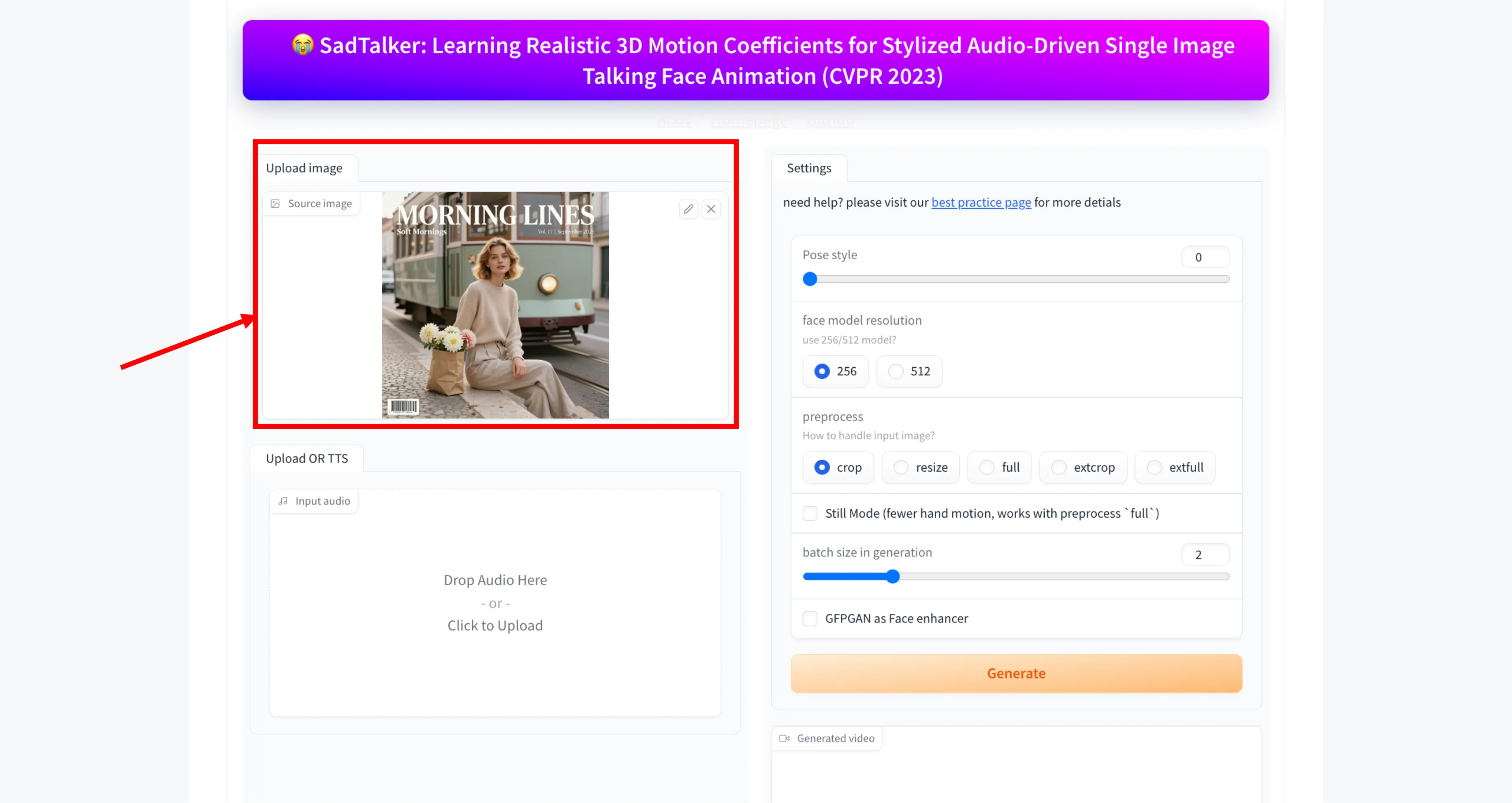
Step 1: Upload the Source Image
Start by uploading the image you want to animate. You can either drag and drop the image into the upload area or click to select an image from your device. This image will be used as the face for the talking animation.
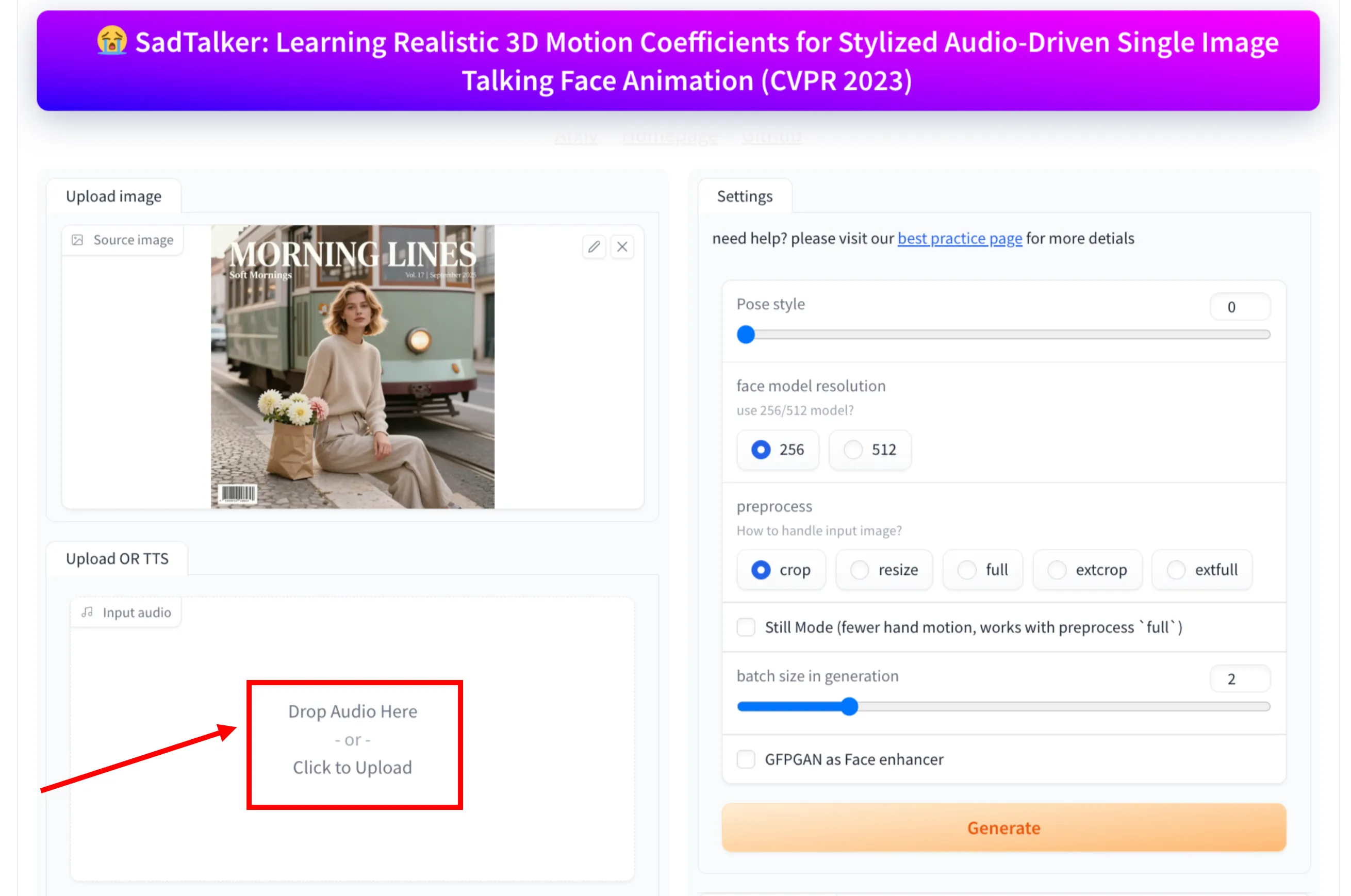
Step 2: Upload Audio or Use TTS
Next, provide the audio that will drive the facial movements. You can upload an audio file by dragging and dropping it or clicking to upload. The input audio determines the lip sync and expressions of the generated video.
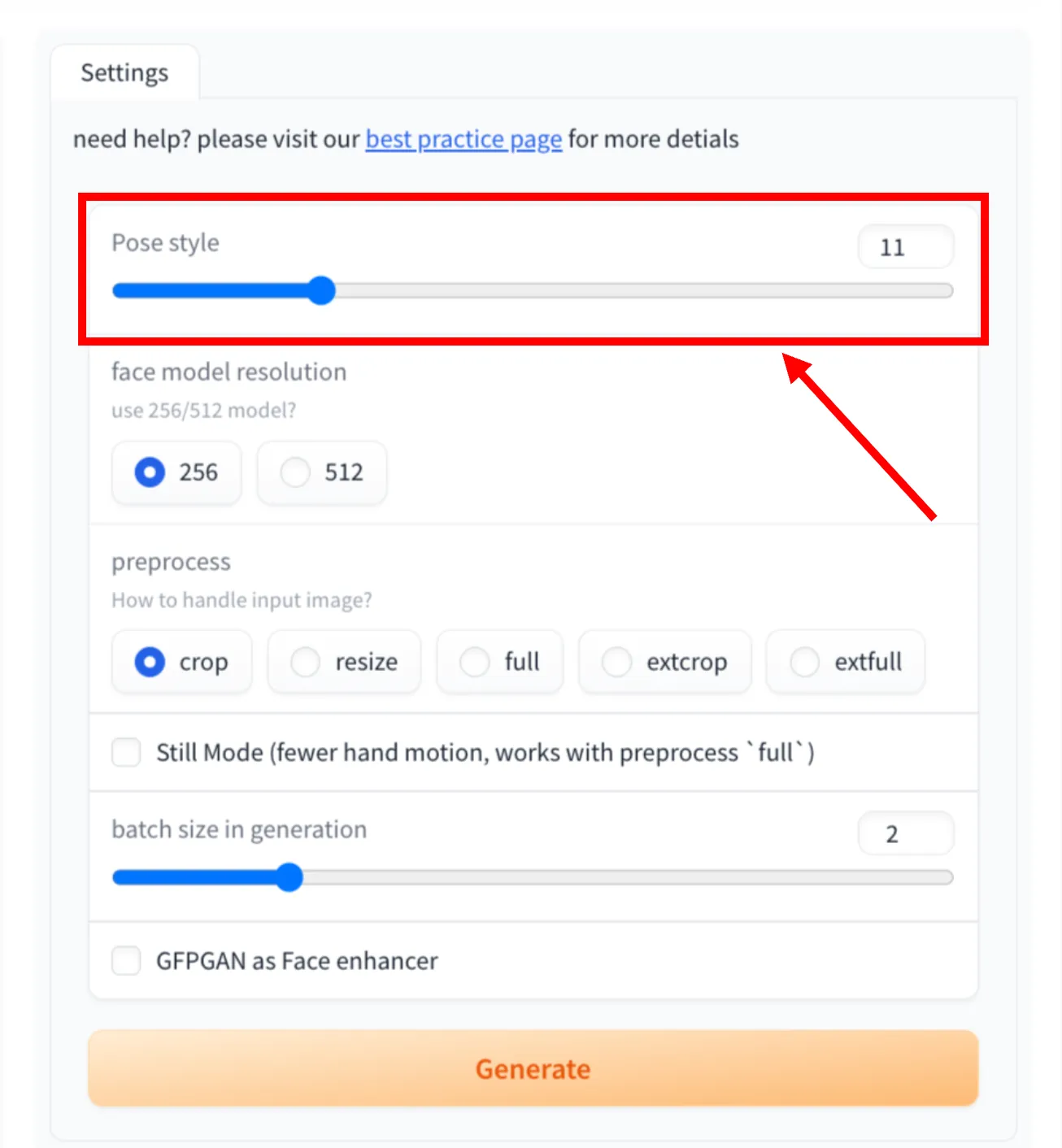
Step 3: Adjust Pose Style
Use the pose style option to control how expressive the face movements are. Lower values keep movements subtle, while higher values add more motion and expression.
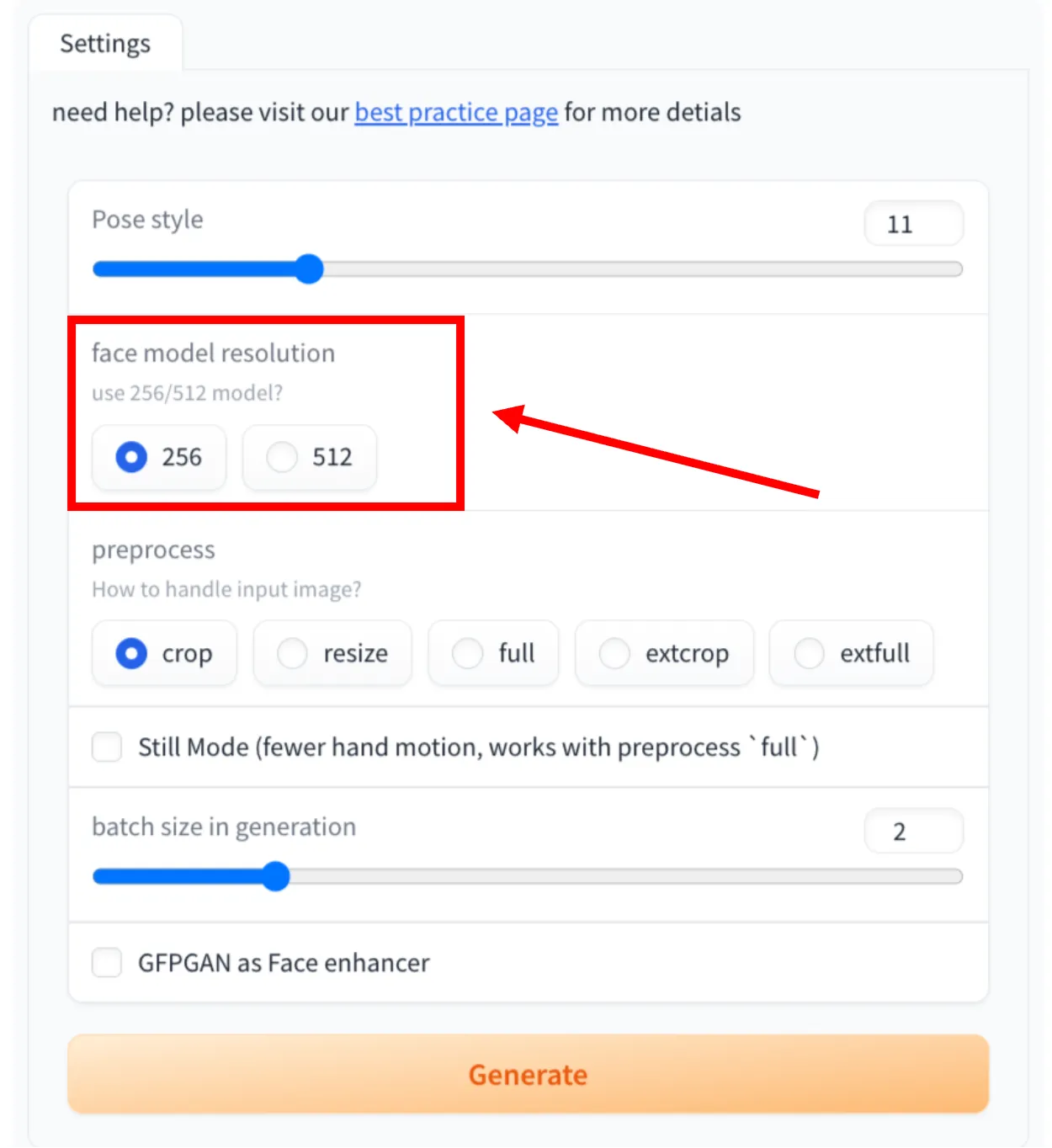
Step 4: Choose Face Model Resolution
Select the face model resolution based on your quality needs. You can choose between 256 for faster generation or 512 for higher-quality facial details.
Step 5: Select Preprocess Method
Choose how the input image should be handled before generation. Available options include crop, resize, full, extcrop, and extfull. This step affects framing and how much of the image is used in the animation.
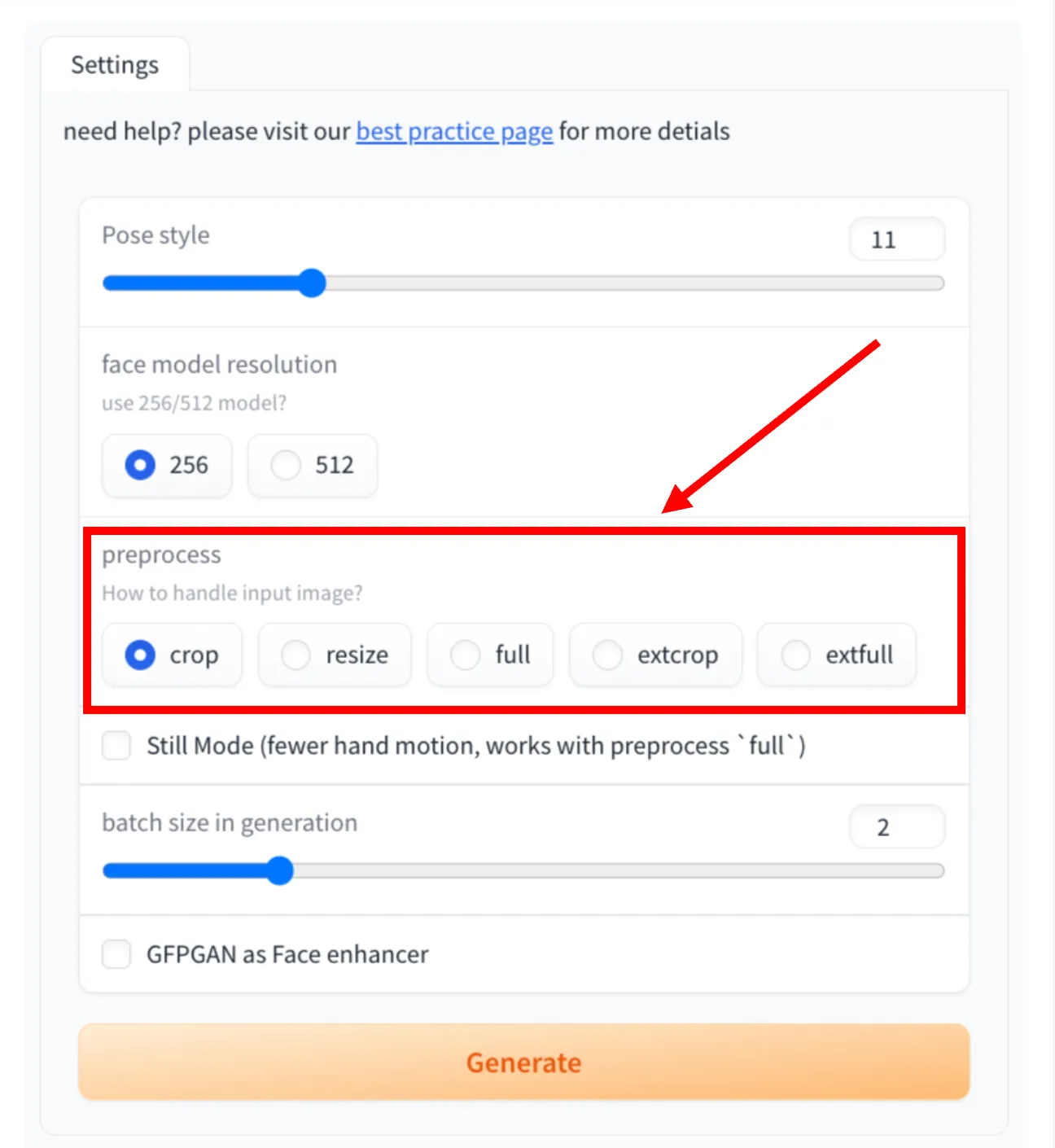
Step 6: Enable Still Mode (Optional)
Turn on Still Mode if you want fewer hand and body movements. This works best when the preprocess option is set to full.
Step 7: Set Batch Size
Adjust the batch size for generation based on your system capability. A higher batch size may improve speed but requires more resources.
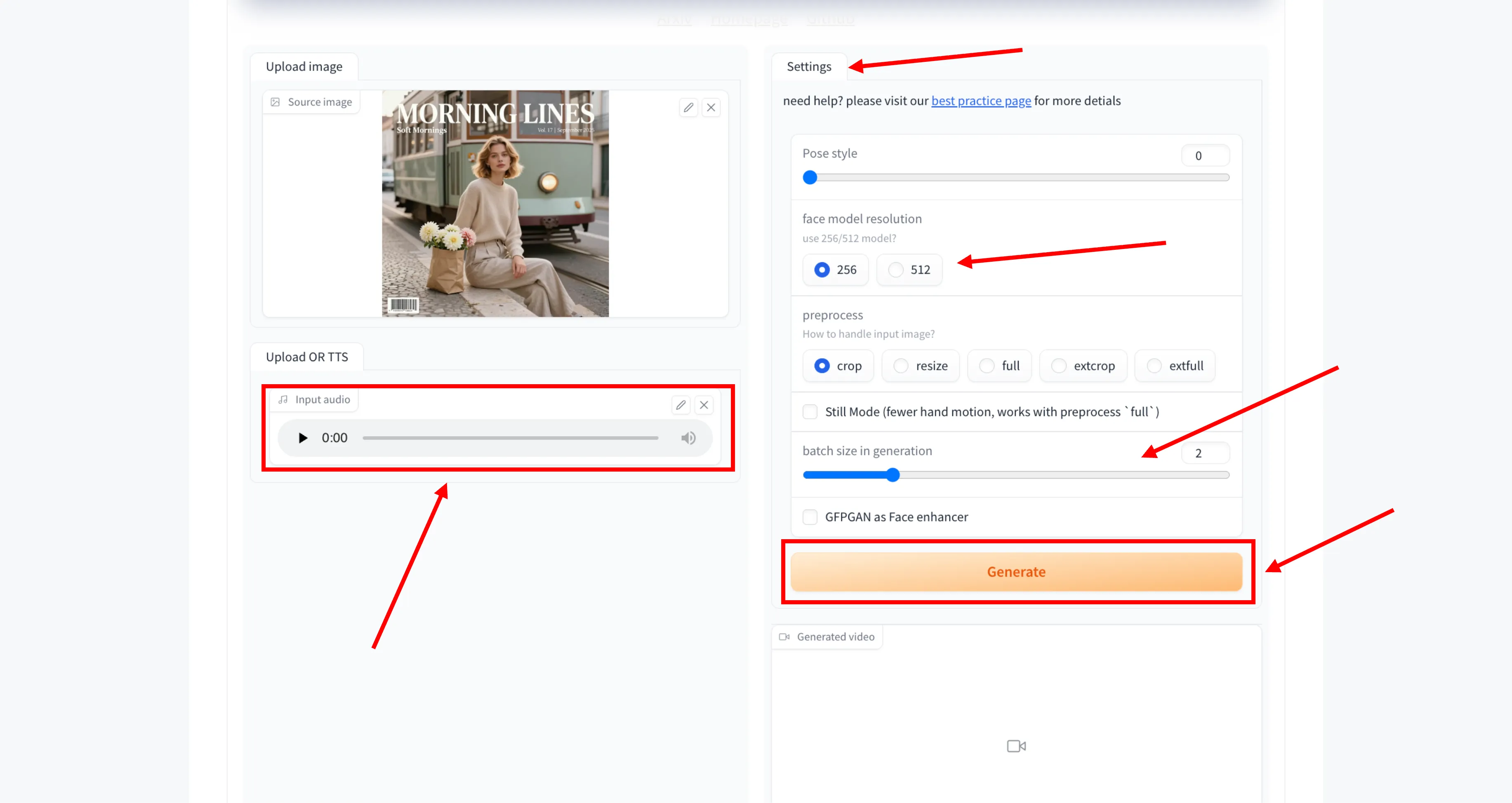
Step 8: Enable Face Enhancement (Optional)
You can enable GFPGAN to enhance facial details in the final output. This option helps improve clarity and smoothness of the face.
Step 9: Generate the Video
Once all settings are configured, click the Generate button. The system will process the image and audio to create the talking face video.
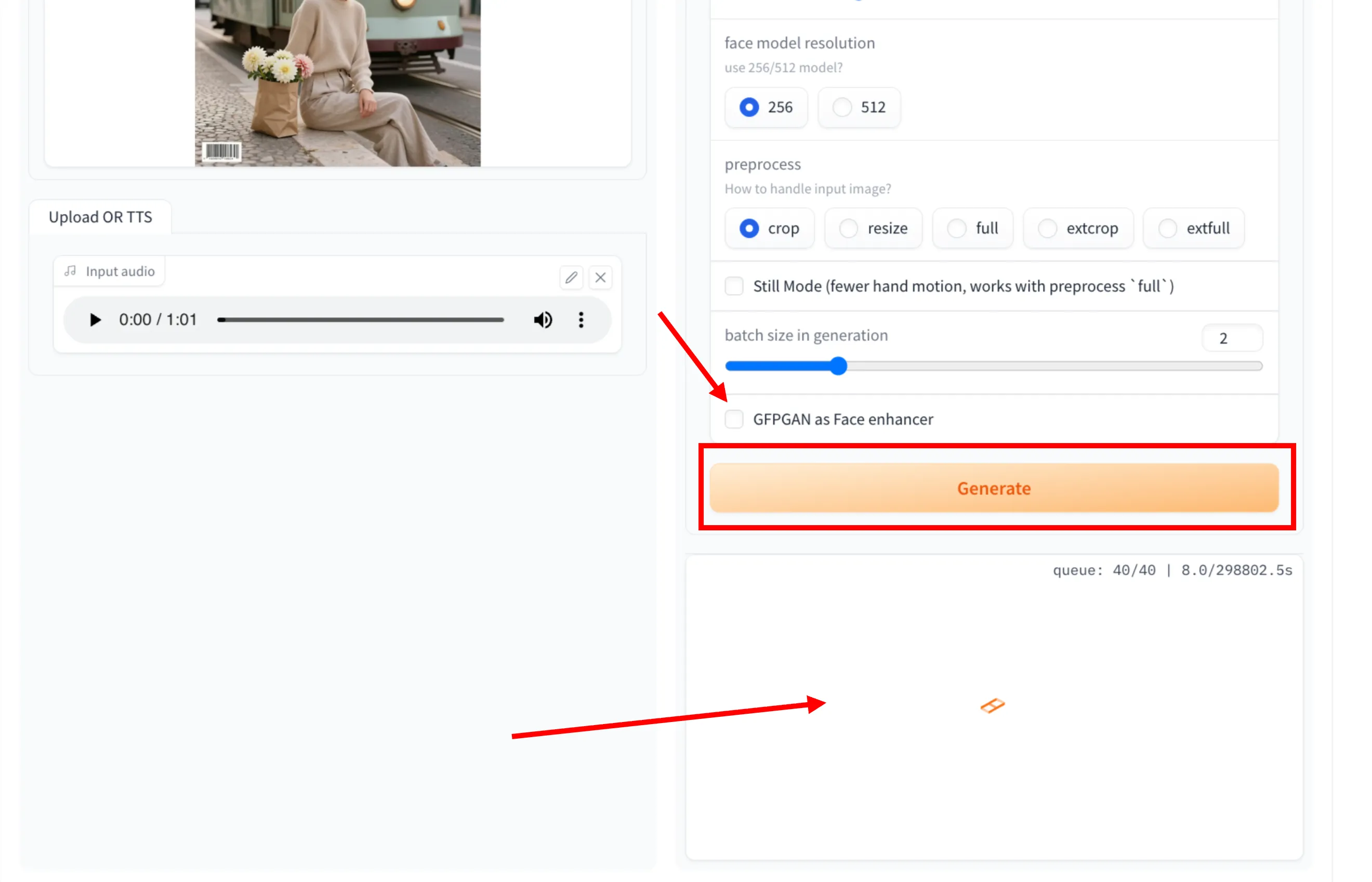
Step 10: View the Generated Result
After generation is complete, preview and save the generated video from the output section.
Technical Framework
3D Motion Coefficient Learning
SadTalker generates 3D motion coefficients (head pose, expression) of the 3D Morphable Model from audio and implicitly modulates a 3D-aware face render for talking head generation . This approach addresses challenges like unnatural head movement and distorted expression that plague other methods.
ExpNet and PoseVAE
The system uses ExpNet to learn accurate facial expressions from audio by distilling both coefficients and 3D-rendered faces. For head pose, PoseVAE utilizes a conditional variational autoencoder to synthesize head motion in different styles . These components work together to create natural-looking animations.
Open-Source Architecture
SadTalker is built on transparent, open-source technology that can run locally without requiring cloud services . The architecture includes pre-trained checkpoints that users can fetch and implement on their own hardware, providing flexibility and control over the generation process.
AI Processing Visualization
How SadTalker Works
Upload Source Image
Start with a clear frontal face photo. SadTalker extracts the face from your image and prepares it for video generation. The system works best with high-quality images that show the face clearly with good lighting and minimal obstructions .
Provide Audio Input
Add any audio file (MP3, WAV, or other formats) that contains speech. SadTalker will analyze the audio content and extract the necessary phonetic information to drive the lip synchronization and facial animations .
Customize Settings
Adjust parameters like eye blinking frequency, head pose style, and video quality settings. These controls allow you to fine-tune the generated animation to achieve the desired level of realism and expressiveness .
Generate Video
Process your inputs to create a talking head video with synchronized facial animations. The generation time varies based on video length and complexity, but typically completes within minutes. The output can be exported in common video formats for various applications .
Usage Benefits
Accessibility
Free to use with open-source availability
Efficiency
Create talking avatars quickly without specialized skills
Flexibility
Multiple deployment options from local to cloud-based
Quality
High-quality output with precise synchronization
Installation Methods
SadTalker offers multiple installation options to suit different technical levels and requirements, from simple online demos to full local installations.
Online Platforms
Try SadTalker instantly in your browser without local setup or hardware requirements:
Hugging Face Spaces
A user-friendly web interface with options for image and audio upload, along with simple settings for still mode and face enhancement.
Try Embedded Hugging Face Demo & Guide →Google Colab
A cloud-based Jupyter notebook environment providing full programmatic control over the generation process with free GPU resources.
Step-by-Step Google Colab Guide & Free Notebook →Online Features
Local Installation
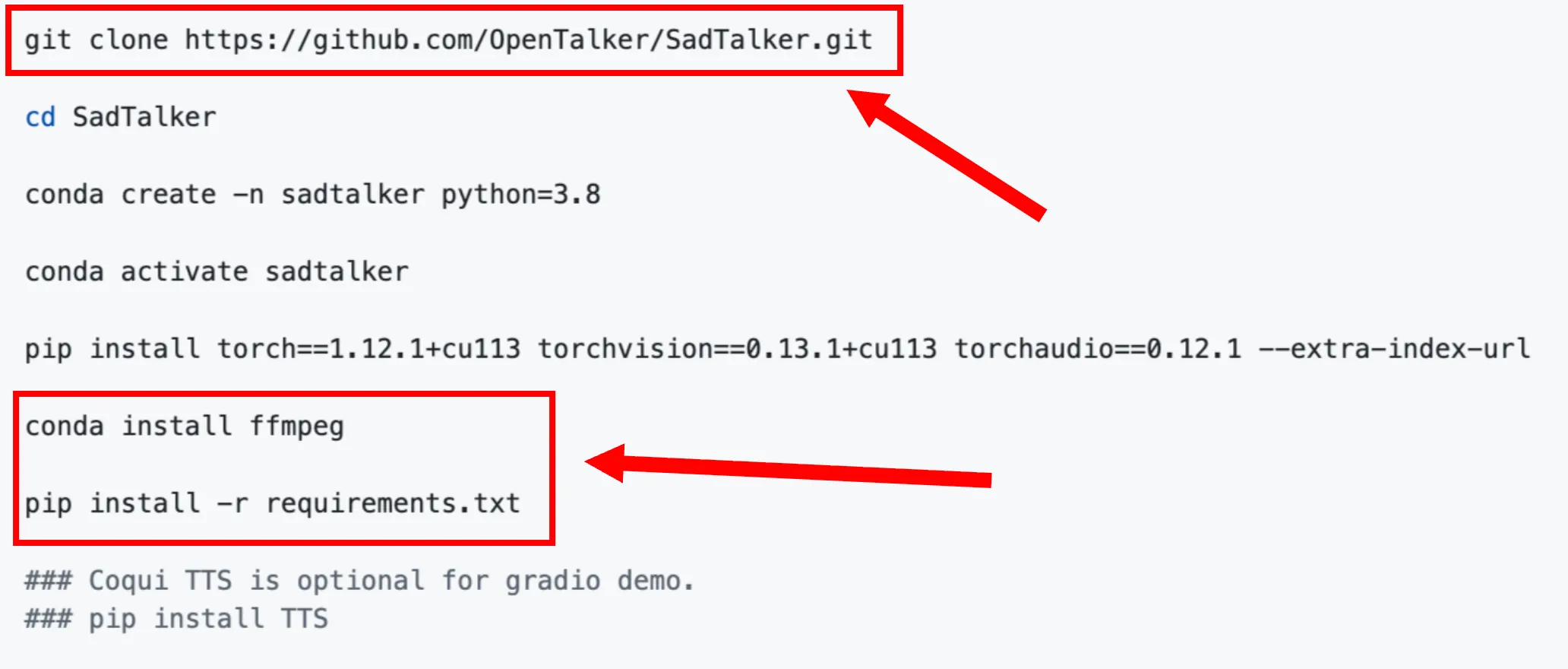
Install SadTalker locally on Windows, macOS, or Linux in 4 easy steps:
Clone Repository
Clone the codebase to your machine using Git command line.
Setup Environment
Initialize a Python 3.10 virtual environment and install dependency packages.
Acquire Weights
Acquire the pre-trained checkpoints and models for talking head generation.
Launch WebUI
Start the local webui server to load the user interface at 127.0.0.1:7860.
Technical Requirements
Ensure your computer satisfies these core prerequisites to successfully run local instances of SadTalker:
OS Compatibility: Fully compatible with Windows 10/11, Ubuntu Linux, or macOS systems.
Dependencies: Require Python 3.10.6, Git version control, and FFmpeg for video processing.
Processing Power: Dedicated GPU with CUDA support is highly recommended for viable rendering speeds.
System Specifications
Practical Applications
Education
Create virtual instructors and animated e-learning avatars that deliver multilingual lessons with perfect lip-sync, making learning materials engaging and accessible for diverse student populations.
Content Creation
Produce interactive social media videos, explainer animations, or storytelling characters without the need for cameras, repeated filming sessions, or expensive setup.
Marketing
Build attention-grabbing video ads, presentations, and localized international campaigns by instantly voicing animated brand avatars in multiple languages.
Entertainment
Animate historical figures, classic artwork, or gaming characters for rapid design prototyping, interactive storytelling, and creative multimedia projects.
Accessibility
Build expressive communication tools and animated visual aids to reinforce audio information visually, providing vital accessibility enhancements for hearing-impaired audiences.
Business Communication
Deploy professional virtual presenters for corporate training, product rollouts, and multilingual virtual events to scale communication and boost viewer retention.
Technical Specifications
Architecture Details
SadTalker maps audio speech inputs to 3D facial motion coefficients and renders them via a 3D-aware neural network:
3D Motion Coefficient Learning
Generates 3D head pose and facial expression coefficients from raw audio, minimizing distortions.
ExpNet & PoseVAE
ExpNet extracts expressions, while PoseVAE synthesizes natural, varied head motions in custom styles.
3D-Aware Face Renderer
Maps coefficients to unsupervised 3D keypoints for stable, realistic talking head generation.
Active Model Pipeline
Performance Metrics
Performance Characteristics
Optimize your generation speeds and visual fidelity based on setup and project requirements:
Hardware Scaling: GPU acceleration (via CUDA) is strongly recommended; CPU processing is slower but functional.
Quality Selection: High-resolution 512px mode enhances facial detail, while 256px mode ensures faster processing.
Enhancement: Integrates GFPGAN to upscale and sharpen facial textures in the final video output.
Technical Specifications
Core Technologies
- Deep Learning-based Face Animation
- Audio-driven Lip Synchronization
- 3D Face Reconstruction
- GAN-based Image Synthesis
- Face Enhancement Modules
System Requirements
- GPU: NVIDIA RTX series recommended (CUDA support required)
- RAM: 8GB minimum (16GB+ recommended)
- OS: Windows, Linux, or macOS
- Python 3.10+
- PyTorch, CUDA Toolkit
Input Specifications
- Image: Single frontal face photo (JPEG/PNG, 256x256+ px recommended)
- Audio: WAV/MP3, clear speech preferred
- Optional: Reference video for style transfer
Output Specifications
- Video: MP4, AVI, GIF (configurable resolution)
- Frame Rate: 25-30 FPS
- Length: Up to several minutes (depends on input audio)
- Face enhancement: Optional post-processing
Frequently Asked Questions
Find answers to common questions about SadTalker, its features, installation, and troubleshooting.
1. What is SadTalker and what does it do?
SadTalker is an open-source AI tool designed to generate realistic talking head videos from a single static image and an audio input. It synchronizes facial movements, including lip-sync, eye blinking, and head poses, to create natural-looking animations.
2. Is SadTalker free to use?
Yes, SadTalker is free and open-source. Users can access it through various platforms like Hugging Face Spaces or Google Colab, or install it locally without cost.
3. What are the main applications of SadTalker?
SadTalker is useful for content creation, education (creating animated avatars for e-learning), marketing (ads and promotional videos), entertainment (animating characters), and accessibility (animating sign language avatars).
4. How does SadTalker compare to other tools like hedra ai?
SadTalker is considered a strong alternative to hedra ai, offering similar features such as multilingual lip-sync, controllable eye blinking, and dynamic video driving. Some users find its video performance superior in terms of precision and quality.
5. What are the installation requirements for SadTalker?
For local installation, SadTalker requires Python 3.10+, Git, and FFmpeg. A dedicated GPU is recommended for faster processing, but it can also run on CPUs with longer processing times.
6. Are there online versions of SadTalker available?
While there isn't an official standalone online version, users can access SadTalker through online demos on platforms like Hugging Face Spaces and Google Colab, which require no local installation.
7. What should I do if the video generates but doesn't display in the WebUI?
This issue might be due to Gradio version compatibility. Try downgrading Gradio to version 3.50.0 using the command pip install gradio==3.50.0 to resolve video display problems.
8. Can I adjust facial expressions manually in SadTalker?
Yes, SadTalker provides customization options such as controlling eye blinking frequency, head pose styles, and pre-processing settings (e.g., crop or full image mode) to fine-tune the generated animations.
9. What are the common troubleshooting steps for SadTalker?
Common fixes include checking Gradio version compatibility, ensuring correct model checkpoint installation, and verifying that all dependencies (like FFmpeg) are properly installed. Consulting the GitHub repository or community forums can also help.
10. What are the limitations of SadTalker?
Limitations include potential security flags from antivirus software during local installation, varying output quality based on input image and audio clarity, and the need for technical knowledge for local setup and troubleshooting. It also cannot replace professional therapy or handle complex emotions if used for mental support applications.