How SadTalker Turns a Single Photo & Audio into a Talking Video
A comprehensive visual guide to SadTalker's 3D Morphable Model (3DMM) pipeline — from extracting facial coefficients and generating audio-driven head pose, to tuning Gradio & CLI parameters for broadcast-quality talking avatars.
Why 3D Motion Coefficients Beat Traditional 2D Lip-Sync
Most earlier talking-photo software (such as classic Wav2Lip implementations) relied on 2D mouth-region inpainting: they identified the mouth landmarks on a photo and replaced the lips frame-by-frame with generated phoneme pixels. While the lips moved in time with speech, the surrounding head, neck, eyes, and brow remained completely motionless — producing an unnatural, uncanny "puppet" effect.
SadTalker, published at CVPR 2023 by researchers from Xi'an Jiaotong University, Tencent AI Lab, and Ant Group ("SadTalker: Learning Realistic 3D Motion Coefficients for Stylized Audio-Driven Single Image Talking Face Animation"), solved this by introducing an intermediate 3D representation.
Instead of generating video pixels directly from audio, SadTalker uses audio waveforms to synthesize 3D Morphable Model (3DMM) coefficients first. This isolates facial geometry, speech expression, and 6-degrees-of-freedom head pose into mathematical vectors before warping the original photo.
Full head choreography, realistic lip articulation, organic eye blinks, and preserved source identity.
Photo + Audio → Talking Video in Action
Below is an actual generation rendered through SadTalker's 512px pipeline with Still Mode and GFPGAN face restoration. Notice how the corporate presenter maintains steady eye contact while the mouth precisely articulates English consonants.

Subject: Studio Corporate Presenter
Resolution: 512×512 PNG, front-facing
Provides base geometry, skin tone, hair, and lighting reference.
Speech Engine: ExpNet & PoseVAE
Timing: Phonemes map to 280 video frames
Audio drives temporal lip articulation and rhythmic nodding.
Notice the natural teeth clarity, steady posture, and zero background jitter.
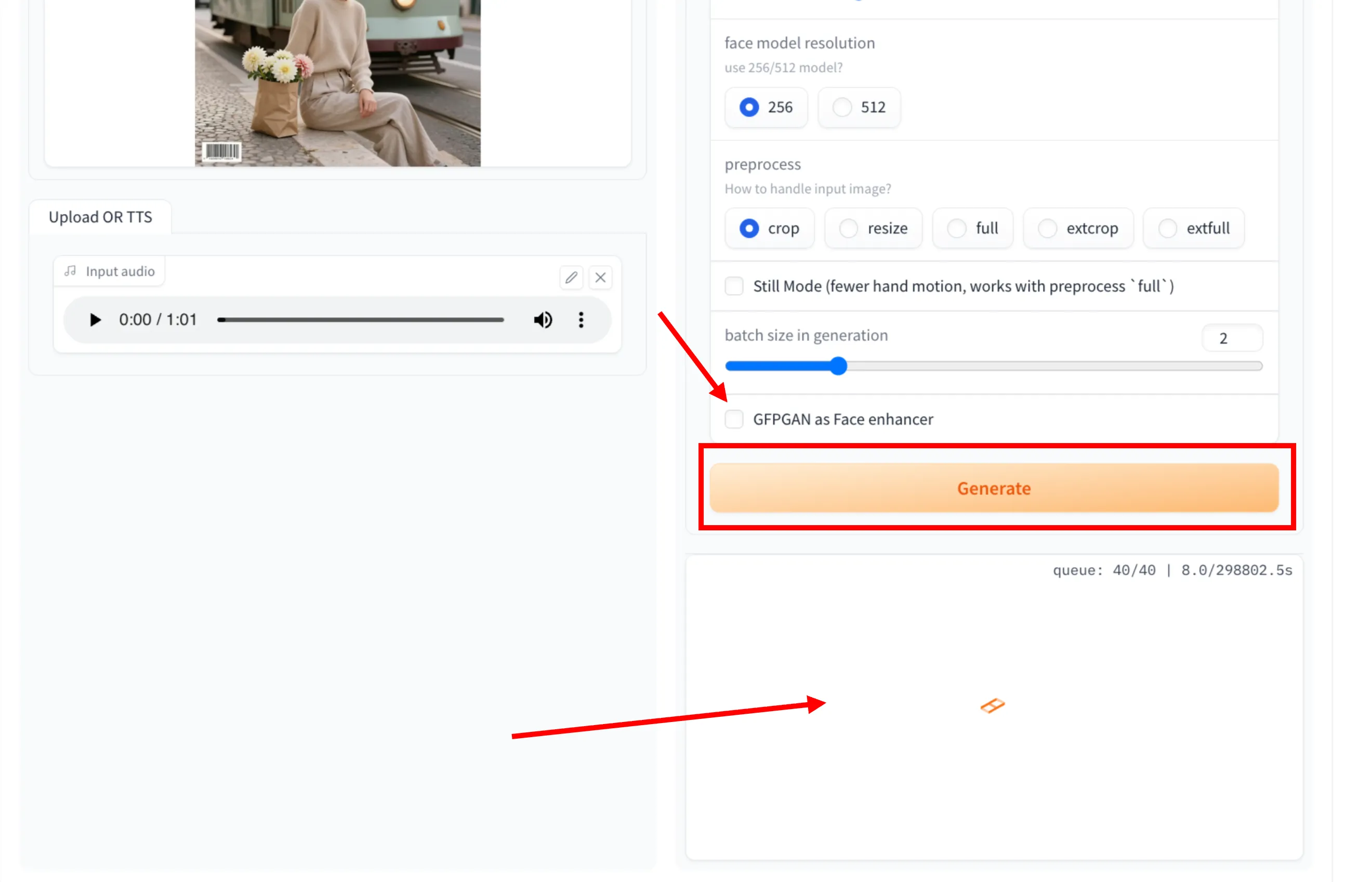
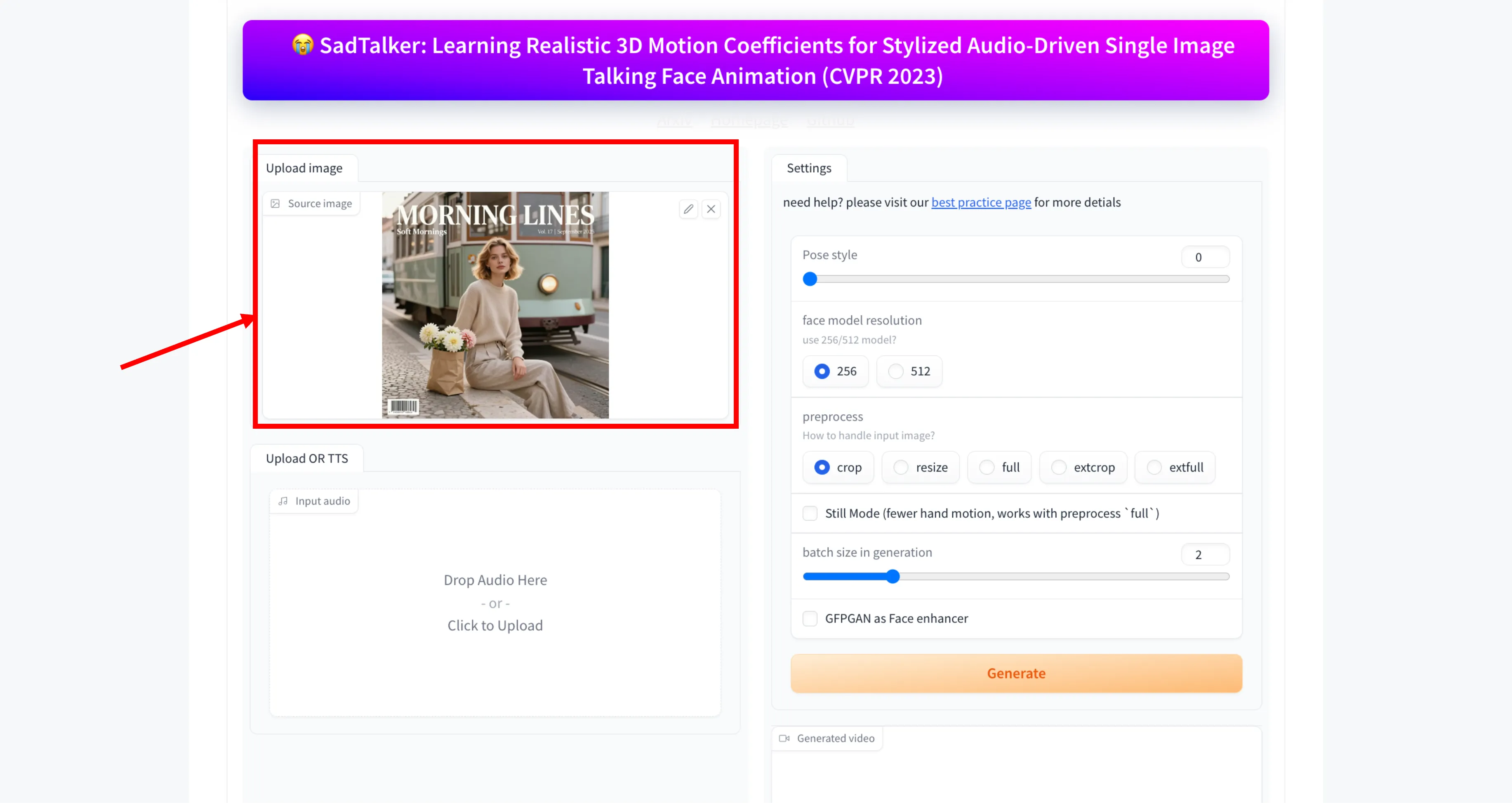
Configuring SadTalker: Visual Parameter Guide
Whether you are running SadTalker through the Gradio Web UI, Google Colab, or CLI scripts, these six core parameters determine video composition, head gesture intensity, and visual fidelity.
Choosing the Right Image Framing
SadTalker provides five preprocessing methods to crop and frame the input portrait before neural animation:
--preprocess full --still to keep the torso anchored.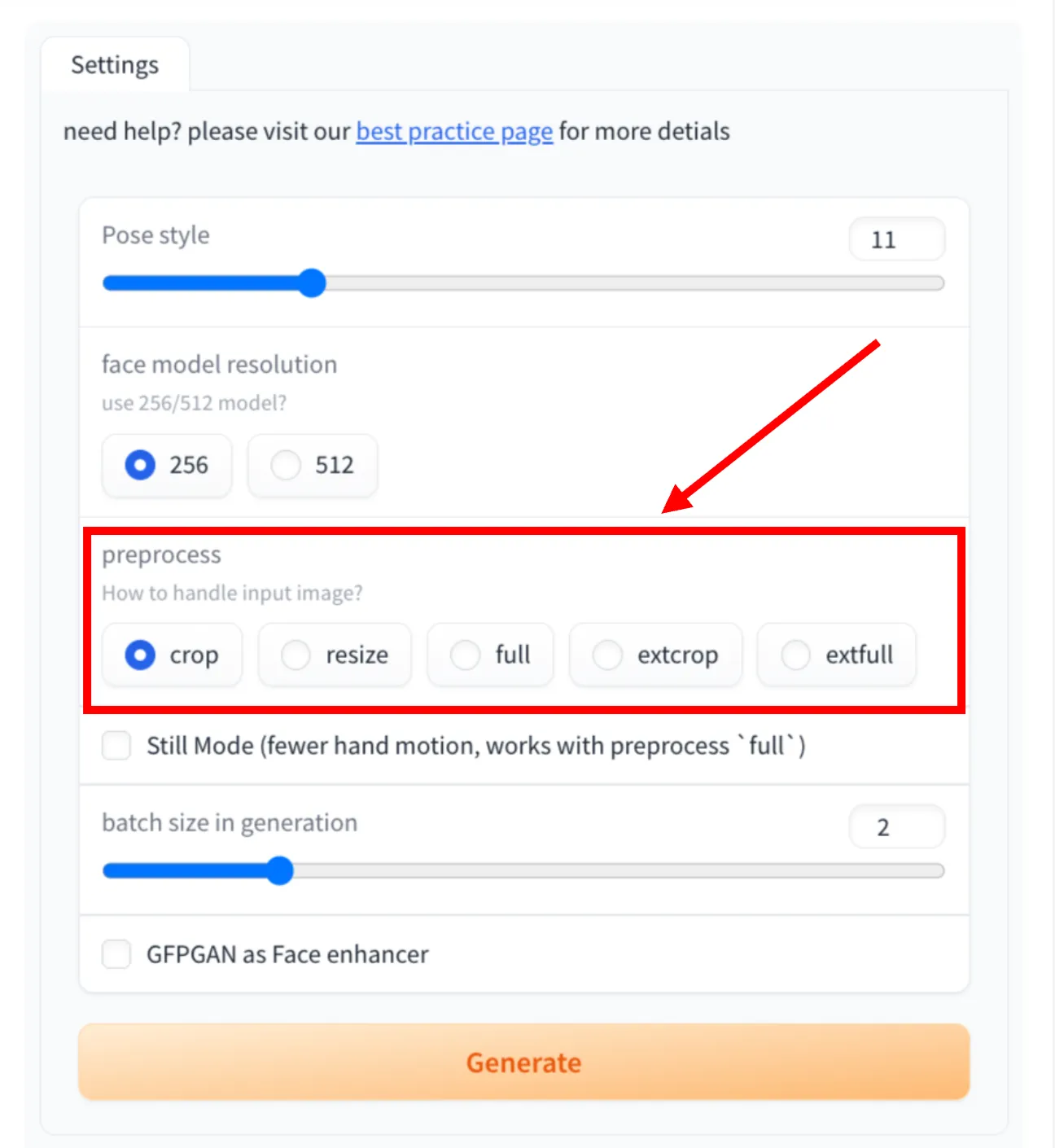
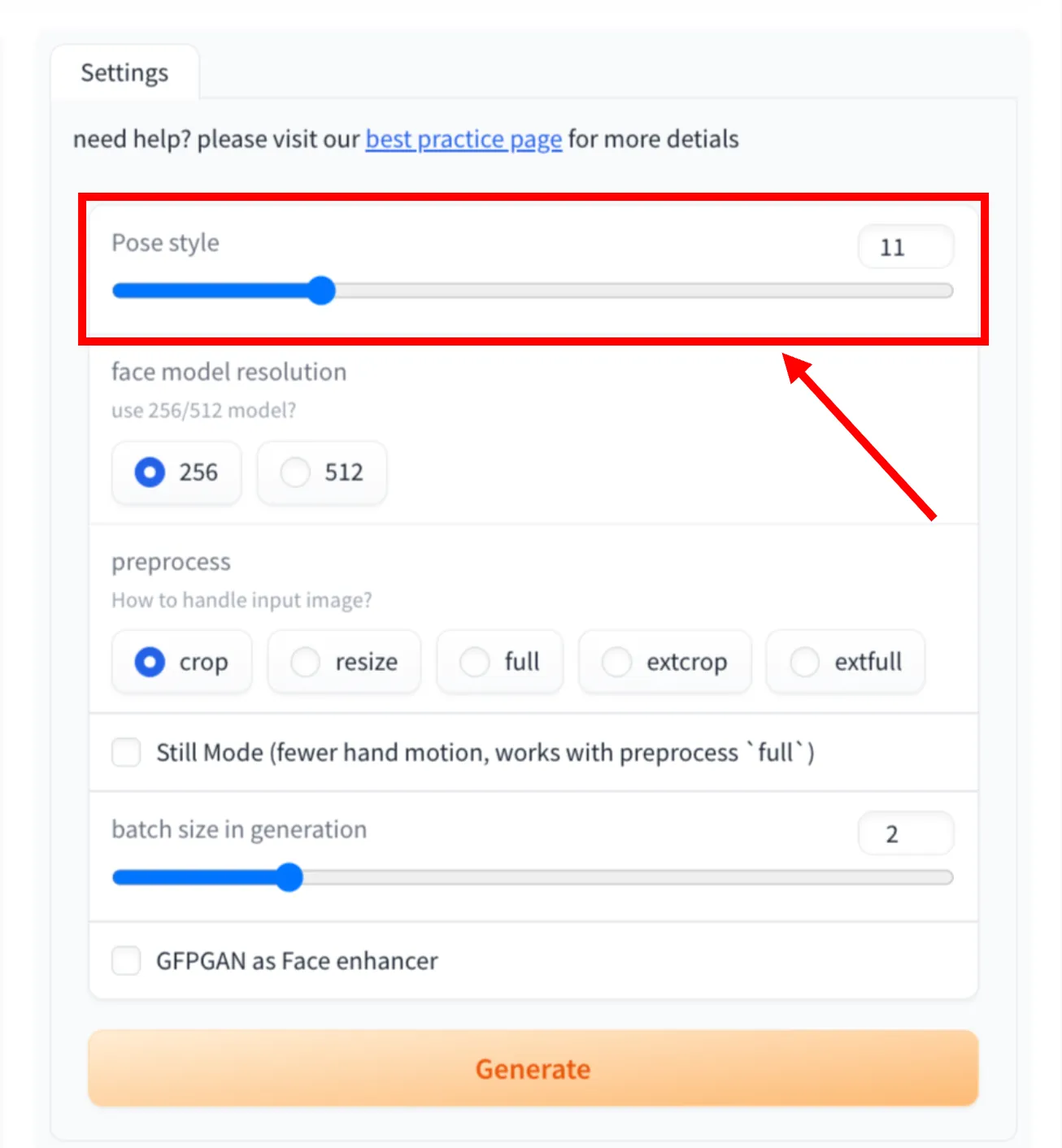
Controlling Head Motion & Expressiveness
SadTalker's PoseVAE model maps audio pacing into a 46-dimensional learned latent space of natural human head gestures. The slider controls the sampled motion style:
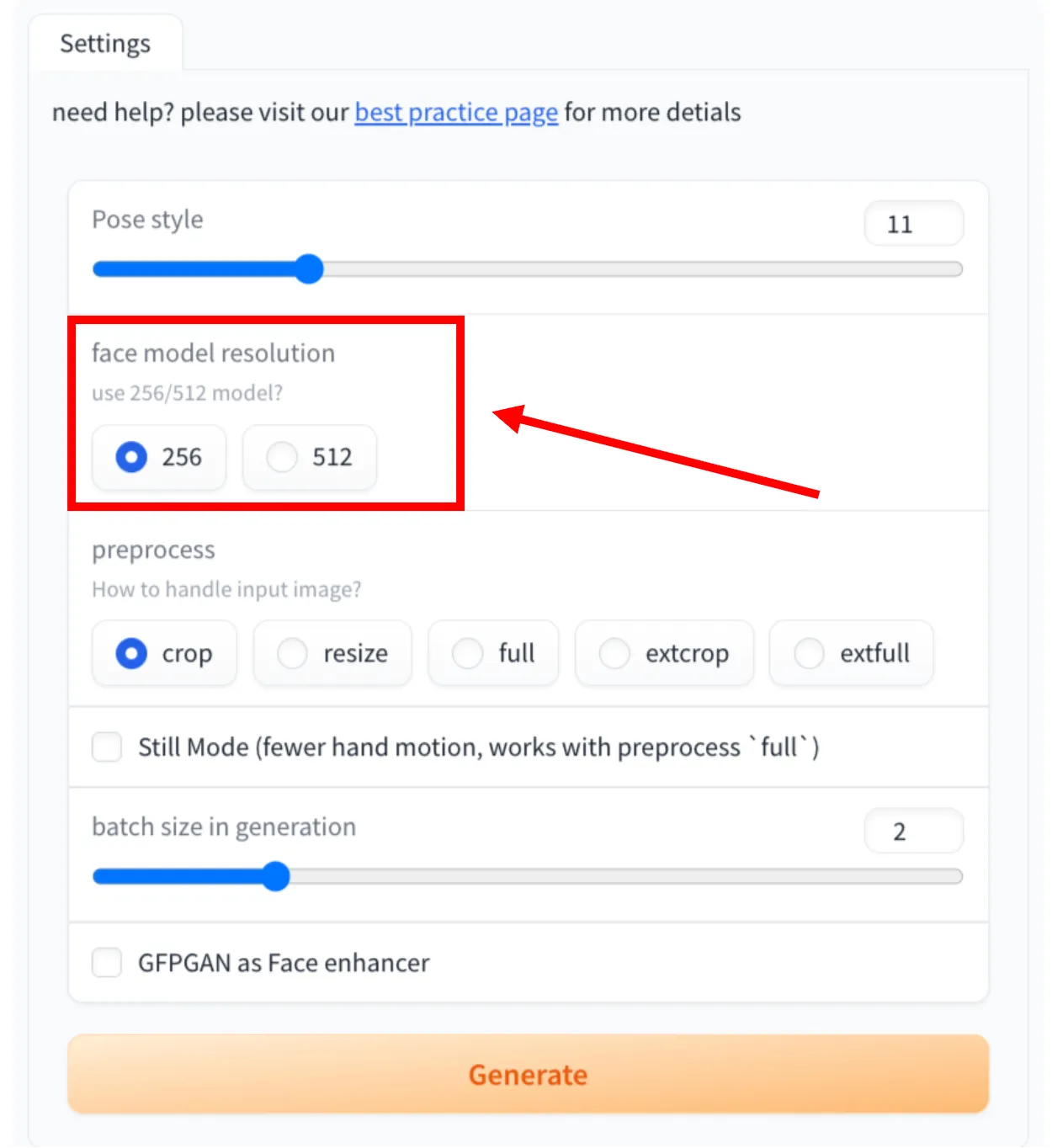
Balancing VRAM Usage vs. Facial Sharpness
SadTalker provides two distinct checkpoint architectures for the neural warping generator:
- • VRAM Footprint: ~3.5 GB
- • Speed: ~18-24 FPS (Fast)
- • Ideal for: GTX 1650/1060, laptops, quick preview iterations
- • VRAM Footprint: ~6.2 GB
- • Speed: ~4-8 FPS
- • Ideal for: 4× pixel density, sharp teeth, clean eye reflections
Want exact rendering times and VRAM stats on RTX 3060, 3090, and 4090? Check out our dedicated SadTalker GPU Benchmark Guide →
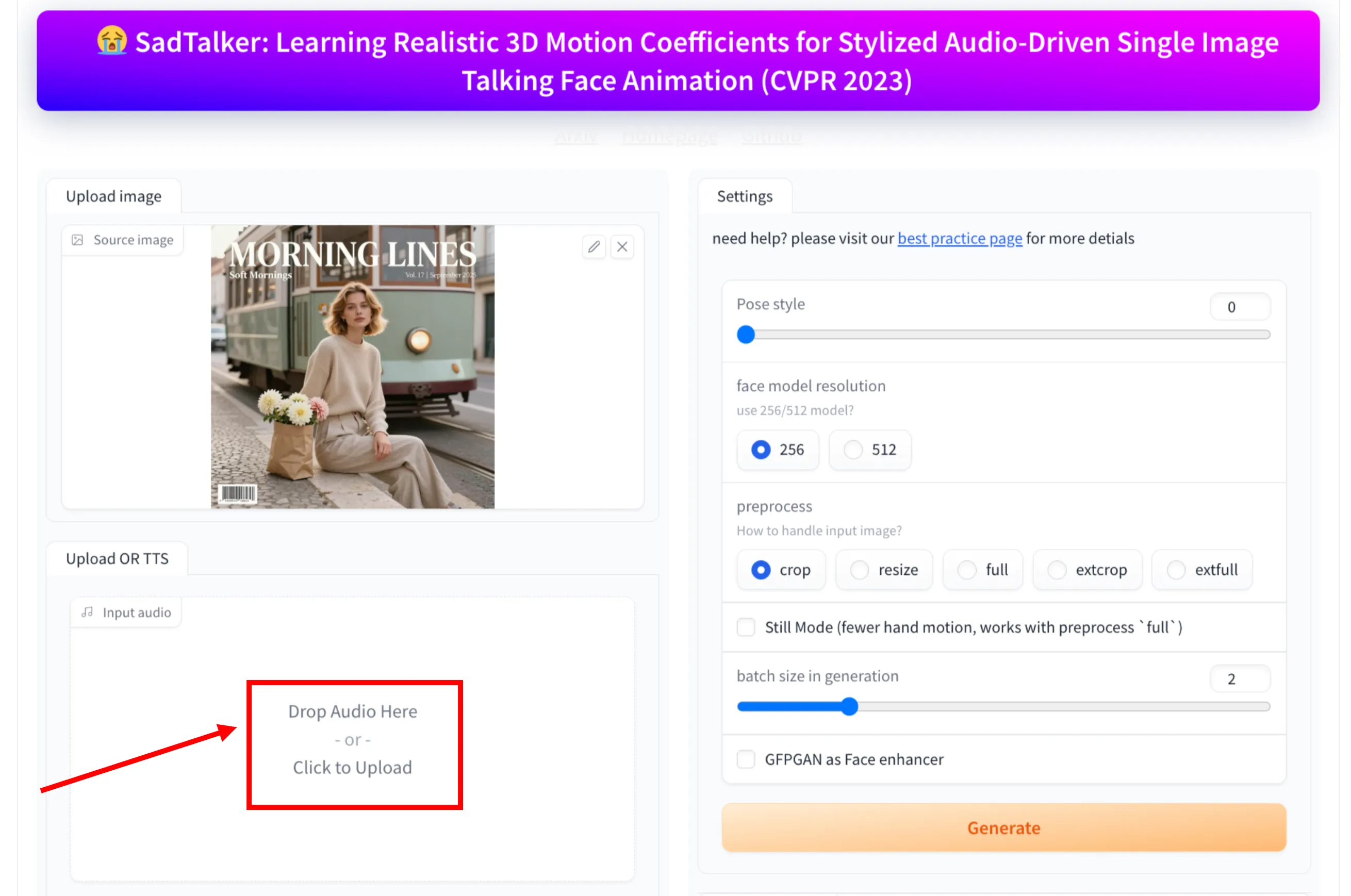
Speech Waveforms, Phonemes & TTS
SadTalker extracts acoustic features from raw audio to drive both mouth shapes and head cadence. For the cleanest lip-sync:
Still Mode, Batching & GFPGAN
The final generation controls fine-tune the render quality and computational efficiency:
Under the Hood: The 6-Stage Neural Pipeline
SadTalker connects six distinct deep neural network models in an end-to-end inference graph. Explore how each stage transforms static pixels and raw soundwaves into smooth video keyframes.
3D Face Reconstruction (3DMM Coefficients)
Rather than predicting raw video pixels, SadTalker first projects the 2D source photo into a 3D Morphable Model (3DMM) parameter space using Deep3DFaceReconstruction. This decomposes the face into identity shape (facial geometry), expression coefficients, and 6-DOF head pose (pitch, yaw, roll, and translation).
Separates who the person is from how they move, ensuring facial identity never warps or distorts.
One-Click CLI Recipes for Every Use Case
Running SadTalker via command-line interface? Copy these tested production recipes directly into your terminal or automation scripts.
Studio Quality Corporate Presenter
News-anchor style presentation with steady posture, crisp 512px facial resolution, and GFPGAN face restoration. Ideal for company announcements and explainer videos.
python inference.py \
  --source_image ./presenter.png \
  --driven_audio ./narration.wav \
  --result_dir ./results \
  --size 512 \
  --still \
  --preprocess crop \
  --enhancer gfpgan
Where SadTalker Fits vs. Other Animation Approaches
Understanding the distinction between audio-driven lip animation (SadTalker) and video-driven portrait reenactment (LivePortrait) helps you choose the right tool for your pipeline.
| Architecture | Primary Input | Head Motion | Facial Realism | Best Use Case |
|---|---|---|---|---|
| SadTalker (3DMM)Audio-driven Warping | Single Photo + Audio (.wav) | Synthesized via PoseVAE | High (GFPGAN detail) | Automated avatars, voiceover videos, TTS explainers |
| LivePortraitVideo reenactment | Photo + Driving Video (.mp4) | Exact actor mimicry (1:1) | Extremely fluid eye/lip nuances | Human actor reenactment, cinematic video dubbing |
| Wav2Lip2D Lip-sync Inpaint | Existing Video + Audio (.wav) | None (Static Head) | Low to Moderate (Mouth blur) | Quick lip replacement on pre-recorded interview clips |
| MuseTalkLatent Diffusion Inpaint | Video + Audio (.wav) | Follows source clip movement | Very High (Diffusion lips) | Real-time digital avatars and broadcast dubbing |
Want a deep head-to-head comparison?
Read our in-depth technical analysis comparing SadTalker vs LivePortrait with side-by-side video rendering and real RTX 3060 nvtop telemetry.
Fixing Common Photo-to-Video Artifacts
Encountering strange neck seams, blurry teeth, or unnatural head wobble? Here is how experienced ML engineers resolve common SadTalker issues:
Why it happens: High audio energy can cause PoseVAE to sample aggressive 3D trajectory angles from the latent space.
--still flag to anchor the 6-DOF translation, or set --pose_style 0 for news-anchor steadiness.Why it happens: Standard 256px resolution without enhancement produces soft mouth inpainting when speaking plosives.
--size 512 --enhancer gfpgan. GFPGAN applies a facial restoration GAN that reconstructs distinct teeth edges and iris reflections.Why it happens: Default crop isolates only the face bounding box; when pasted back onto clothing, contrast differences create a seam.
--preprocess full or --preprocess extcrop to provide smooth alpha-blended transition margins.Why it happens: Running 512px with GFPGAN and a large batch size requires at least 6.5 GB VRAM.
--batch_size 1, downscale to --size 256, or run on free cloud GPUs with our Google Colab notebook →Explore Related SadTalker Guides & Tools
Everything you need to master audio-driven talking face generation on your hardware or in the cloud.
Interactive Demo Lab
Test preloaded audio clips and talking head avatars directly in your browser.
Google Colab Guide
Run SadTalker on free Tesla T4 GPUs with zero local configuration.
Local Install Guide
Complete Conda, PyTorch, and FFmpeg setup for Windows, Linux, and macOS.
GitHub & CLI Reference
Download model checkpoint weights and automate headless Python generation.
GPU Benchmarks
Empirical inference speeds and VRAM usage on RTX 3060, 3090, and 4090.
SadTalker vs LivePortrait
Direct comparison of audio-driven lip sync vs video-driven actor reenactment.
Real-World Use Cases
How educators, digital marketers, and game developers utilize SadTalker.
Troubleshooting & FAQs
Solutions for PyTorch version mismatches, CUDA OOM, and audio codec errors.