What People Are Actually Building With SadTalker
Specific use cases based on what SadTalker's feature set actually supports — with the settings, tradeoffs, and limitations for each.
Choose a workflow below, prepare a clear portrait and narration, and inspect a short clip before producing the final video. Useful controls include: --still mode, --preprocess full, the GFPGAN enhancer, and the Stable Diffusion WebUI and video-lip-sync extensions the community has built around it.
E-Learning & Virtual Instructors
A single instructor photo turned into a narrating avatar for course modules, onboarding videos, or training slides — recorded once, then reused with new audio for every new lesson without re-filming.
What you would actually use
--still modeKeeps the presenter composed, avoiding distractions from content.
512px face modelClearer detail on training platforms viewed full-screen.
Multilingual reuseSame source image with different audio tracks in different languages — SadTalker syncs lip movement to whatever audio it's given.
Where it falls short
Suggested settings
Preprocess
crop
Still
On
Enhancer
Optional
Reviving Old or Historical Photos
Taking a single archival photo — a historical figure, an old family photo, a painting or illustrated portrait — and animating it to "speak" a piece of narration, quote, or scripted dialogue. One of the most common community use cases.
What you would actually use
--preprocess fullFor half-body or full-body images rather than tight face crops.
GFPGAN enhancerCompare restoration OFF/ON on older or soft scans; it may generate plausible detail rather than recover the original face exactly.
--stillStart with restrained head movement. Pose style selects a motion pattern; it is not a motion-strength slider.
Where it falls short
Suggested settings
Preprocess
full
Still
On
Enhancer
Compare ON/OFF
Prepare an old photo for animation
- Use a scan with one visible face. Crop away album borders and other people; keep the eyes, nose and mouth unobstructed.
- Use full preprocessing to retain the photograph’s composition, or crop for a close talking-head view. Start with still mode ON and enhancement OFF to inspect the original likeness.
- Pair the image with a short narration. Listen for clipping, background music and long pauses before rendering.
- Check the mouth, eyes and pasted face boundary. Compare GFPGAN separately if facial detail needs restoration.
These are starting settings for an old-photo workflow. For measured settings comparisons, see full vs crop vs resize and GFPGAN ON vs OFF.
Common problems to check
- Several faces or a profile view can make face selection unreliable. Isolate one clear face first.
- Scratches across the mouth or eyes can carry into the animation. Compare the output with the source at the same size.
- Restoration may change wrinkles, teeth or eye detail. Keep enhancement OFF when preserving likeness matters more than sharpening.
Narration from the website
Download narrationStarting command
Run from your SadTalker installation folder after saving the input image and audio there. Replace old-photo.png with your scan.
python inference.py --source_image ./old-photo.png --driven_audio ./sadtalker-male-narration-audio.wav --result_dir ./results/old-photo --preprocess full --size 512 --still --batch_size 2 --pose_style 0 --expression_scale 1.0Animating AI-Generated Art & Characters
Taking a Stable Diffusion-generated portrait (an original character, a stylized avatar, concept art) and giving it a voice — a workflow the community formalized with a dedicated SD WebUI extension for SadTalker.
What you would actually use
SD WebUI extensionGenerate the face and animate it in the same Automatic1111 pipeline.
Standard cropStraightforward preprocessing for face-on character portraits.
Where it falls short
Suggested settings
Preprocess
crop
Still
On for a steady presenter
Enhancer
Optional
Avatar input and animated result
This existing website example pairs a digital-avatar portrait with male narration. The playable output is 11.24 seconds at 25 fps, with a 1024 × 1024 export.
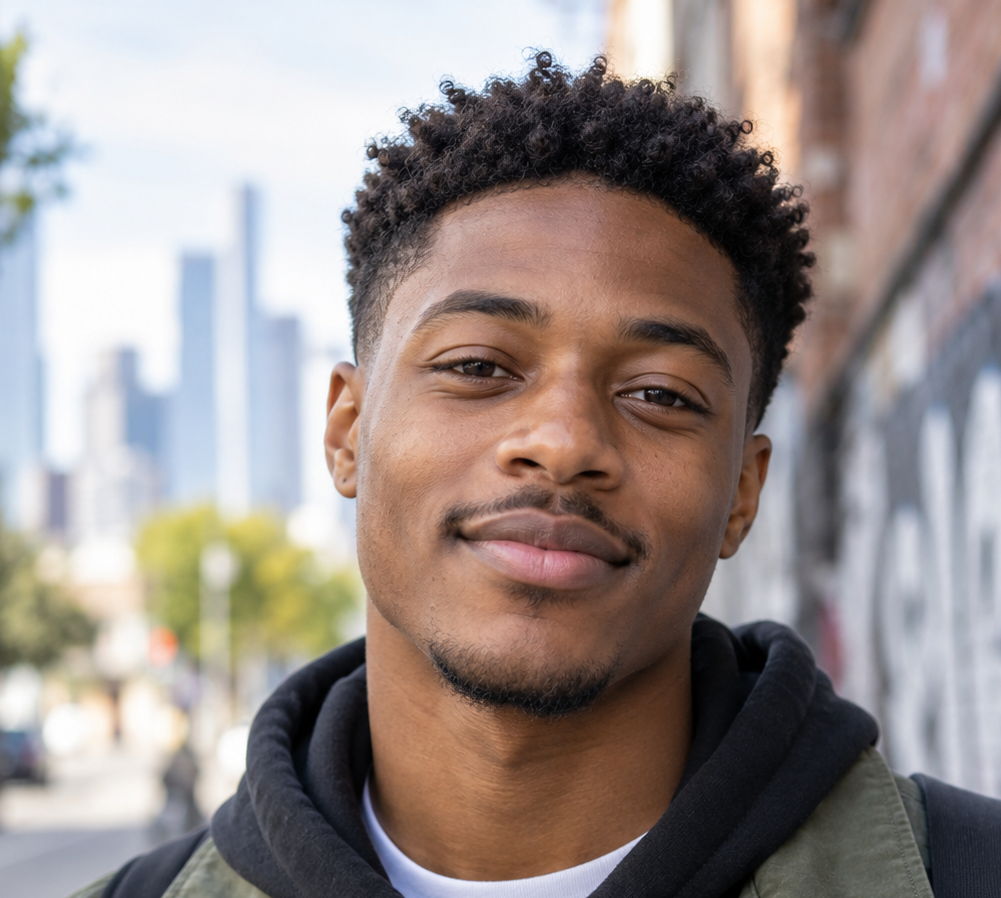
In the inspected frame at 4 seconds, facial texture and the background appear softer than in the input, and the mouth shape changes. Inspect the moving clip around speech and pauses before choosing the final version.
This example uses a human-shaped face. Exaggerated cartoon features, covered mouths and non-human anatomy need separate testing. Compare enhancement OFF if restoration alters the character’s design.
Narration from the website
Download narrationExample command for this workflow
Run from your SadTalker installation folder after saving the input image and audio there. The example uses crop, 512, still ON and GFPGAN. It is a recipe to run, not a fresh timing measurement.
python inference.py --source_image ./sadtalker-male-avatar-source.png --driven_audio ./sadtalker-male-narration-audio.wav --result_dir ./results/avatar --preprocess crop --size 512 --still --enhancer gfpgan --batch_size 2 --pose_style 0 --expression_scale 1.0Marketing & Localized Ad Campaigns
A single brand spokesperson image reused across multiple regional ad variants — same face, different audio per market or language — instead of re-filming a presenter for every locale.
What you would actually use
512px modelFor customer-facing output where visual polish matters more than render speed.
Batch generationMultiple audio files for localizing one script into several languages.
Where it falls short
Suggested settings
Preprocess
crop or full
Still
Depends on brand tone
Enhancer
Compare ON/OFF
Redubbing & Lip-Sync for Existing Video
Changing the audio track of an existing talking video — dubbing, correcting a line, or translating spoken content — while keeping the lip movement in sync with the new audio, not the original.
What you would actually use
Video-Lip-Sync extensionThe community-maintained SadTalker-Video-Lip-Sync extension, built specifically for re-syncing lips on video input rather than animating a still image.
Where it falls short
Suggested settings
Preprocess
Use lip-sync extension
Still
—
Enhancer
—
Accessibility & Visual Communication Aids
Pairing spoken audio with a visible, expressive face for audiences who benefit from a visual anchor alongside audio — reinforcing spoken announcements, presentations, or instructional content with a synchronized face.
What you would actually use
--still modeA calm, non-distracting presenter.
Clear, well-lit source photosFacial clarity matters more here than in entertainment — the visual is doing communicative work, not just decorative work.
Where it falls short
Suggested settings
Preprocess
crop
Still
On
Enhancer
Compare ON/OFF
Business Presentations & Corporate Communication
A consistent virtual presenter face for internal updates, product announcements, or investor communications — recorded once as a source image, reused across many scripted updates.
What you would actually use
--still + GFPGANA polished, professional look suitable for external-facing communication.
Where it falls short
Suggested settings
Preprocess
crop
Still
On
Enhancer
Compare ON/OFF
Quick Reference
Choosing the Right Settings by Use Case
A summary of recommended configuration for each workflow.
| Use case | Preprocess | Still mode | Enhancer |
|---|---|---|---|
| E-learning / instructor | crop | On | Optional |
| Old photo revival | full | On | Compare ON/OFF |
| AI art / character | crop | On for a steady presenter | Optional |
| Marketing / ads | crop or full | Depends on brand tone | Compare ON/OFF |
| Video redub | (use lip-sync extension) | — | — |
| Accessibility content | crop | On | Compare ON/OFF |
| Business presentation | crop | On | Compare ON/OFF |