Master settings guide · Updated 5 October 2026 · Benchmarks from 4 October
SadTalker best settings: choose by goal, then check the output
Start with the framing and head movement you need. Choose the base render size, then decide whether face restoration helps. These presets bring together our four ComfyUI setting tests on the same RTX 4090.
Choose a starting preset for your goal
For a first draft, try crop · still OFF · 256 · enhancer none. Move to 512 for a larger face display, turn still ON for a steadier head, and compare GFPGAN before keeping its restored output. All seven presets below used batch size 2, expression scale 1.0 and pose style 0 in the captured evidence.
Swipe the table sideways to see all settings.
| Goal | Preprocess | Still | Base size | Enhancer | Evidence |
|---|---|---|---|---|---|
| Quick preview | crop | OFF | 256 | none | Measured on the studio portrait |
| Larger face display | crop | OFF | 512 | none | Measured on the studio portrait |
| Optional face restoration | crop | OFF | 512 | gfpgan | Measured on the studio portrait |
| Steady presenter head | crop | ON | 512 | gfpgan | Three measured still-ON runs |
| Keep the scene, steady head | full | ON | 512 | gfpgan | One supplemental run only |
| Keep the scene, moving head | full | OFF | 512 | gfpgan | Three measured preprocessing runs |
| Already suitable face framing | resize | OFF | 512 | gfpgan | Three measured preprocessing runs |
The steady-scene preset has only one supplemental render; it is a useful example, not repeat-trial validation. Full retains the surrounding source scene by compositing the animated face; it does not animate a whole body. GFPGAN ON is optional even for a final render.
What the measured results support
Still controls generated head motion, not scene framing
At crop, size 512 and GFPGAN ON, the OFF median was 117.40 s and ON was 117.68 s, from three measured runs each. ON kept this head nearer the source pose while the mouth animated. This test does not establish a speed advantage or guaranteed elimination of seams. Watch still ON/OFF.
Choose preprocessing for the composition
At size 512, still OFF and GFPGAN ON, full took 218.55 s, crop 118.13 s and resize 116.08 s (three-run medians). Full preserved the jacket and scene; crop made a face close-up; resize rendered the resized whole portrait. Full’s larger output also undergoes enhancement, so this does not isolate preprocessing cost. Compare the framing.
512 showed finer-looking detail, at greater cost in this sample
With crop, still OFF and GFPGAN OFF, 256 took 27.88 s and 512 took 55.41 s. Sampled whole-GPU peaks were 4,799 and 10,047 MiB. These are single trials, not medians. Final videos were 256 × 256 and 512 × 512. Inspect matching close crops.
GFPGAN adds generated detail, processing and final upscaling
At crop, size 512 and still OFF, OFF took 55.41 s and ON 119.39 s, one trial each. Sampled whole-GPU peaks were 10,047 and 10,207 MiB. ON produced 1024 × 1024 video and looked sharper around eyes and facial hair, with smoother skin. Sharper presentation does not prove recovered identity or improved lip sync. Compare restoration OFF/ON.
Adapt the starting point to the portrait
The factorial evidence is from one well-lit, front-facing studio portrait. The following choices for other inputs are guidance to try, not separately tested portrait presets.
- Tight headshot: start with crop. If the source is already framed exactly as needed, inspect resize as an alternative; review crop boundaries before a long render.
- Shoulder-up presenter or wider scene: try full when clothing and background must remain. Still ON may reduce distracting head movement; inspect jaw/neck seams. A small face in a wide image still limits available facial detail.
- Soft or compressed photo: first compare an unenhanced draft. Try GFPGAN only if it looks useful; inspect the original likeness, skin and teeth. Restoration cannot establish the exact detail lost in the source.
- Illustration or cartoon: try enhancer none first to avoid adding unwanted photorealistic texture. Face detection, motion quality and this recommendation were not benchmarked on cartoons here.
- Profile, occluded, tiny or multiple faces: use a clearer single-face source where possible. No tested preset here establishes reliable handling or face selection for these cases.
Use the presets in ComfyUI or the standalone CLI
Follow our ComfyUI installation guide, then load a preset workflow, upload the shared portrait and narration, and Run. Every download below is a single-node preset adapted from the guide template. Loading a workflow does not launch a render by itself. An unchanged graph can reuse cached outputs.
Control mapping: ComfyUI still ON is the boolean true (shown as “still”); OFF is false (“animated”). The CLI uses --still for ON and omits it for OFF. ComfyUI enhancer none maps to omitting --enhancer in the CLI. Size is the base face renderer; the final video dimensions also depend on preprocessing and enhancement.
CLI examples specify the same settings; they were not timed as new standalone runs. Run them from the SadTalker repository in its activated environment, with the supplied inputs available. Use the four-thread launcher instructions to match the tested worker CPU limits; GUI workflows alone do not set these limits.
Quick preview
Measured on the studio portrait. Inspect its source test before adapting it to your own portrait.
ComfyUI workflowComfyUI API graph
python inference.py --source_image "sadtalker-corporate-presenter-source.png" --driven_audio "sadtalker-male-narration-audio.wav" --result_dir "results/preview" --preprocess crop --size 256 --batch_size 2 --expression_scale 1.0 --pose_style 0Larger face display
Measured on the studio portrait. Inspect its source test before adapting it to your own portrait.
ComfyUI workflowComfyUI API graph
python inference.py --source_image "sadtalker-corporate-presenter-source.png" --driven_audio "sadtalker-male-narration-audio.wav" --result_dir "results/large-face" --preprocess crop --size 512 --batch_size 2 --expression_scale 1.0 --pose_style 0Optional face restoration
Measured on the studio portrait. Inspect its source test before adapting it to your own portrait.
ComfyUI workflowComfyUI API graph
python inference.py --source_image "sadtalker-corporate-presenter-source.png" --driven_audio "sadtalker-male-narration-audio.wav" --result_dir "results/restored-face" --preprocess crop --size 512 --batch_size 2 --expression_scale 1.0 --pose_style 0 --enhancer gfpganSteady presenter head
Three measured still-ON runs. Inspect its source test before adapting it to your own portrait.
ComfyUI workflowComfyUI API graph
python inference.py --source_image "sadtalker-corporate-presenter-source.png" --driven_audio "sadtalker-male-narration-audio.wav" --result_dir "results/steady-presenter" --preprocess crop --size 512 --batch_size 2 --expression_scale 1.0 --pose_style 0 --still --enhancer gfpganKeep the scene, steady head
One supplemental run only. Inspect its source test before adapting it to your own portrait.
ComfyUI workflowComfyUI API graph
python inference.py --source_image "sadtalker-corporate-presenter-source.png" --driven_audio "sadtalker-male-narration-audio.wav" --result_dir "results/steady-scene" --preprocess full --size 512 --batch_size 2 --expression_scale 1.0 --pose_style 0 --still --enhancer gfpganKeep the scene, moving head
Three measured preprocessing runs. Inspect its source test before adapting it to your own portrait.
ComfyUI workflowComfyUI API graph
python inference.py --source_image "sadtalker-corporate-presenter-source.png" --driven_audio "sadtalker-male-narration-audio.wav" --result_dir "results/moving-scene" --preprocess full --size 512 --batch_size 2 --expression_scale 1.0 --pose_style 0 --enhancer gfpganAlready suitable face framing
Three measured preprocessing runs. Inspect its source test before adapting it to your own portrait.
ComfyUI workflowComfyUI API graph
python inference.py --source_image "sadtalker-corporate-presenter-source.png" --driven_audio "sadtalker-male-narration-audio.wav" --result_dir "results/already-framed" --preprocess resize --size 512 --batch_size 2 --expression_scale 1.0 --pose_style 0 --enhancer gfpganThe 512 and GFPGAN presets require their corresponding weights. Use the model guide, missing-checkpoint fix or FFmpeg checks if a render fails.
Inspect all four setting tests
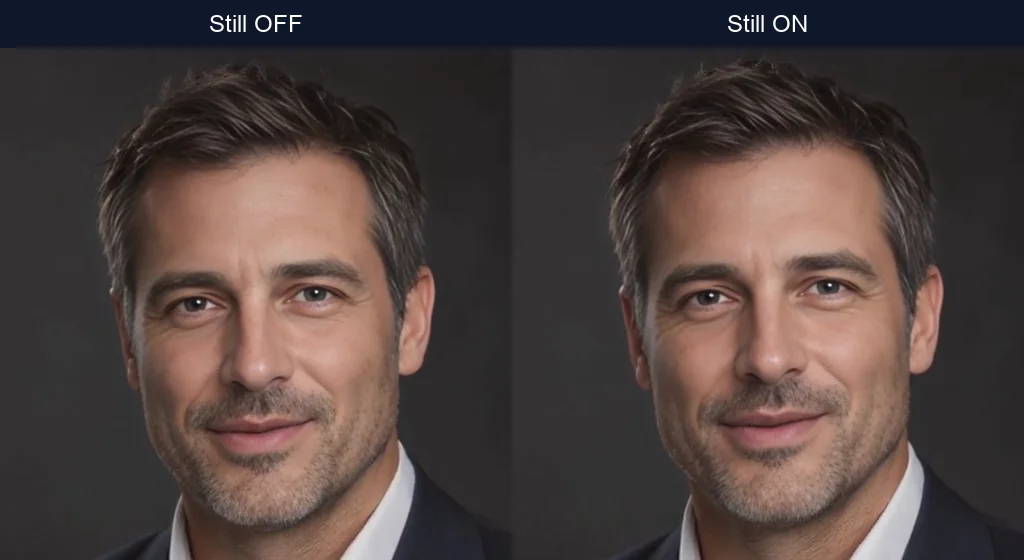
Still ON vs OFF →
Head motion and presenter steadiness. Includes original videos, settings screenshots and downloadable evidence.
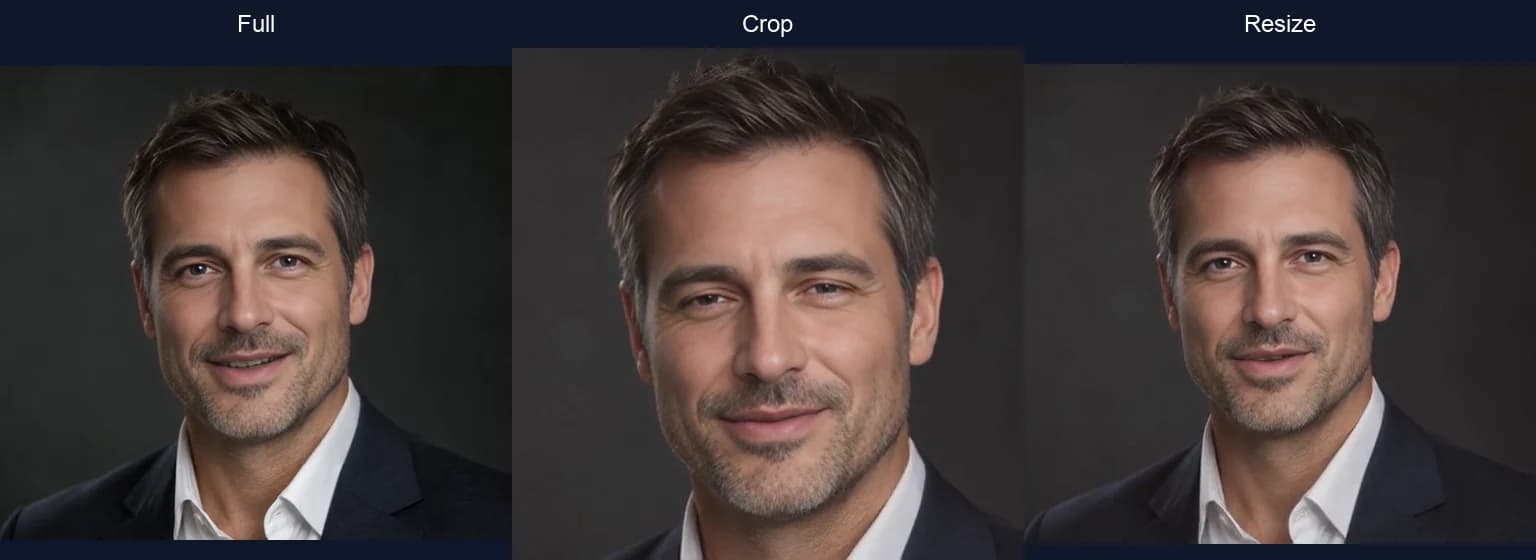
Full vs crop vs resize →
Scene framing and compositing. Includes original videos, settings screenshots and downloadable evidence.
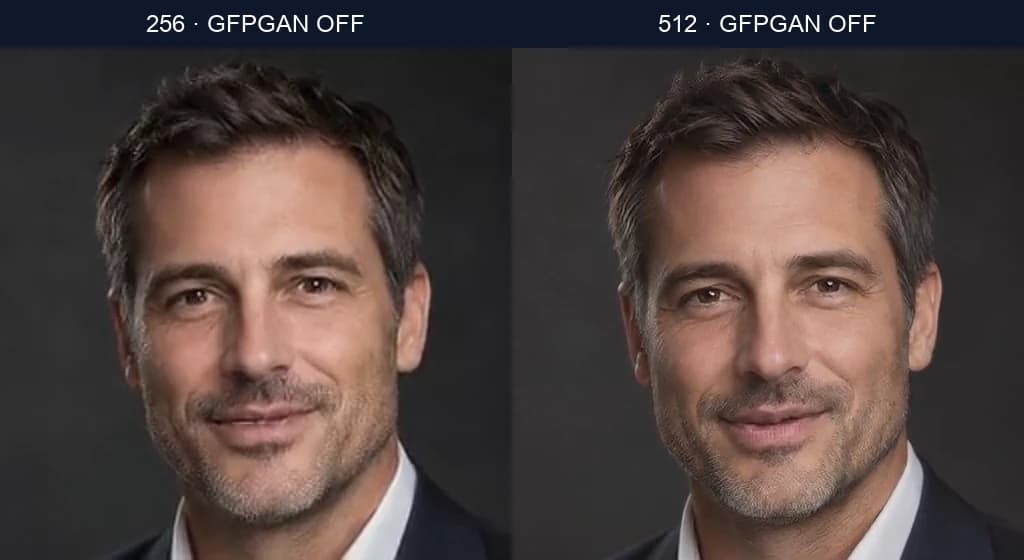
256 vs 512 →
Base detail, render time and sampled VRAM. Includes original videos, settings screenshots and downloadable evidence.
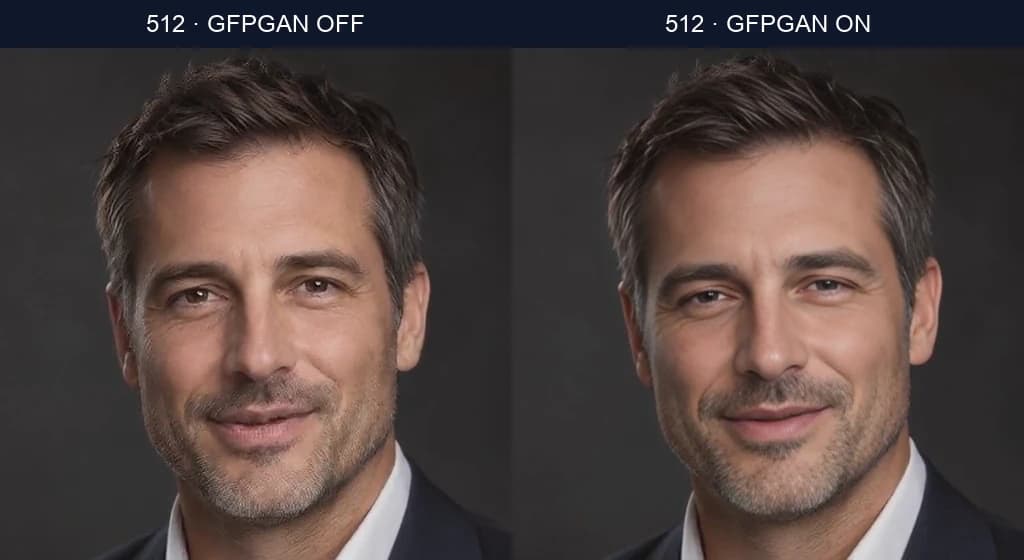
GFPGAN ON vs OFF →
Restored detail, artifacts and processing cost. Includes original videos, settings screenshots and downloadable evidence.