ComfyUI guide · Tested 4 October 2026 · RTX 4090
SadTalker still mode: ON vs OFF
Enable still for a steadier head pose. Leave it off for generated head movement. Compare the same portrait and narration below, then reproduce the test in ComfyUI.
Watch the same clip with still OFF and ON
Both sides use the same source image, audio, GPU and rendering settings. The only node setting changed is still. This synchronized comparison uses one audio track: OFF on the left, ON on the right.
Watch or get the individual outputs
Still OFF
Still ON
What to look for
- Compare head turns, nodding and position against the original pose.
- Watch the mouth and eyes on both sides: steady head pose still allows facial animation.
- Look at the jaw, hairline and face edges for warping or flicker. Still mode is not a general artifact-removal setting.
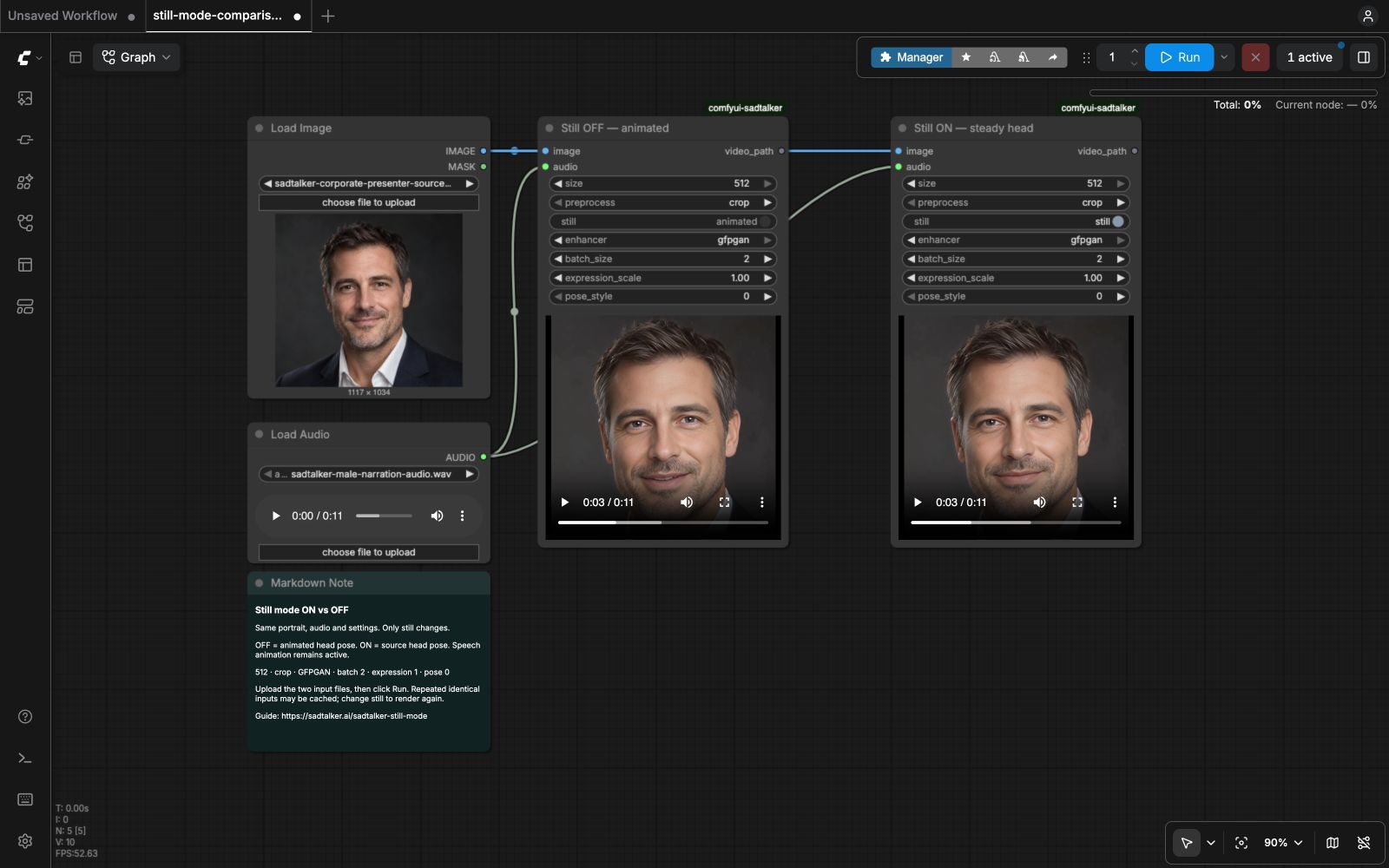
In this clip, OFF adds small head turns, nods and shifts. ON keeps the head near the source pose while speech animation remains visible. These are visual observations, not a scored quality or lip-sync test.
Measured results on an RTX 4090
We submitted the guide’s API workflow to the running ComfyUI server. Each mode had one warm-up followed by three measured runs, alternating OFF and ON. The node starts a new worker process for every render, so model-loading time remains included even after a warm-up. The values below are ComfyUI execution times, including input loading, the isolated worker and video export.
Swipe the table sideways to compare both modes.
| Setting | Still OFF | Still ON |
|---|---|---|
| Measured runs | 117.19 s / 118.66 s / 117.40 s | 118.32 s / 117.63 s / 117.68 s |
| Median execution time | 117.40 s | 117.68 s |
| Output video | 1024 × 1024 · 25 fps · 11.24 s | 1024 × 1024 · 25 fps · 11.24 s |
size = 512 sets the base face-rendering resolution. The tested GFPGAN stage applies 2× upscaling, so the individual crop MP4s are 1024 × 1024. The synchronized player scales each side to 512 pixels for a compact comparison.
The medians differ by 0.28 seconds in this sample. We observed no substantial speed difference; choose the mode for the head movement you want.
These are measurements from one rented machine and one input pair. They do not establish that either mode is generally faster, or that one improves lip-sync accuracy. Both outputs were verified to contain video and audio streams.
Exact test setup and reproducibility
- GPU
- NVIDIA GeForce RTX 4090 · 24 GB VRAM · driver 580.95.05
- Render settings
- size 512 · crop · GFPGAN · batch_size 2 · expression_scale 1.0 · pose_style 0
- Worker
- Python 3.10.21 · PyTorch 2.1.2+cu121 · CUDA runtime 12.1
- CPU thread limits
- OMP, MKL, OpenBLAS and NumExpr: 4 threads each, applied only to the isolated worker. Default cloud-host thread counts can produce substantially different times.
- SadTalker revision
- cd4c0465ae0b54a6f85af57f5c65fec9fe23e7f8
- Custom node revision
- 4c231660fea4e1f2748d03dcf38ea438fd9f884f
- ComfyUI revision
- 73c9bad4d21e7addbe1d13bc92eee0f1431b017d
- Timing method
- Server execution_start → execution_success timestamps; excludes installation, file transfers and queue waiting.
- Cache control
- Identical input bytes copied to new filenames for each run. Every run returned a unique output and the SadTalker node was checked for cache hits.
- Randomness
- The template has no seed control. Head pose is the intended comparison; individual expressions and blinking may vary between runs.
Get run data and input hashesGet outputs, workflows and worker logs
Reproduce the worker thread limits on Linux
The workflow JSON controls rendering settings, but cannot set worker CPU threads. To match this test, get the four-thread worker launcher, save it as /opt/sadtalker-venv/bin/python-still-test, and make it executable:
chmod +x /opt/sadtalker-venv/bin/python-still-testBack up custom_nodes/comfyui-sadtalker/config.json, then temporarily set its python field to that launcher path. Keep the separate worker environment from our setup guide; if its Python lives elsewhere, adjust the launcher's final line. Restore the original python path after your timing tests.
How to enable still mode in ComfyUI
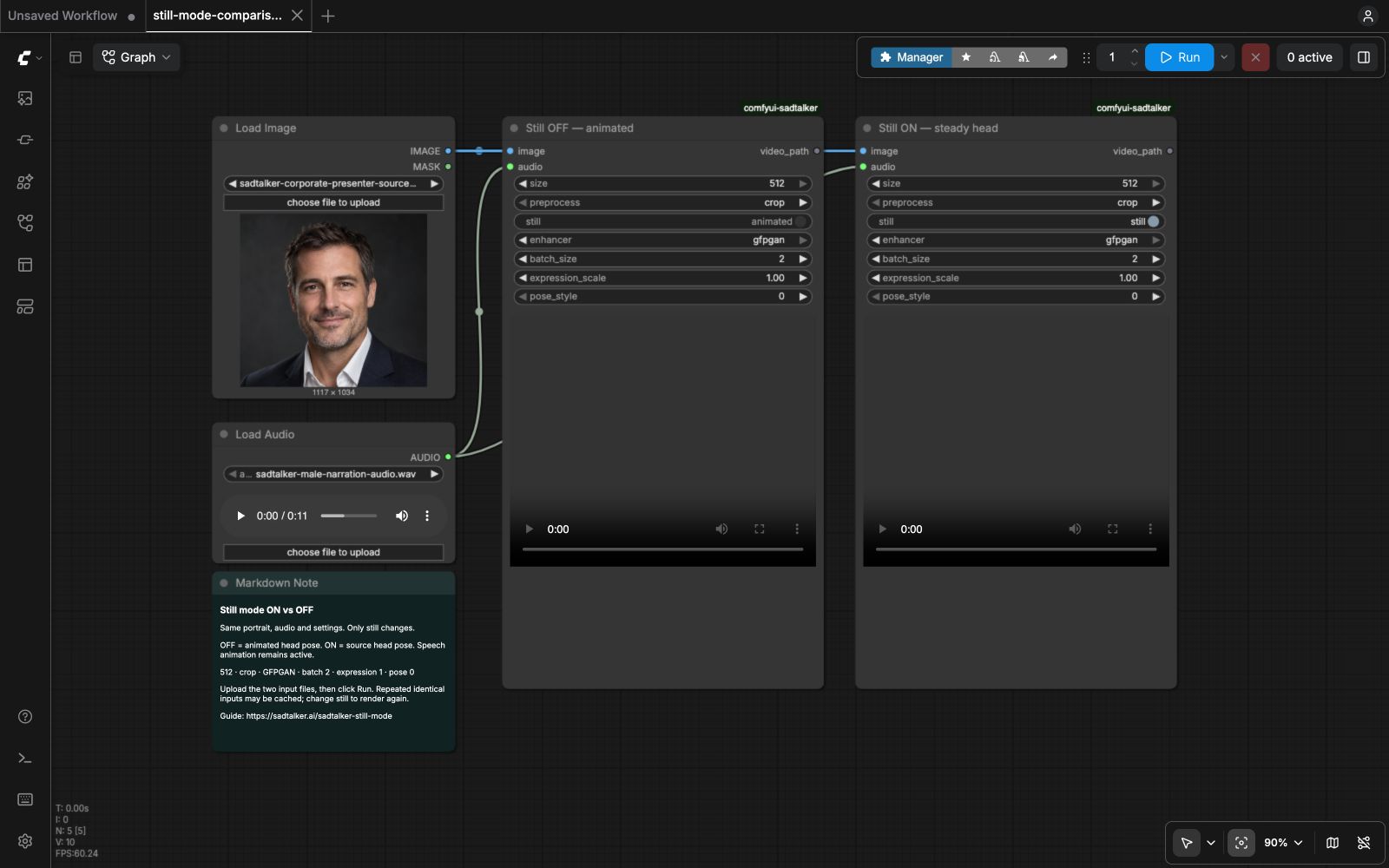
Start with our SadTalker ComfyUI setup guide if the custom node is not installed. This test uses that guide’s LoadImage → SadTalkerIsolated ← LoadAudio template.
- Get the ON/OFF comparison workflow and drag the JSON into ComfyUI. It has two SadTalker nodes connected to the same image and audio.
- In LoadImage, upload the portrait. In LoadAudio, upload the narration. Use our test portrait and our test audio to match this comparison.
- Keep the settings below identical. The left SadTalker node has
still = false; the right hasstill = true. The control displays animated for OFF and still for ON. - Click Run. Each node shows its generated video inline. The MP4 and worker log are saved under
ComfyUI/output/sadtalker/<run-id>/.

| Parameter | Test value |
|---|---|
| size | 512 |
| preprocess | crop |
| still | OFF: false / ON: true |
| enhancer | gfpgan |
| batch_size | 2 |
| expression_scale | 1.0 |
| pose_style | 0 |
Use the ComfyUI API instead
Get the OFF API workflow or ON API workflow. Place the supplied inputs in ComfyUI’s input folder. Wrap the chosen API graph in a prompt object before posting it:
python -c 'import json; print(json.dumps({"prompt": json.load(open("still-on-api.json"))}))' > prompt.json
curl -X POST http://127.0.0.1:8188/prompt \
  -H 'Content-Type: application/json' \
  --data-binary @prompt.json
Use your ComfyUI server’s actual address and port. This rented machine runs ComfyUI internally on port 18188. The example uses the usual local port 8188. Repeating an unchanged workflow can reuse a cached output.
Still mode with full-image preprocessing
still controls pose; preprocess controls framing. Compare full, crop and resize. To preserve the original image around the animated face, set preprocess = full in both nodes, then compare OFF and ON again. Do not change preprocessing on only one side.
Both outputs retain the jacket and surrounding frame. OFF adds head shifts within that framing; ON keeps the head aligned more steadily while the mouth continues animating. Review the jaw and neck boundary before using a full-image render.
The 512 setting describes the base face-rendering resolution. Both full-image MP4s in this test are 2240 × 2080, with the original framing preserved and GFPGAN upscaling applied. The comparison player scales them down to fit.
Which setting should you use?
Use ON for a steadier presenter
Try it when head turns distract from the narration, when matching a fixed presenter pose, or when compositing the animated face into the original image. Review the mouth and face edges before publishing.
Use OFF for more head movement
Try it when you want generated nodding or head turns. Check that the movement suits the portrait and does not introduce distracting distortion.
Limitations and common questions
Does still mode stop lip movement?
No. SadTalker retains expression coefficients while replacing pose-related coefficients with those from the source image. The talking animation remains active.
Does it improve lip sync or remove artifacts?
This test does not measure lip-sync accuracy. Still mode controls head pose; it does not guarantee better mouth shapes, clean teeth, stable identity, or artifact-free face edges. GFPGAN was enabled equally on both sides and can also affect facial detail.
Why does my next run look different?
This ComfyUI template does not expose a random seed. Expressions and blinking may vary. Record your node settings and version, and compare more than one render before drawing a broad conclusion.
Why did Run return immediately?
ComfyUI may reuse an unchanged node output. For a visual comparison, change still between OFF and ON. For repeated timing tests, invalidate the cache and confirm a new output folder and actual worker execution.
What if I run out of GPU memory?
Try size 256 and batch_size 1, then rerun both modes with the same settings. Those settings were not benchmarked on this page. Follow the ComfyUI setup guide for worker and model troubleshooting.
Implementation references: SadTalker still-mode rendering and the tested ComfyUI node.