01 / THE CLEAR-CUT ANSWER
Who each tool is for
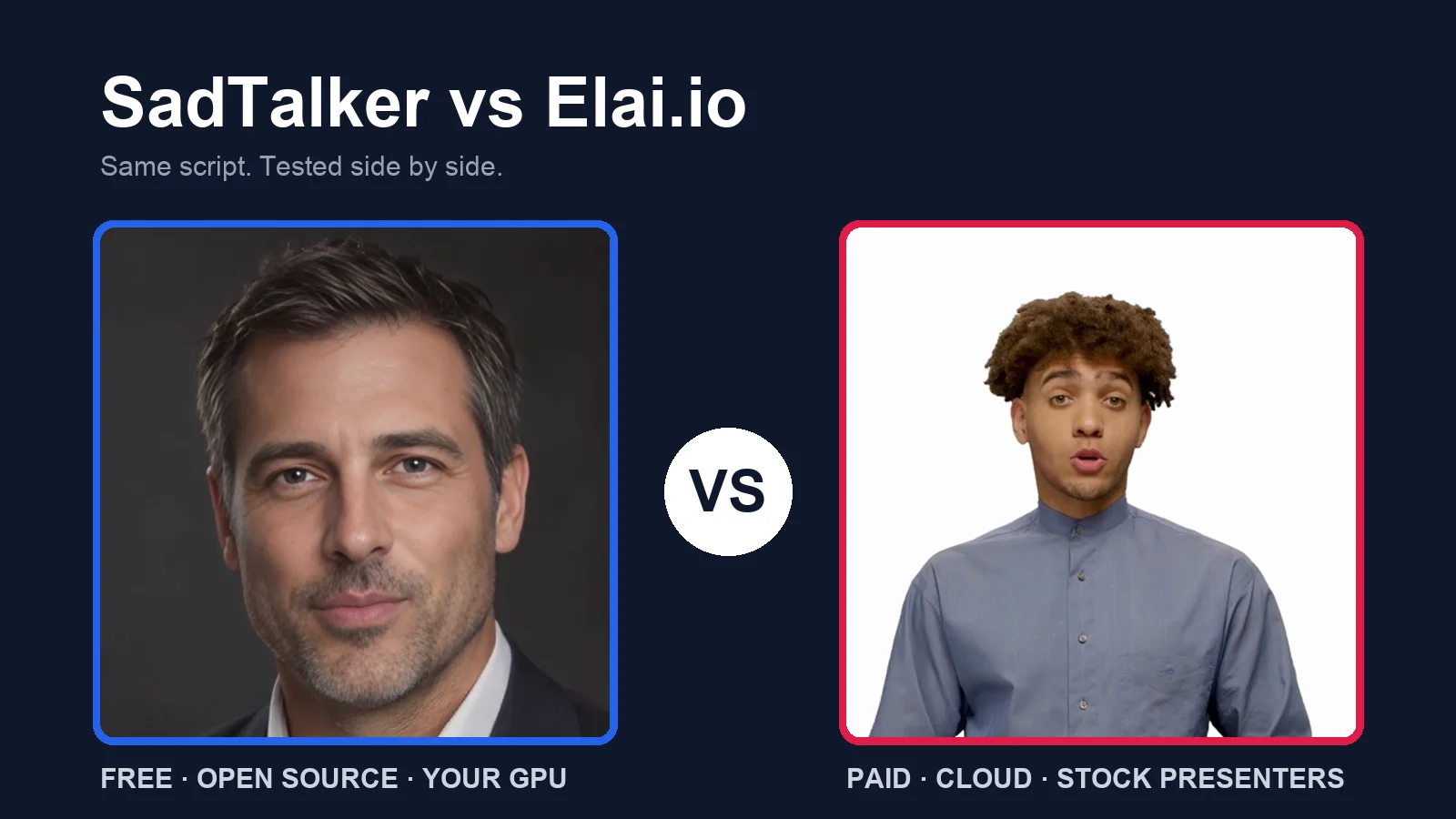
Pick SadTalker to make your own photo talk with your own voice, for free. Pick Elai.io to turn a script into a video with a ready-made presenter, without recording or installing anything.
SadTalker
For: creators, developers, students and researchers on a zero budget.
Purpose: animate any portrait with any audio. Keep files local and automate it with code.
Not for: people who want stock presenters, voices, slides or captions out of the box.
See SadTalker →Elai.io
For: L&D, HR, marketing and sales teams making regular explainer and training videos.
Purpose: type a script, pick a presenter and voice, add slides and quizzes, render in the cloud.
Not for: animating your own face cheaply, or free use beyond a 1-minute trial.
See Elai.io →02 / QUICK VERDICT
The short version
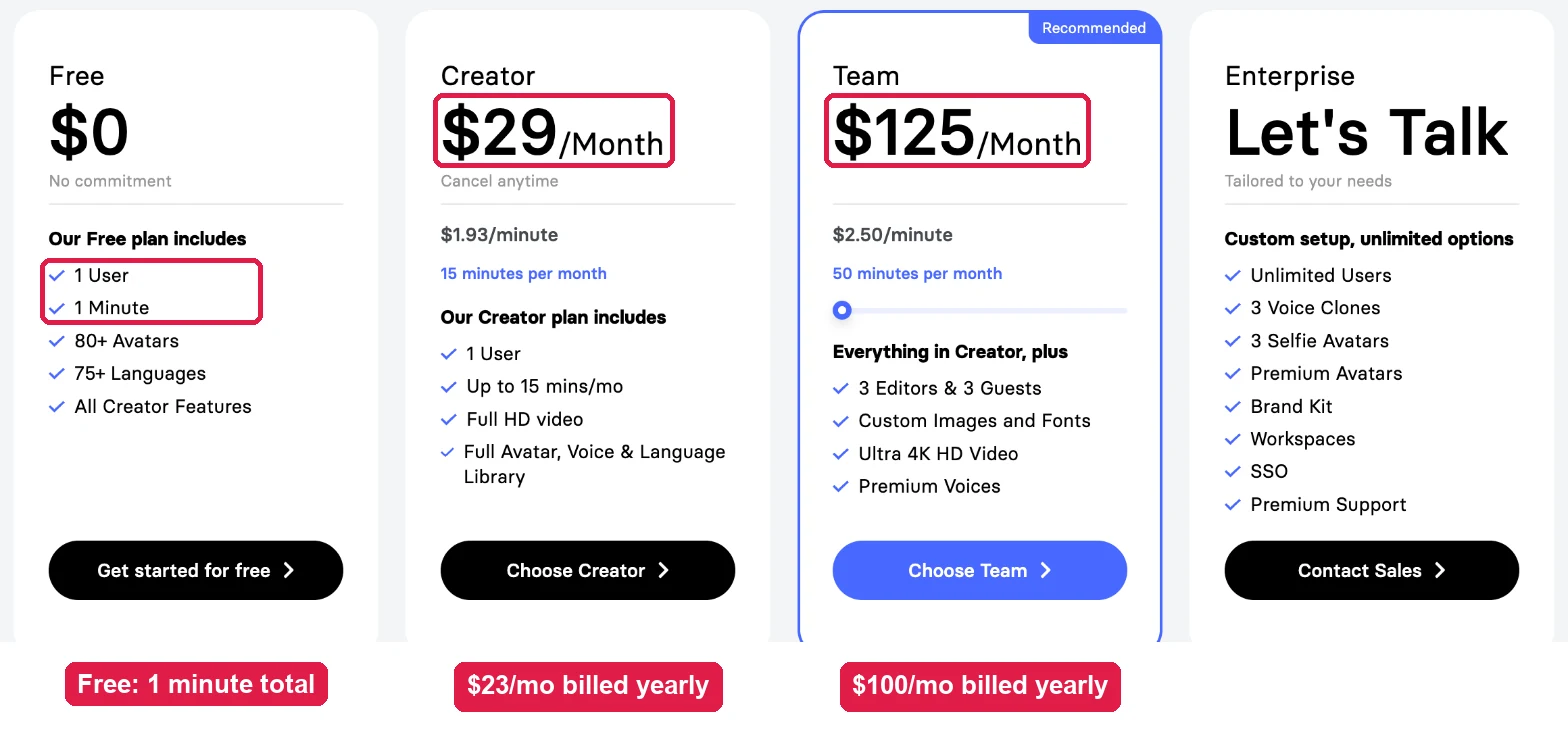
- Pricing: SadTalker is free; you pay only for GPU time. Elai.io gives 1 free minute in total, then $29/mo, or $23/mo billed yearly, for 15 minutes a month.
- Key difference: SadTalker animates your photo. Elai.io animates its presenters; your own face is a paid add-on from $199 a year.
- In our test: Elai’s filmed presenter moved and spoke naturally, with a small “Powered by elai” mark. SadTalker gave a larger, sharper face from a single photo.
- Our pick: Elai.io for quick script-to-video work with stock presenters. SadTalker for your own face, your own voice, privacy or zero budget.
03 / TOOL 1
What is SadTalker?
SadTalker is an open-source research model. It takes one portrait and one audio file and generates a talking-face video with lip sync, expressions and head motion.
It runs on your own GPU, on Google Colab, or on a rented cloud GPU, through a web UI, ComfyUI or the command line.
SadTalker pricing
On a small screen, swipe the table sideways.
| Where you run it | Software cost | What you pay for |
|---|---|---|
| Your own NVIDIA GPU | $0 | Electricity and your hardware |
| Google Colab | $0 | Free tier limits, or a paid Colab plan |
| Rented cloud GPU | $0 | GPU hourly rate × minutes used |
Estimate rented-GPU cost with our GPU cost calculator.
Key benefits
- Your own face: any clear portrait, no order form or waiting time.
- Your own audio, any language: it lip-syncs whatever you record.
- No minute caps: render as much as your GPU allows.
- Private: portraits and audio never leave your machine.
- Automatable: script batches in Python or chain it in ComfyUI.
What we noticed in testing
Our tests used one studio portrait and an 11.26-second narration on an RTX 4090. 256 px took 27.9 s, and 512 px took 55.4 s. Peak sampled GPU memory was about 4.7 GB and 9.8 GB. The steady-presenter preset (512, crop, still ON, GFPGAN) took a 117.7 s median over three runs.
Pros
- Free and open source
- Animates your own photo
- Works with any language you record
- Runs offline; easy to batch
Cons
- Needs a GPU and some setup
- No voices, scenes or captions
- Head-and-shoulders only, no gestures
- Neck and edge seams can need checking
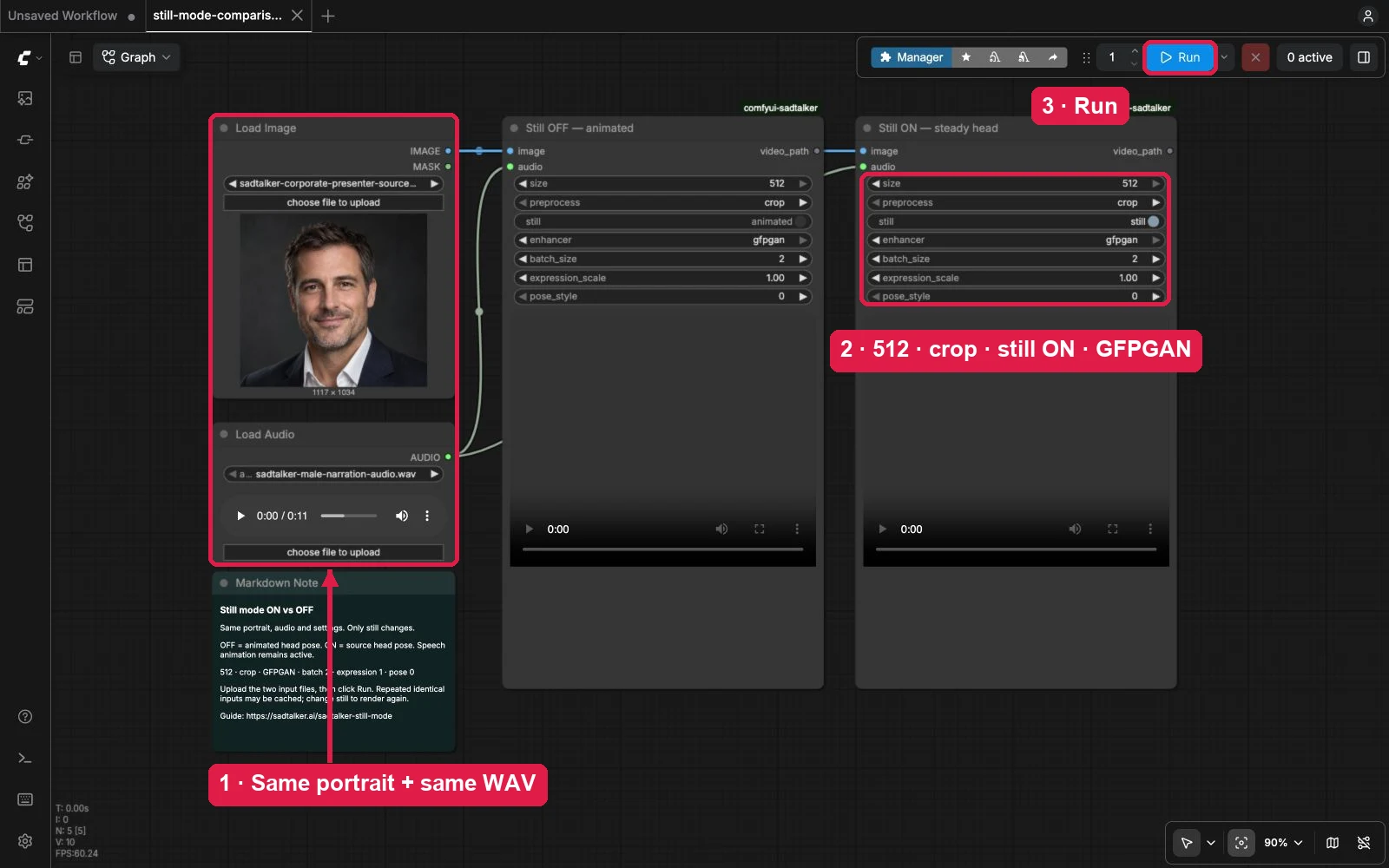
Start here: online demo, Google Colab, local install or the ComfyUI guide. Our best-settings guide explains each preset.
04 / TOOL 2
What is Elai.io?
Elai.io is a paid, browser-based AI video platform for training, marketing and sales videos. You type a script, pick a stock presenter and voice, arrange slides, and it renders the video in the cloud.
It adds templates, media, subtitles, interactivity such as quizzes and branching, a screen recorder, translation and team features on higher plans.
Elai.io pricing
On a small screen, swipe the table sideways.
| Plan | Price | Video minutes | Best for |
|---|---|---|---|
| Free | $0 | 1 minute in total | Trying it out |
| Creator | $29/mo monthly · $23/mo yearly | 15 min/mo | Solo creators |
| Team | $125/mo monthly · $100/mo yearly | 50 min/mo (100 and 150 options) | Small teams, 4K, premium voices |
| Enterprise | Custom (contact sales) | Custom | SSO, SCORM, premium avatars |
On a small screen, swipe the table sideways.
| Add-on | Price | Delivery |
|---|---|---|
| Selfie Avatar (phone or webcam video) | $199/yr · $399/yr with voice clone | 5–7 business days |
| Scenario Avatar | $199/yr · $399/yr with voice clone | 2–3 business days |
| Studio Avatar (studio footage) | $500/yr · $700/yr with voice clone | 2–3 business days |
| Voice cloning only | $200/yr | Needs 5 minutes of recording |
Key benefits
- No setup: nothing to install and no GPU needed.
- Script to video: type text and pick from hundreds of voices in 75+ languages.
- Natural presenters: filmed stock avatars with real body language.
- Full editor: slides, media, charts, animation, music and templates.
- Training tools: quizzes, branching, buttons and video analytics.
What we noticed in testing
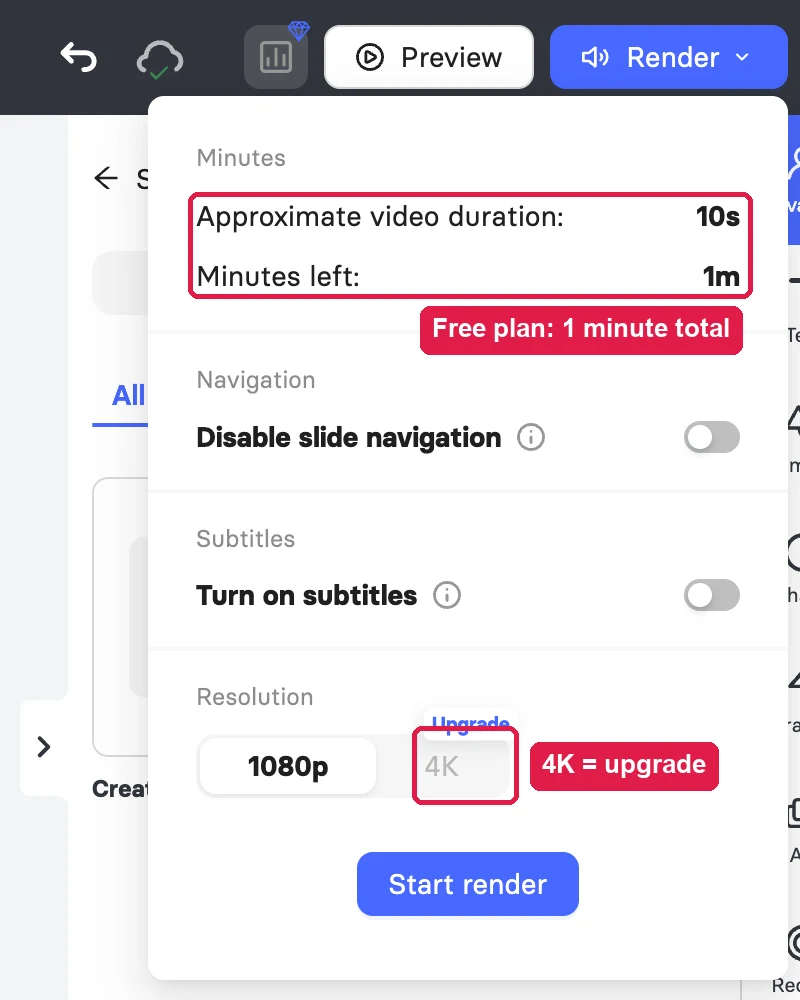
A blank video opened ready to edit with a free presenter and a default voice. Typing the script showed a live estimate of seconds used. The 13-second render was ready in under 1½ minutes, and the free balance dropped from 1 minute to 47 seconds.
Pros
- No GPU, no install
- Natural filmed presenters
- Voices, languages and subtitles built in
- Fast render; billed by the second
Cons
- Only 1 free minute in total
- Your own face costs $199+/yr and takes days
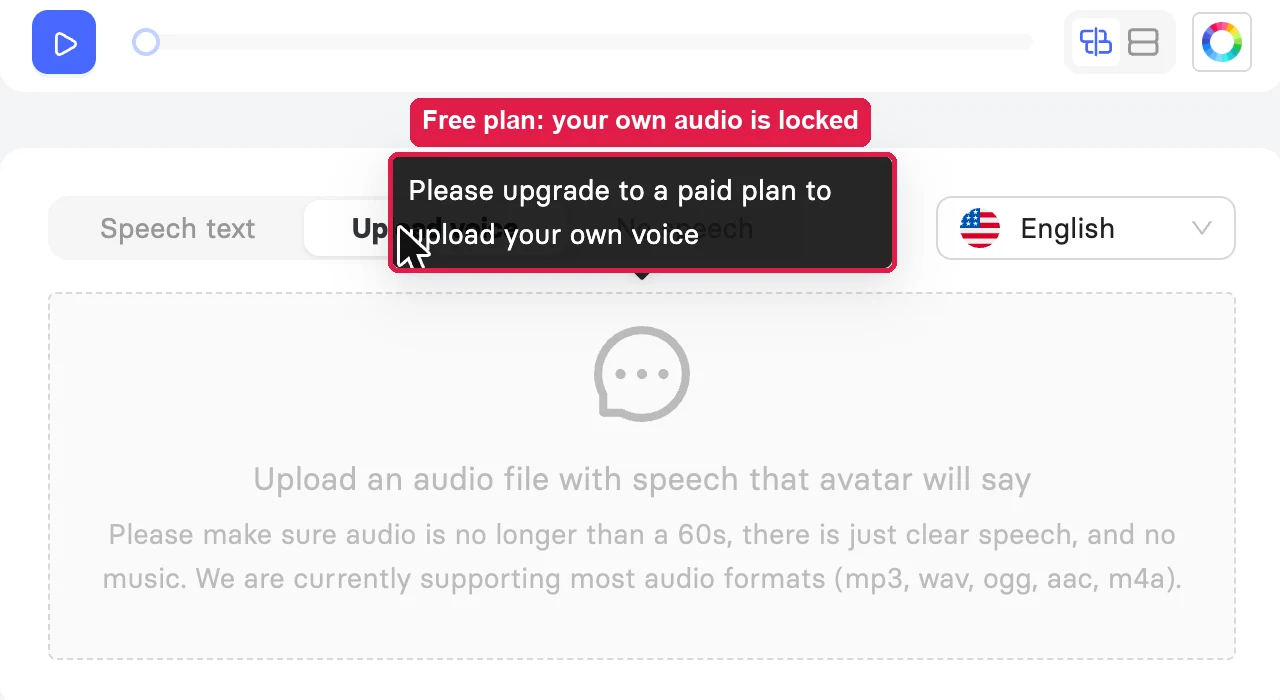
- Own-audio upload locked on free plan
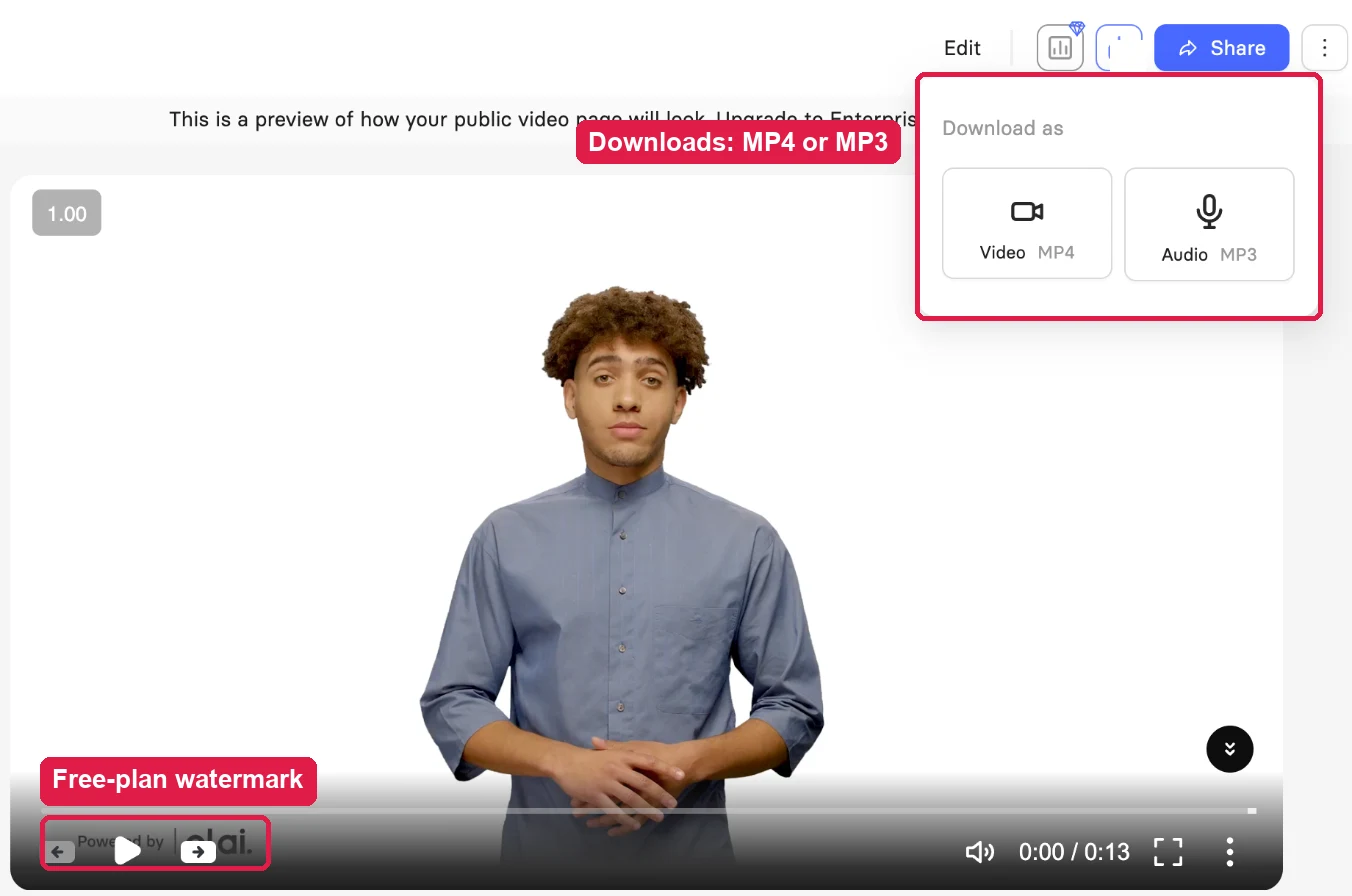
- Watermark on free exports
05 / ORIGINAL TEST
Same script, two results
We used the same script as our SadTalker benchmark narration. Elai’s free plan could not use our portrait (no instant photo avatar) or our WAV (audio upload is paid), so we used its default free presenter and voice. That is exactly what a free user gets.
On a small screen, swipe the table sideways.
| Measurement | SadTalker | Elai.io |
|---|---|---|
| Inputs | Portrait PNG + narration WAV | Same script as text (photo and audio upload not available free) |
| Settings | 512 · crop · still ON · GFPGAN · batch 2 | 1080p · default presenter and voice · subtitles off |
| Where it ran | RTX 4090 via ComfyUI | Elai cloud |
| Time to result | 117.7 s median (3 runs) | Under 1½ min (Elai estimate: about 1 min) |
| Output | 1024 × 1024 · 25 fps · 11.2 s | 1920 × 1080 · 25 fps · 12.8 s · 4.9 MB |
| Framing | Face close-up (square) | Full presenter, waist up, on white |
| Plan usage | None | 13 s of the 1-minute free allowance |
SadTalker time is ComfyUI execution time and excludes setup and model downloads. Elai time is from “Start render” to a ready video and includes cloud queueing. Treat them as planning numbers, not a lab race.
Look closely: mouth and face detail
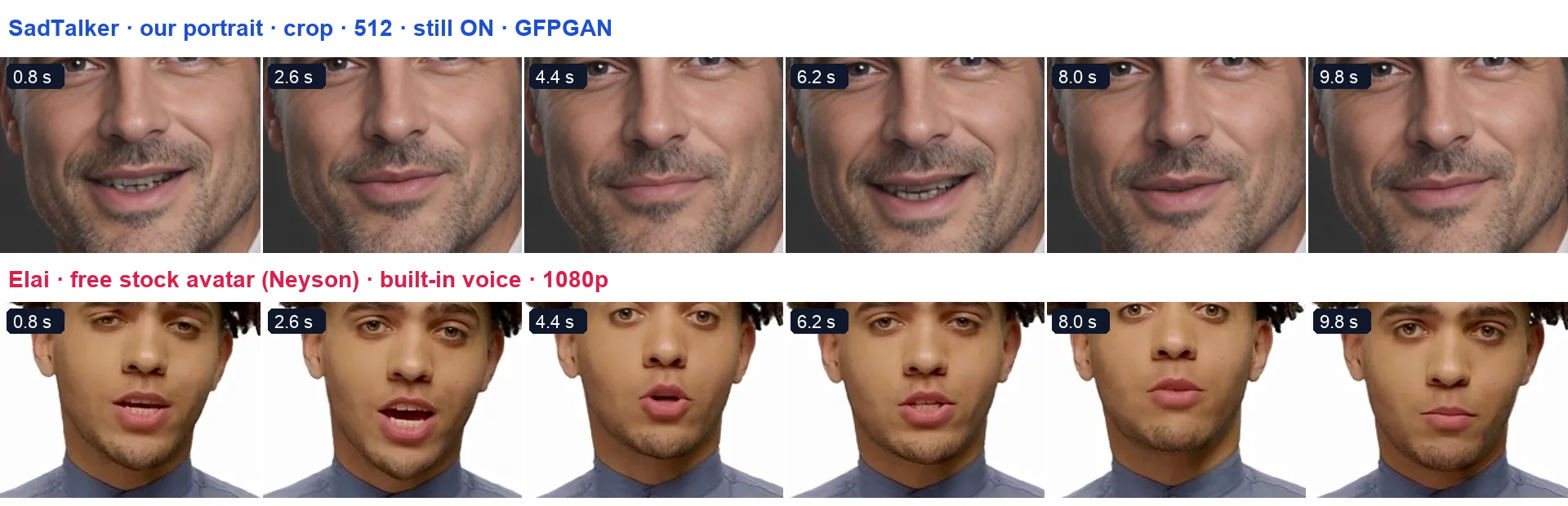
- Mouth shapes: Elai’s filmed presenter opened and rounded the lips naturally. SadTalker also followed the speech, with a calmer, smaller range.
- Detail: SadTalker’s 1024 px face shows sharp stubble and skin. Elai’s presenter fills a small part of a 1080p frame, so the face is softer up close.
- Motion: SadTalker held the head steady (still mode ON). Elai’s presenter moved head, shoulders and hands like a real recording.
- Branding: the free Elai export carried a “Powered by elai” mark in the bottom-left corner.
06 / AT A GLANCE
Feature comparison
On a small screen, swipe the table sideways.
| Feature | SadTalker | Elai.io |
|---|---|---|
| Starting price | Free, open-source code | Free plan; Creator $29/mo, or $23/mo billed yearly |
| What you pay for | Your own GPU time or a cloud GPU | Rendered video minutes, billed by the second |
| Free usage | Unlimited on your own hardware | 1 minute in total on the free plan |
| Needs a GPU or setup | Yes: a local NVIDIA GPU, Colab or a rented GPU | No: runs in the browser |
| Animate your own photo | Yes: any clear portrait | No instant photo avatar; custom avatars are paid add-ons from $199/yr |
| Ready-made presenters | No | Yes: 80+ on every plan; many more marked Premium |
| Text-to-speech voices | No: bring your own audio | Yes: 300+ standard and 100+ premium voices (pricing page) |
| Upload your own audio | Yes: core workflow | Paid plans only; locked on the free plan in our test |
| Languages | Any language you record | 75+ languages |
| Scenes, text, media, templates | No: face video only | Yes: slides, media, templates, interactivity |
| Captions | No: add them yourself | Yes: subtitles toggle at render |
| Output size | 256 or 512 face; 1024 with GFPGAN; “full” keeps the source frame | 1080p; 4K on the Team plan |
| Automation | Yes: Python CLI, ComfyUI, scripts | Public API on paid plans |
| Data location | Stays on your machine | Elai cloud |
| Branding on export | None | “Powered by elai” mark on our free-plan export |
| Best for | Free, private, scriptable talking photos | Script-to-video training and marketing clips with stock presenters |
07 / HEAD TO HEAD
10 areas compared
1. Video quality and realism
SadTalker: Sharp face detail at 512 px, and 1024 px with GFPGAN. Lip shapes follow the audio. It animates a still photo, so there are no hand gestures; check jaw and neck edges.
Elai.io: Filmed stock presenters look like real recordings, with natural head, shoulder and hand movement. The face is small in a full-body 1080p frame.
2. Generation speed
SadTalker: About 28 s (256) to 117.7 s (512 + GFPGAN) for an 11-second clip on an RTX 4090. Slower GPUs take longer, and first-time setup adds time.
Elai.io: Our 13-second clip was ready in under 1½ minutes; Elai estimated about 1 minute. No GPU needed.
3. Avatar from your own photo
SadTalker: Any clear, front-facing portrait. No order form, no waiting.
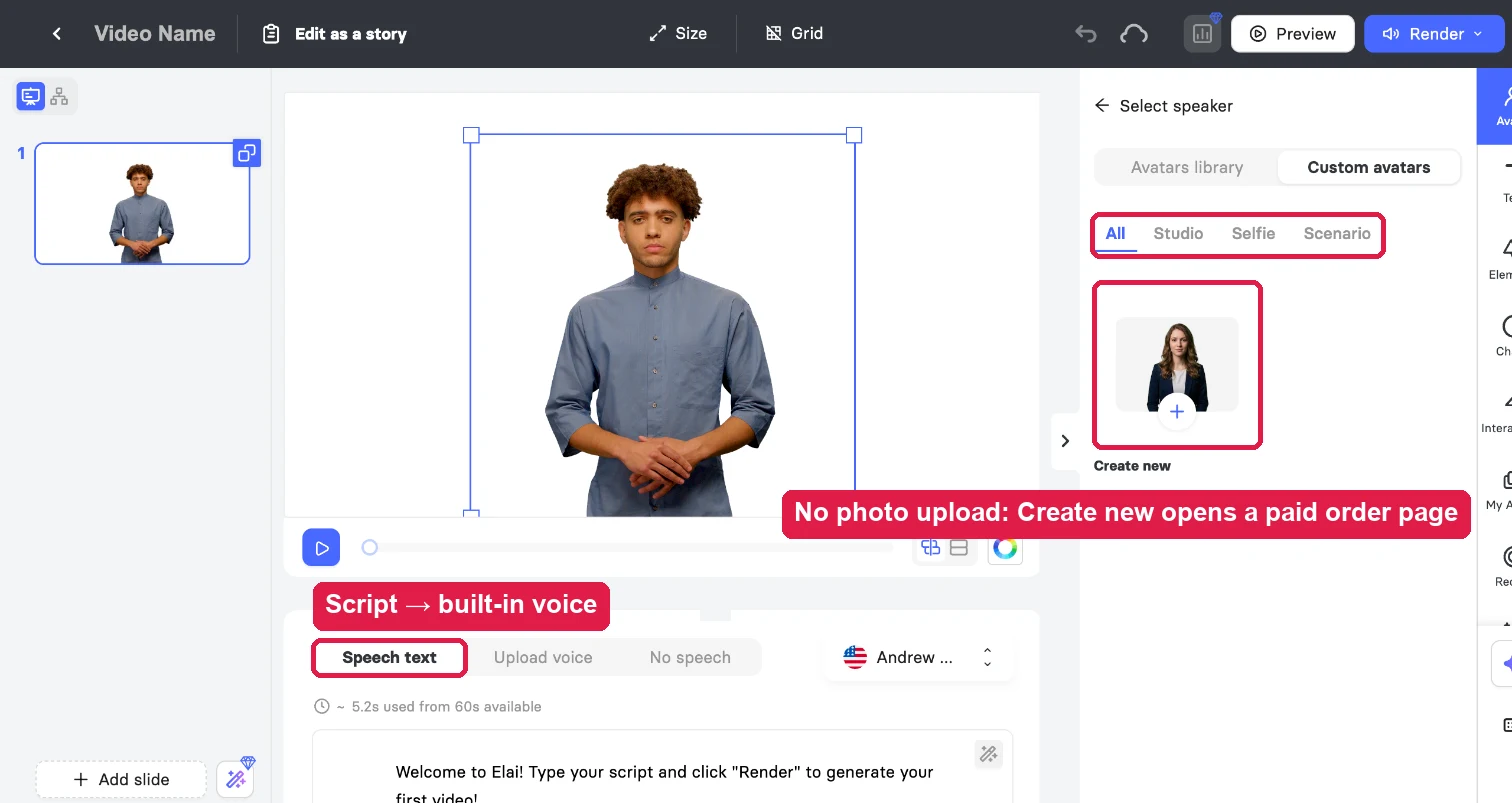
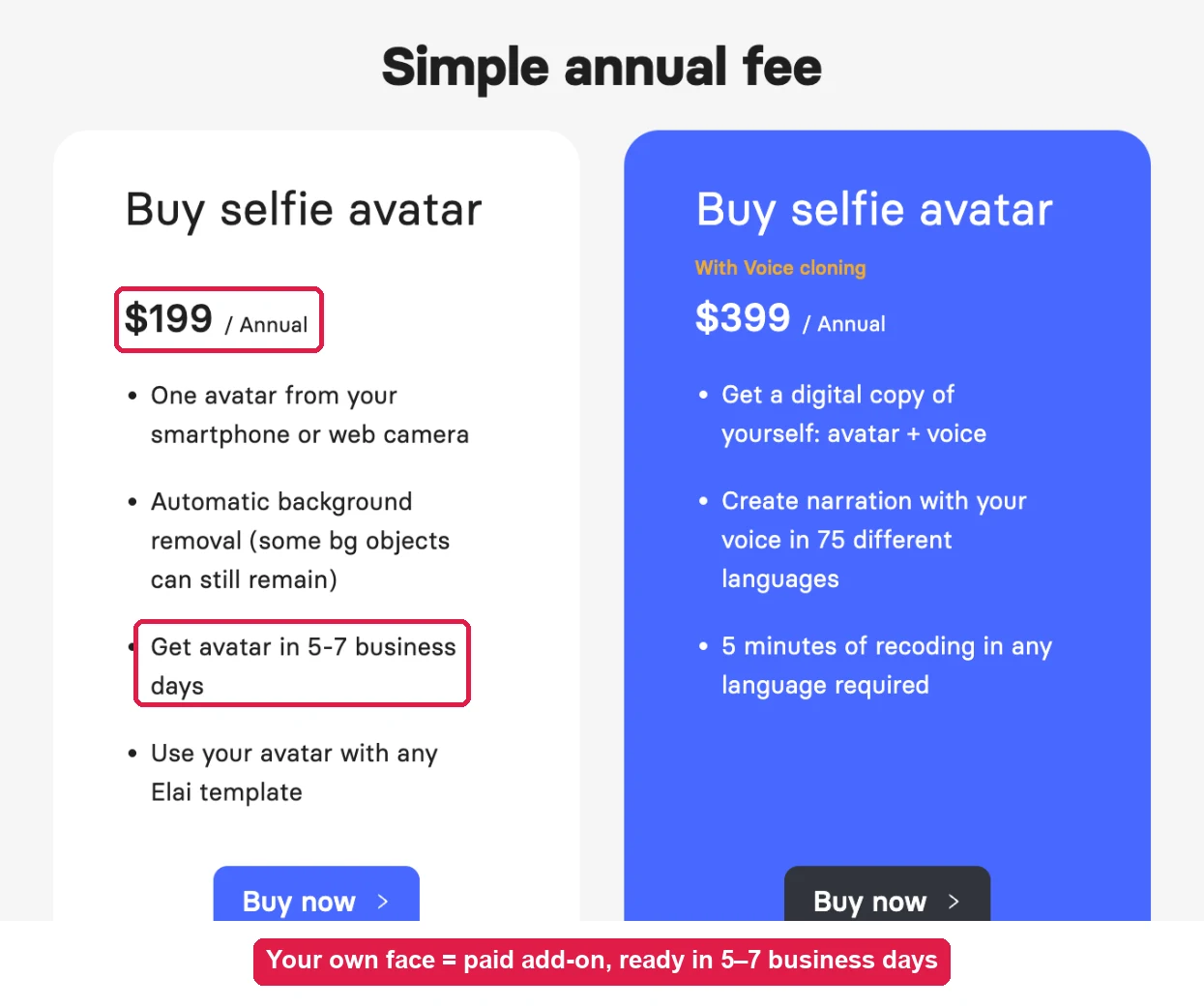
Elai.io: No instant photo avatar. Custom avatars (Selfie, Scenario, Studio) are paid yearly add-ons, delivered in days.
4. Voice, audio and languages
SadTalker: No voice generation. Record or create the audio elsewhere; SadTalker lip-syncs it in any language.
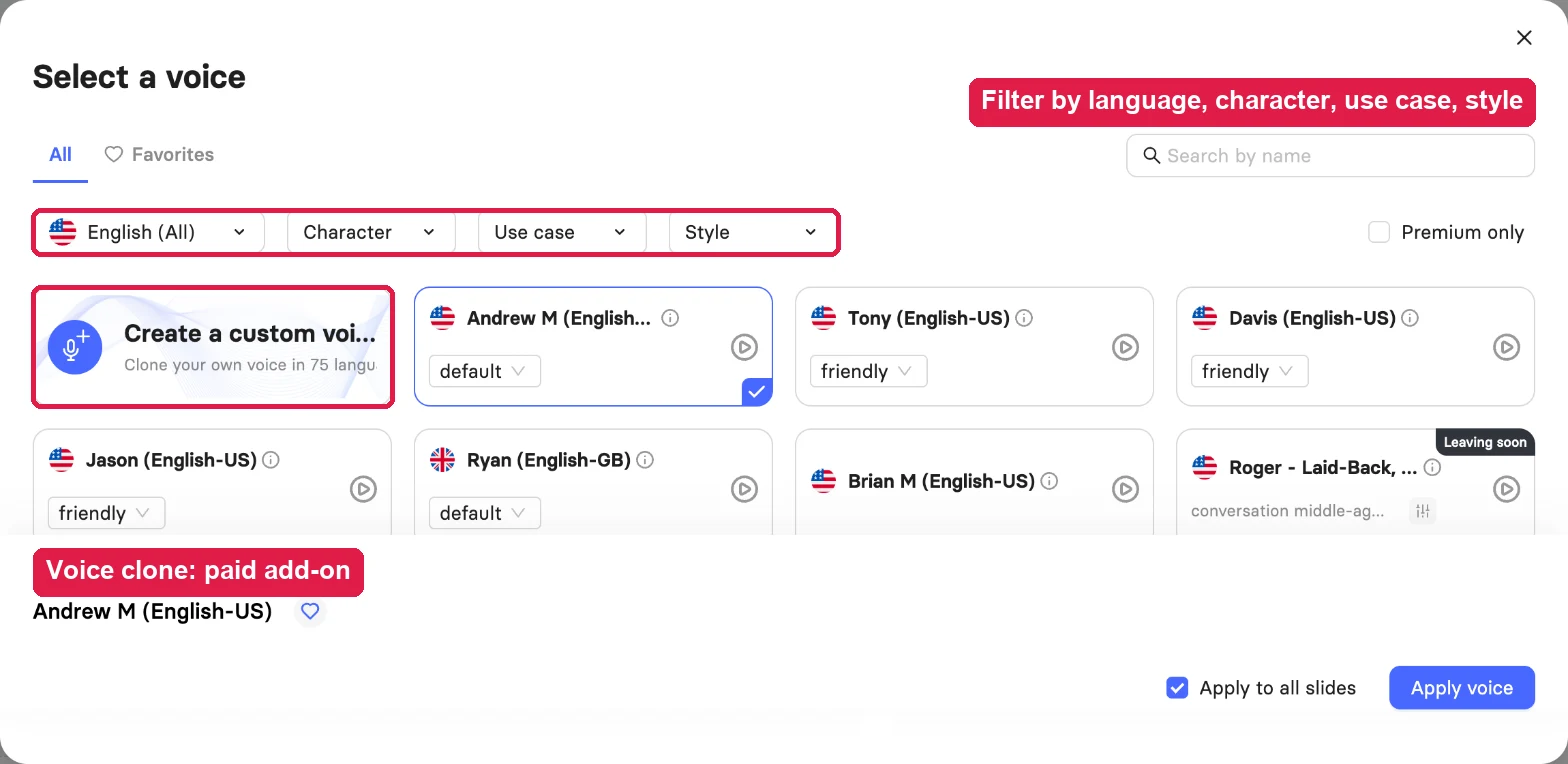
Elai.io: 300+ standard and 100+ premium voices in 75+ languages, with filters. Uploading your own audio (MP3, WAV, OGG, AAC, M4A; under 60 s per slide) needs a paid plan.
Need non-English audio with SadTalker? See our Hindi audio test.
5. Editing, scenes and templates
SadTalker: None. The output is the face video only. Add titles, slides and music in a video editor.
Elai.io: Slides with avatar, text, media, charts, animation, music and templates, plus an AI storyboard and presentation import.
6. Exports, captions and resolution
SadTalker: An MP4. Size depends on settings: 256, 512 or 1024 square with crop, or the source dimensions with “full”.
Elai.io: MP4 or MP3 download and a share page. Subtitles toggle at render. 1080p on all plans; 4K on Team.
7. Setup and ease of use
SadTalker: Moderate. Use the demo or Colab, or install Python, PyTorch and the checkpoints locally. Our guides cover each route.
Elai.io: Easy. Create video → blank or template → type the script → Render. No install.
8. Privacy, control and licensing
SadTalker: Everything stays local. The code is Apache 2.0, so you can read and change it.
Elai.io: Cloud processing. Elai lists SOC 2 compliance and SSO for Enterprise.
9. Scaling and automation
SadTalker: Loop through scripts with the Python CLI or ComfyUI. Cost grows only with GPU time.
Elai.io: Public API on paid plans. Volume grows with your monthly minutes (15, 50, 100 or 150, or custom).
10. Pricing and cost
SadTalker: $0 for the software. A long clip costs only the GPU time it takes.
Elai.io: Free: 1 minute in total. Creator $29/mo ($23 yearly) for 15 minutes. Team $125/mo ($100 yearly) for 50 minutes. Custom avatars from $199/yr.
08 / DECIDE FAST
Pick by scenario
On a small screen, swipe the table sideways.
| If you need… | Choose | Why |
|---|---|---|
| A talking video of your own face, for free | SadTalker | Elai needs a paid custom avatar for your face. |
| A quick presenter video from a script | Elai | Pick a stock presenter and voice; no recording. |
| No GPU and no technical setup | Elai | Everything runs in the browser. |
| Using your own voice recording | SadTalker | Free and unlimited; Elai locks audio upload on its free plan. |
| Many short clips on a budget | SadTalker | No per-minute cost; batch it on your GPU. |
| Training modules with quizzes and branching | Elai | Interactivity is built into the editor. |
| Footage that must stay on your own computer | SadTalker | Nothing is uploaded. |
| The same video in many languages | Elai | Built-in voices in 75+ languages. |
Budget
$0 and a GPU? SadTalker. Budget for a subscription and no recording? Elai.io.
Whose face
Your own face? SadTalker, today. A stock presenter is fine? Elai.io.
Voice
Already have the audio? SadTalker. Need the voice generated? Elai.io.
Data
Files must stay offline? SadTalker. Cloud is fine? Elai.io.
09 / MOVING BETWEEN THEM
Switching guide
SadTalker → Elai.io
You gain
- No GPU or install
- Stock presenters, voices and languages
- Slides, subtitles and quizzes
You lose
- Free, unlimited renders
- Your own face (without a paid add-on)
- Offline privacy
How
- Paste your script into a blank video
- Pick a presenter and voice
- On a paid plan, upload your audio instead
Elai.io → SadTalker
You gain
- No minute caps or subscription
- Your own face from one photo
- Local files and open code
You lose
- Built-in voices and languages
- Slide editor and subtitles
- Natural full-body presenters
How
- Download your narration as MP3 from Elai
- Check the files with our input checker
- Start with the settings finder
10 / FINAL VERDICT
Which one wins?
On a small screen, swipe the table sideways.
| Category | Winner | Why |
|---|---|---|
| Price | SadTalker | Free software; Elai’s free plan is 1 minute in total. |
| Setup speed | Elai | Sign up and type a script. |
| Your own face | SadTalker | Any portrait works; Elai’s custom avatars cost $199+/yr. |
| Your own audio | SadTalker | Elai’s free plan locks audio upload. |
| Natural presenter motion | Elai | Filmed stock presenters move and speak naturally. |
| Face detail up close | SadTalker | Large, sharp face at 1024 px with GFPGAN. |
| Finished video | Elai | Slides, media, subtitles and 16:9 output. |
| Privacy and control | SadTalker | Local files, open code. |
It depends on whose face is on screen
- Elai.io wins for script-to-video with stock presenters. It is quick, polished and needs no setup, as long as you pay for minutes.
- SadTalker wins when it is your face or your voice. It is free, private and unlimited, with sharper face detail in our test.
Try the free option first
Make a 10-second SadTalker preview with your own photo and voice. If you then need stock presenters, slides and subtitles, a paid studio is the next step.
11 / QUICK HELP
Frequently asked questions
Is SadTalker better than Elai.io?
They do different jobs. SadTalker animates your own photo with your own audio, for free, on your GPU. Elai.io turns a script into a presenter video with stock avatars and voices in the cloud.
Is Elai.io free?
Elai.io has a free plan with 1 minute of video in total (checked 19 November 2026). Creator costs $29 per month, or $23 per month billed yearly, for 15 minutes a month. Team costs $125 per month, or $100 per month yearly, for 50 minutes.
Is SadTalker free?
Yes. The official code is open source under Apache 2.0. You need a GPU: your own, Google Colab or a rented cloud GPU.
Can Elai.io animate my own photo like SadTalker?
Not instantly. In our test, “Create new” under Custom avatars opened a paid order page. A Selfie Avatar costs $199 per year and takes 5–7 business days; a Studio Avatar costs $500 per year.
Can I upload my own voice recording to Elai.io?
On a paid plan, yes. On the free plan the “Upload voice” option showed “Please upgrade to a paid plan to upload your own voice”. Uploads must be under 60 seconds per slide.
How is Elai.io usage counted?
By rendered video length. Our 13-second render used 13 seconds of the free plan’s 1 minute. Minutes do not roll over.
Which one is faster?
Our SadTalker steady-presenter preset took about 117.7 seconds of execution time on an RTX 4090 for an 11-second clip. Elai rendered a 13-second clip in under 1½ minutes in the cloud. The two were measured differently.
Can I sell videos made with these tools?
Check the licenses yourself. SadTalker’s code is Apache 2.0; also review the model and dependency licenses. Elai.io use is governed by its subscription terms. Always use faces and voices you have permission to use.
SOURCES
- Hands-on Elai.io test on the free plan, 19 November 2026 (screenshots and render on this page)
- Elai.io public pricing page and in-app custom avatar pricing, checked 19 November 2026
- Our SadTalker evidence: still mode test, 256 vs 512, GFPGAN test and GPU benchmark
- SadTalker official repository and documentation
Also compare SadTalker vs Colossyan, SadTalker vs MuseTalk and SadTalker vs LivePortrait.