01 / THE CLEAR-CUT ANSWER
Who each tool is for
Pick HeyGen if you want the best-looking talking video and a finished result: voices, languages, captions and editing in one place. Pick SadTalker only if you need it free, offline, unlimited or open source.
HeyGen
For: creators, marketers, educators, sales and L&D teams who publish video regularly.
Purpose: turn a photo, a script or an existing video into a realistic presenter video, in 175+ languages, with editing built in.
Not for: people who need free downloads, offline processing or code they can modify.
See HeyGen →SadTalker
For: developers, students, researchers and hobby creators on a zero budget.
Purpose: animate one portrait with one audio file on your own GPU, privately and without limits.
Not for: anyone who wants natural motion, voices, captions or a finished video out of the box.
See SadTalker →02 / QUICK VERDICT
The short version
- Winner: HeyGen, in 8 of our 10 categories, including realism, lip sync, voices, languages, editing and ease of use.
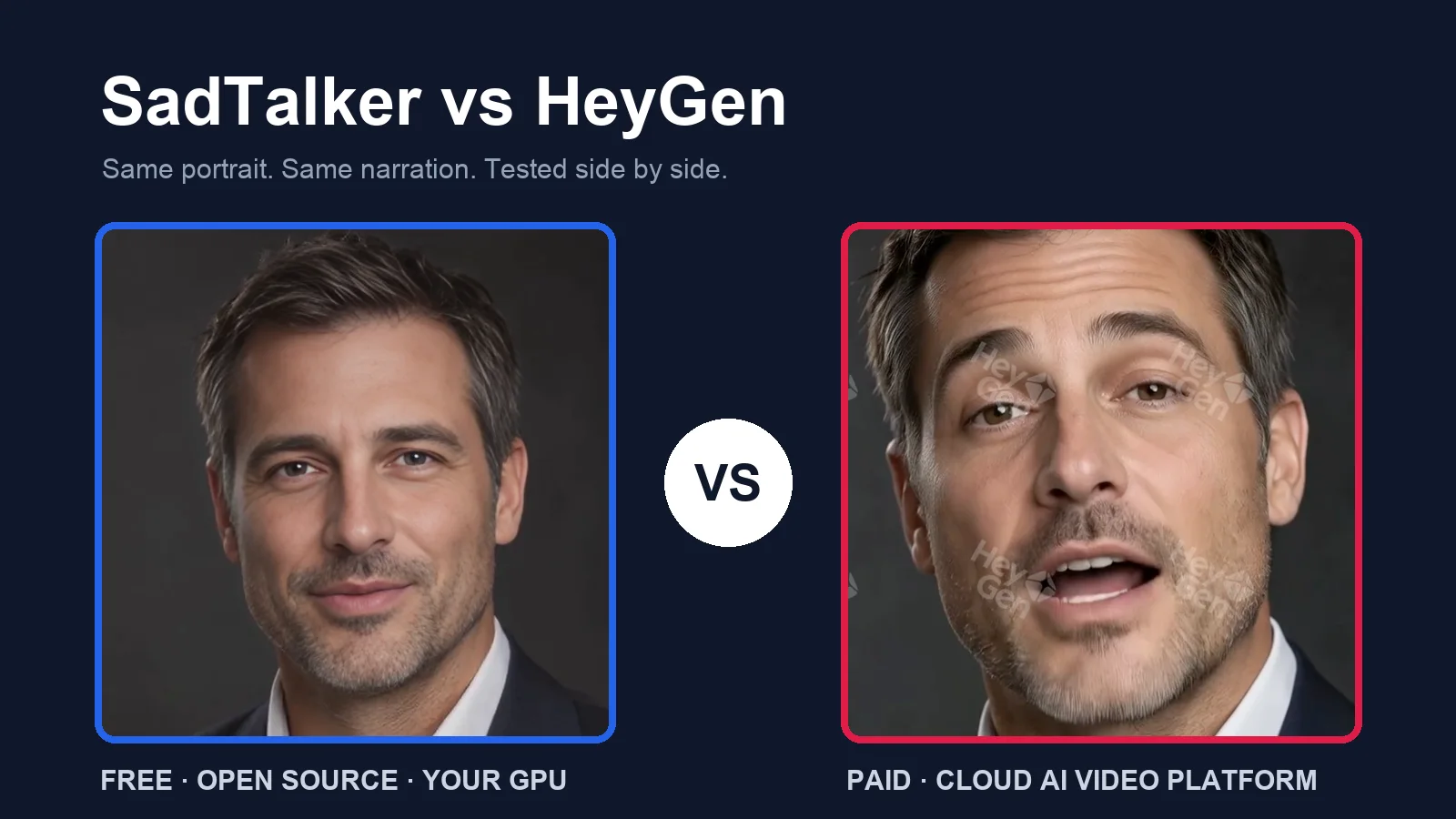
- In our test: from the same photo and WAV, HeyGen’s avatar turned its head, raised its eyebrows and shaped every word clearly. SadTalker’s face stayed calm and stiff.
- Pricing: SadTalker is free; you pay only for GPU time. HeyGen’s free plan is a watermarked preview you cannot download; Creator is $29/mo, or $24/mo billed yearly.
- Where SadTalker still wins: zero cost, unlimited renders, offline privacy and open code.
03 / TOOL 1
What is SadTalker?
SadTalker is an open-source research model. It takes one portrait and one audio file and generates a talking-face video with lip sync, expressions and head motion.
It runs on your own GPU, on Google Colab, or on a rented cloud GPU, through a web UI, ComfyUI or the command line.
SadTalker pricing
On a small screen, swipe the table sideways.
| Where you run it | Software cost | What you pay for |
|---|---|---|
| Your own NVIDIA GPU | $0 | Electricity and your hardware |
| Google Colab | $0 | Free tier limits, or a paid Colab plan |
| Rented cloud GPU | $0 | GPU hourly rate × minutes used |
Estimate rented-GPU cost with our GPU cost calculator.
Key benefits
- Free and unlimited: no credits, plans or watermarks.
- Your own audio, any language: it lip-syncs whatever you record.
- Private: portraits and audio never leave your machine.
- Automatable: script batches in Python or chain it in ComfyUI.
What we noticed in testing
Our tests used one studio portrait and an 11.26-second narration on an RTX 4090. 256 px took 27.9 s, and 512 px took 55.4 s. Peak sampled GPU memory was about 4.7 GB and 9.8 GB. The steady-presenter preset (512, crop, still ON, GFPGAN) took a 117.7 s median over three runs.
Pros
- Free and open source
- No watermark, no download wall
- Works with any language you record
- Runs offline; easy to batch
Cons
- Stiffer motion and smaller mouth shapes
- Needs a GPU and some setup
- No voices, scenes, captions or translation
- Head-and-shoulders only, no gestures
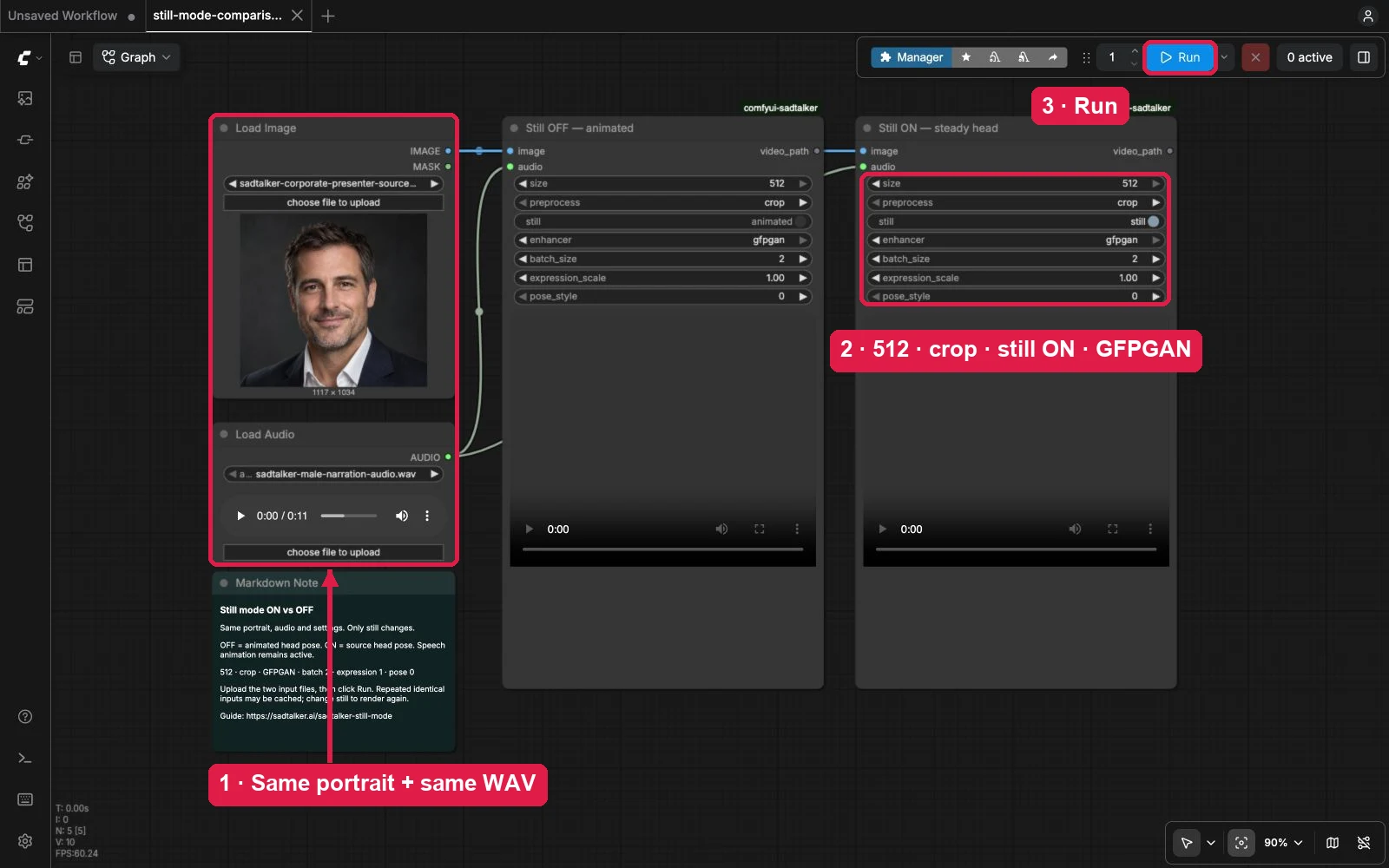
Start here: online demo, Google Colab, local install or the ComfyUI guide. Our best-settings guide explains each preset.
04 / TOOL 2
What is HeyGen?
HeyGen is a paid, browser-based AI video platform. It turns a photo, a script, a prompt, slides or an existing video into a presenter video, and renders it in the cloud.
Talking avatars are only the start. It adds 1,000+ voices, voice cloning, translation into 175+ languages, a full editor, an AI agent that builds whole videos, and a library of apps.
HeyGen pricing
On a small screen, swipe the table sideways.
| Plan | Price | What you get | Best for |
|---|---|---|---|
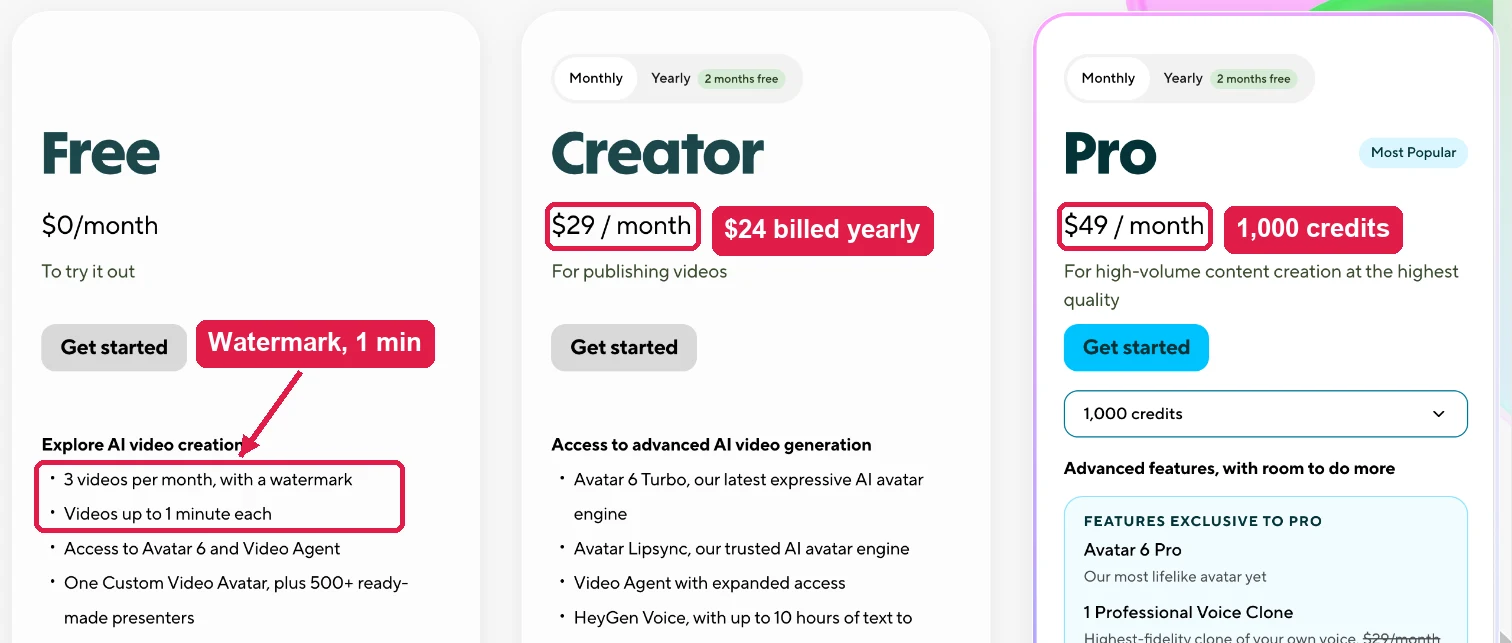
| Free | $0 | 3 videos/mo with watermark, 1 min each, 720p, up to 3 photo avatars | Trying it out |
| Creator | $29/mo monthly · $24/mo yearly | 600 credits, 1080p, no branding, 30-min videos, 175+ languages | Solo creators |
| Pro | From $49/mo | 1,000 credits, Avatar 6 Pro, 4K, 1 professional voice clone | High-volume, top quality |
| Business | $149/mo + $20/seat/mo | Team workspace, collaboration and admin controls | Teams |
Key benefits
- Most realistic motion: head turns, eyebrows and full mouth shapes from a single photo.
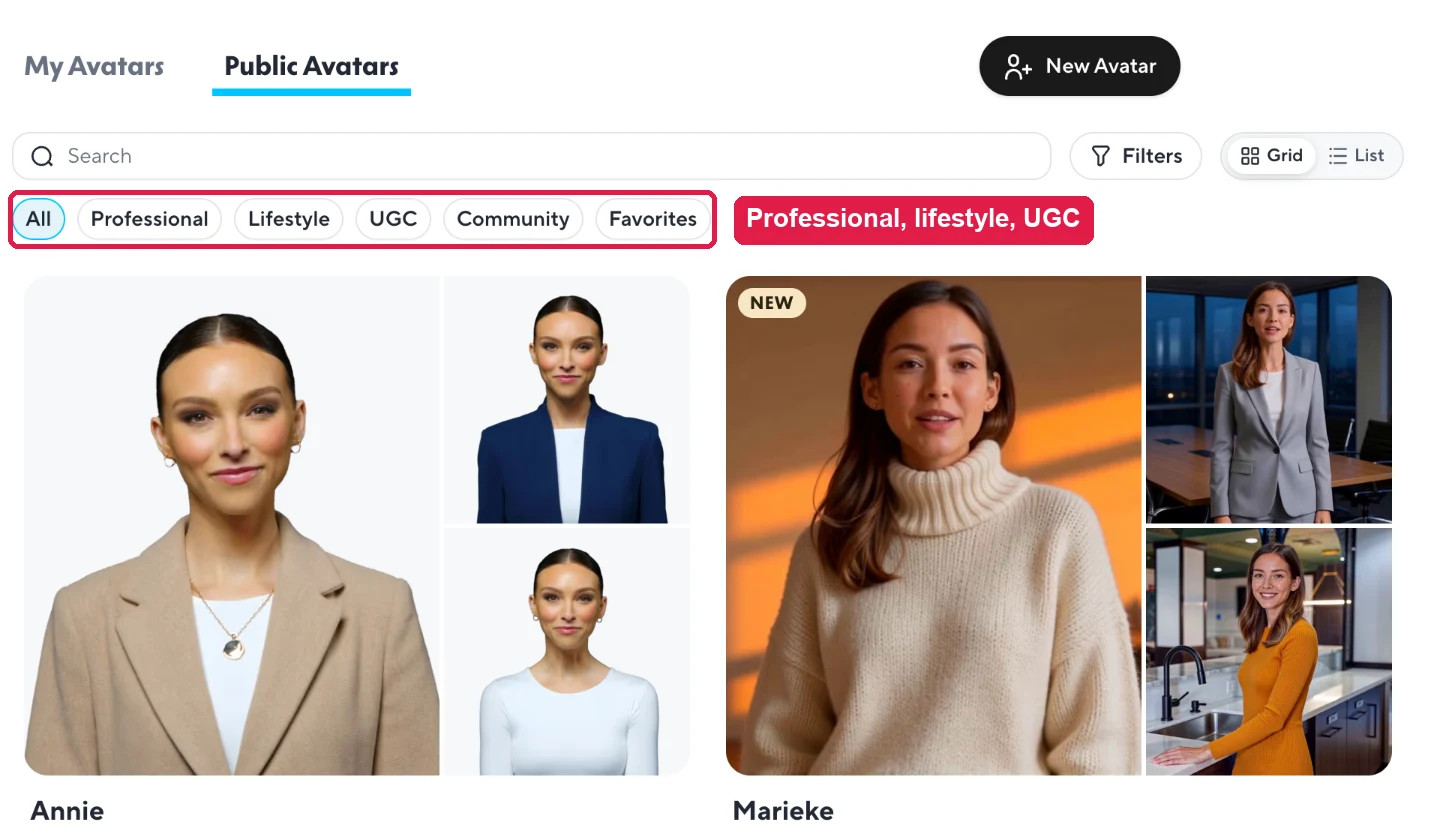
- Your face or a stock presenter: photo avatars in a minute, or 500+ ready-made presenters.
- Any voice, any language: upload audio, type a script, clone your voice or translate a video.
- A finished video: scenes, captions, B-roll, music and brand kits.
- No GPU, no install: everything runs in the browser.
What we noticed in testing
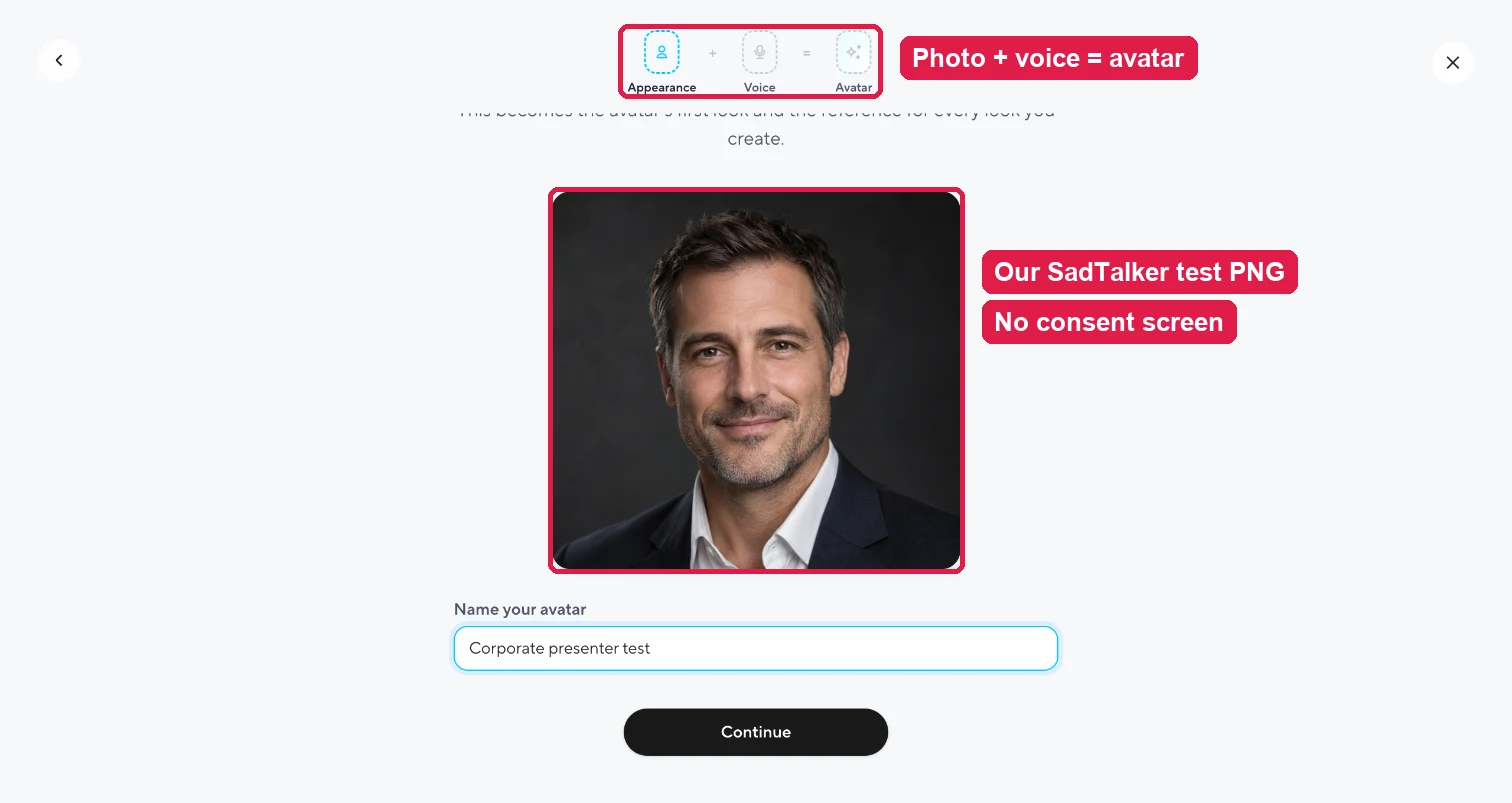
Creating a photo avatar took about a minute: upload, name, pick one of five suggested voices. We saw no separate consent screen. The video was ready in under 4 minutes. HeyGen even titled it for us from the transcript.
Pros
- Far more natural motion and lip sync
- Photo avatar in about a minute
- Own audio accepted on the free plan
- Huge feature set: voices, translation, editor, apps
Cons
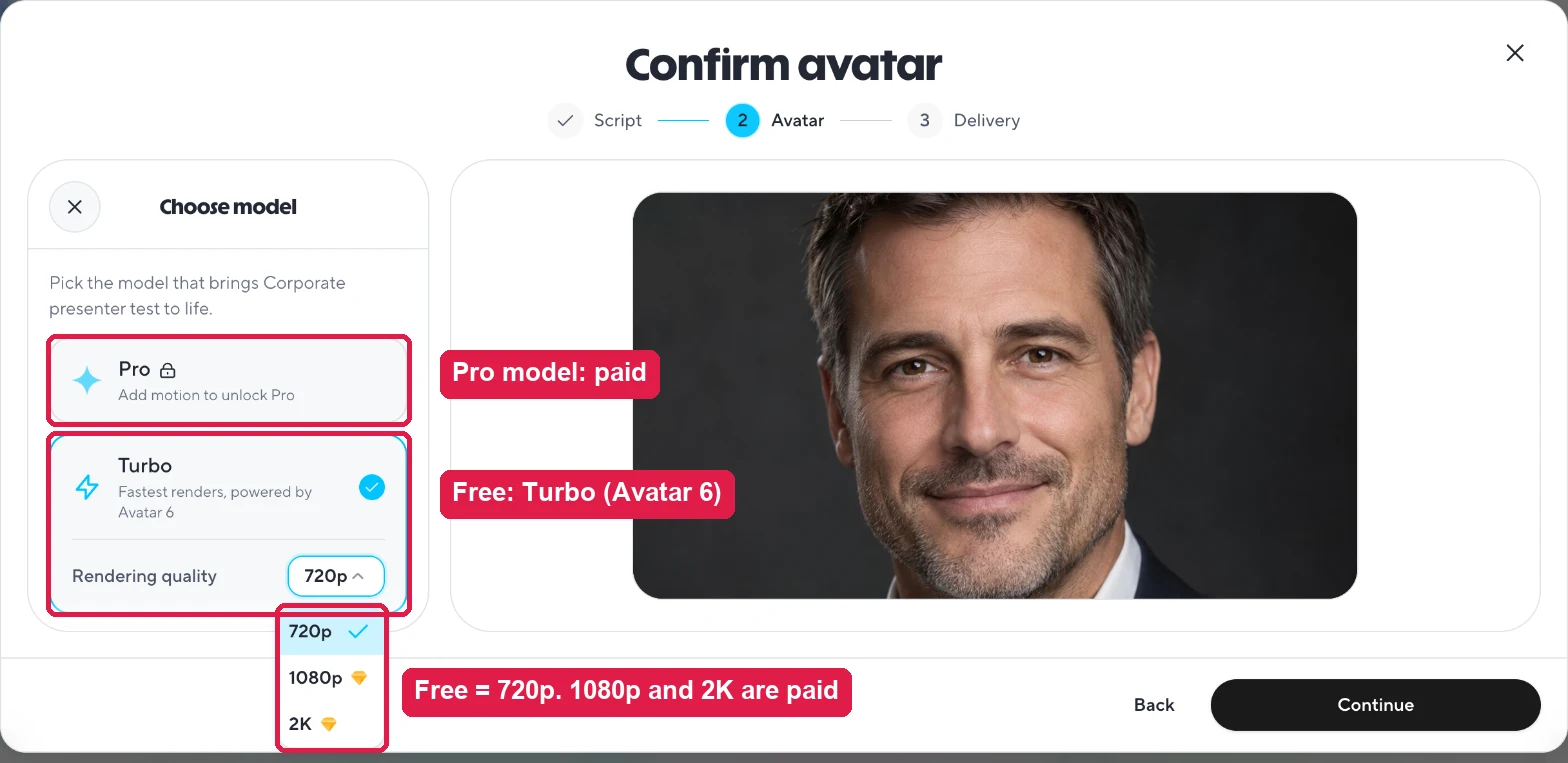
- Free plan: no download, watermark, 720p
- Our free account allowed only one video
- Credits make costs harder to predict
- Cloud only; footage leaves your machine
05 / ORIGINAL TEST
Same portrait, same narration
We used the same corporate presenter portrait and the same 11.26-second WAV as our SadTalker benchmark pages. In HeyGen we created a photo avatar from the portrait and uploaded the WAV as the audio.
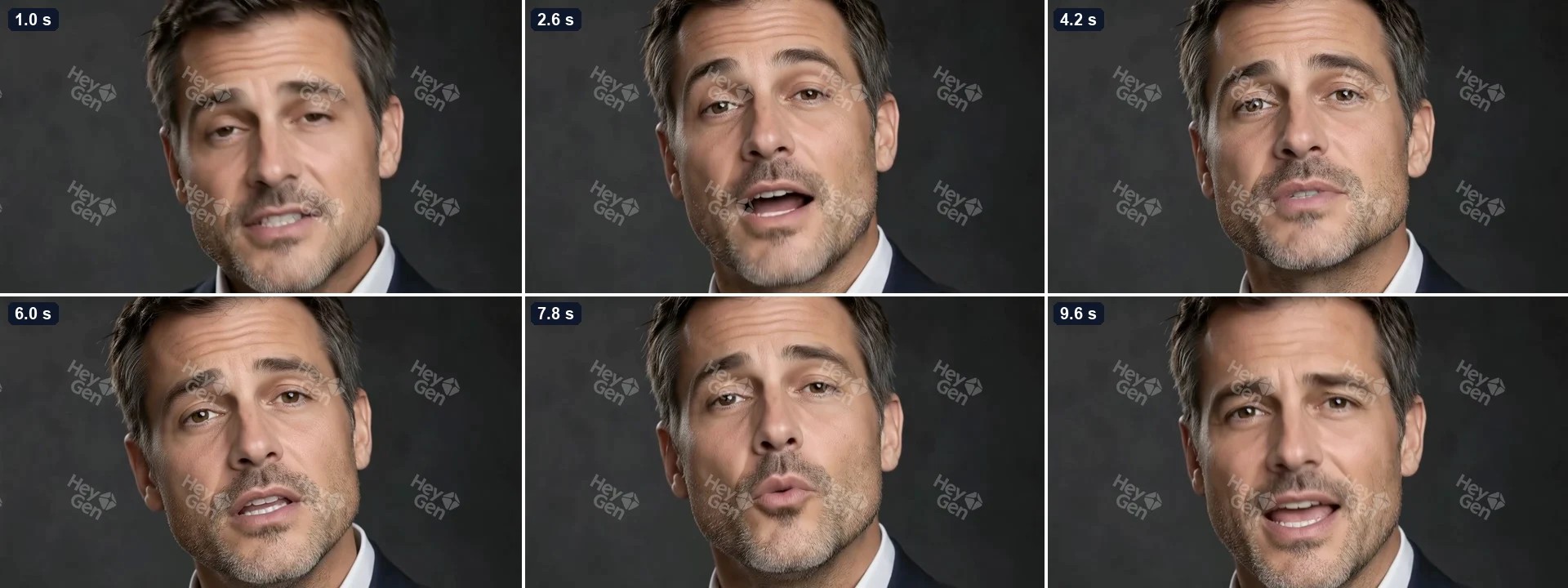
HeyGen’s free plan does not allow downloads, so we show its result as frames captured from the in-app player instead of a video file.

On a small screen, swipe the table sideways.
| Measurement | SadTalker | HeyGen |
|---|---|---|
| Inputs | Portrait PNG + narration WAV | Same PNG + same WAV |
| Settings | 512 · crop · still ON · GFPGAN · batch 2 | Photo avatar · Turbo (Avatar 6) · 720p · landscape, fill |
| Where it ran | RTX 4090 via ComfyUI | HeyGen cloud |
| Time to result | 117.7 s median (3 runs) | Under 4 min |
| Output | 1024 × 1024 · 25 fps · 11.2 s · MP4 file | 1280 × 720 · 12.8 s · in-app only on free |
| Framing | Face close-up (square) | Face filling a 16:9 frame |
| Branding | None | Tiled HeyGen watermark |
| Plan usage | None | Our only free video; the next one was blocked |
SadTalker time is ComfyUI execution time and excludes setup and model downloads. HeyGen time is from “Generate video” to the finished preview and includes cloud queueing. Treat them as planning numbers, not a lab race.
Look closely: mouth and face motion
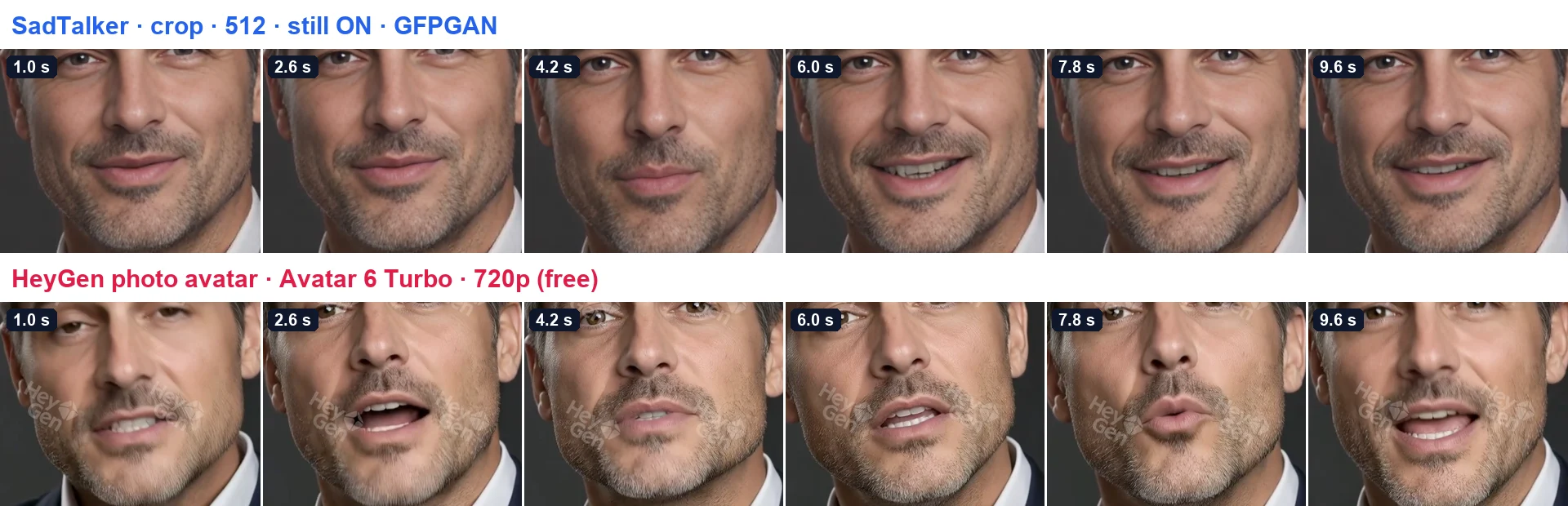
- Mouth shapes: HeyGen opens, rounds and closes the lips clearly, with visible teeth and tongue. SadTalker follows the audio with much smaller movements.
- Expression: HeyGen raises the eyebrows and squints on stressed words. SadTalker keeps a near-neutral face.
- Head motion: HeyGen turns and tilts the head like a real speaker. SadTalker holds still (still mode ON, our steady-presenter preset).
- Detail: SadTalker’s 1024 px face is sharp and clean. HeyGen’s free 720p output is softer and covered by the watermark.
06 / AT A GLANCE
Feature comparison
On a small screen, swipe the table sideways.
| Feature | SadTalker | HeyGen |
|---|---|---|
| Starting price | Free, open-source code | Free plan; Creator $29/mo, or $24/mo billed yearly |
| What you pay for | Your own GPU time or a cloud GPU | Monthly credits shared across all features |
| Free usage | Unlimited on your own hardware | 3 watermarked videos a month, 1 minute each (our account was blocked after one) |
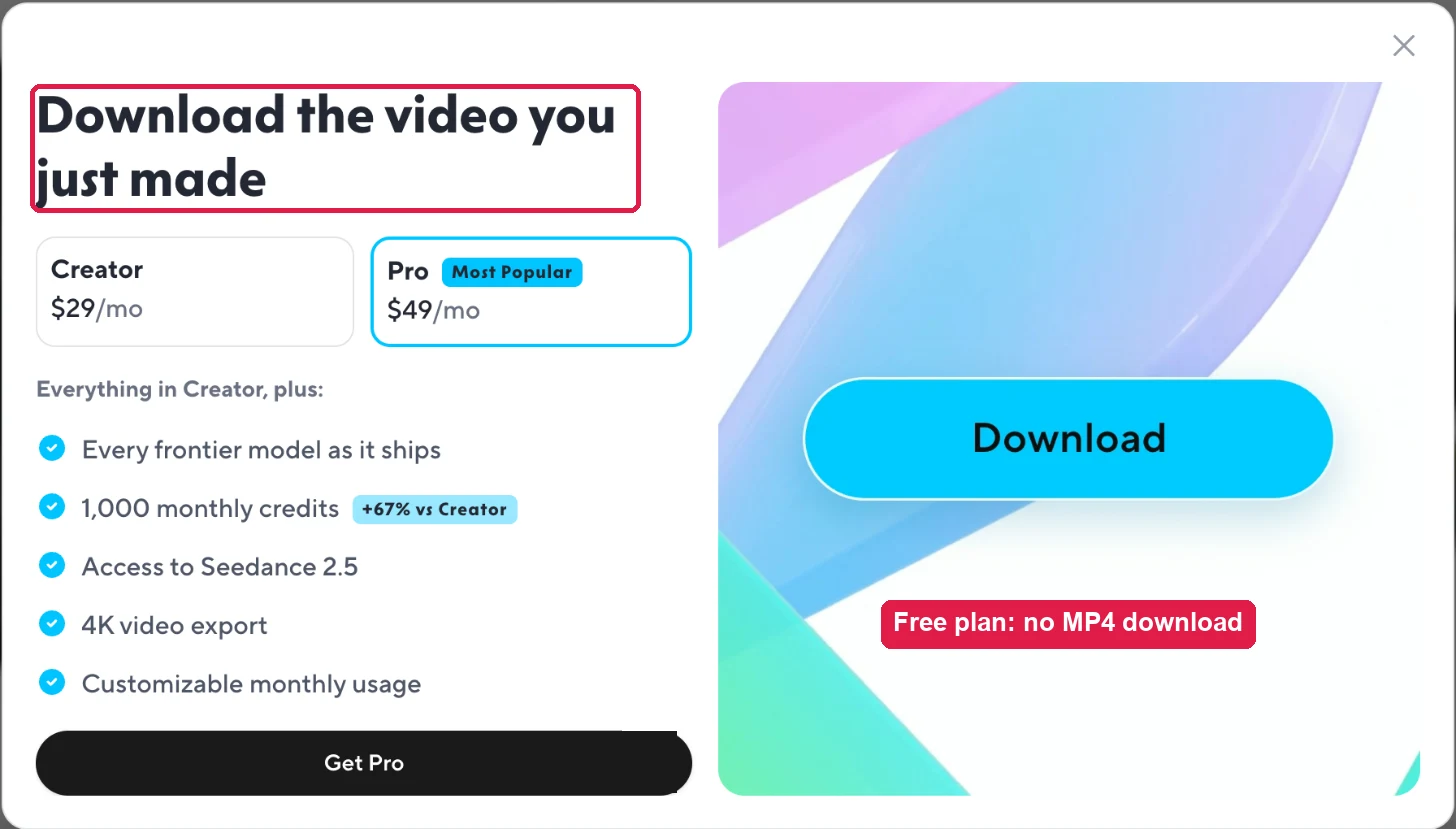
| Download on the free plan | Yes: it is your own file | No: “Download video” opened an upgrade wall in our test |
| Needs a GPU or setup | Yes: a local NVIDIA GPU, Colab or a rented GPU | No: runs in the browser |
| Animate your own photo | Yes: any clear portrait | Yes: PNG worked, about a minute to set up; up to 3 photo avatars free |
| Head motion and expressions | Small head motion, or still mode; eye blinks | Natural head turns, raised eyebrows, wide mouth shapes |
| Ready-made presenters | No | Yes: 500+ free, 700+ on paid plans |
| Text-to-speech voices | No: bring your own audio | Yes: 1,000+ voices, voice design, cloning and imports |
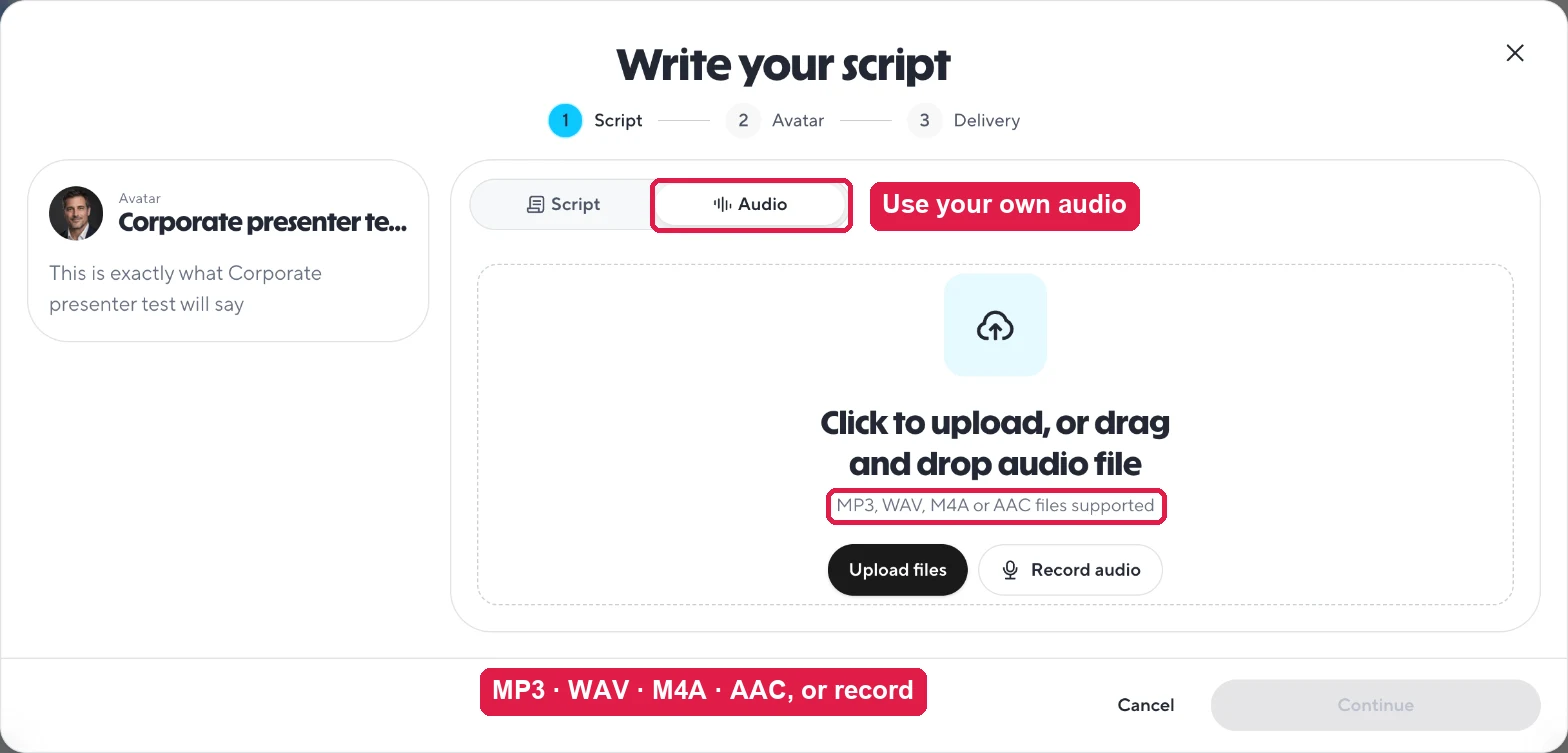
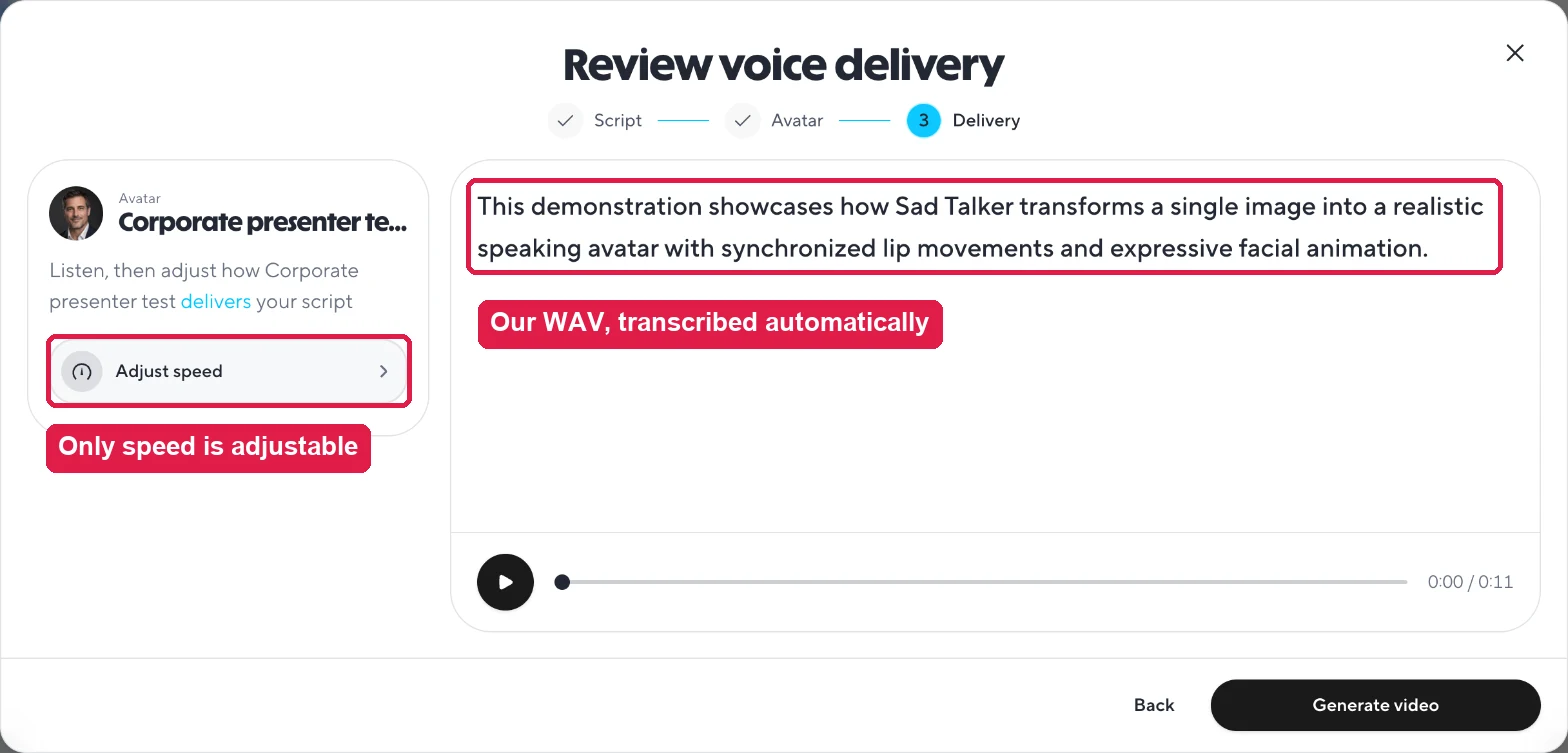
| Upload your own audio | Yes: core workflow | Yes: MP3, WAV, M4A or AAC, auto-transcribed |
| Languages | Any language you record | 30+ free; 175+ languages and dialects on paid plans |
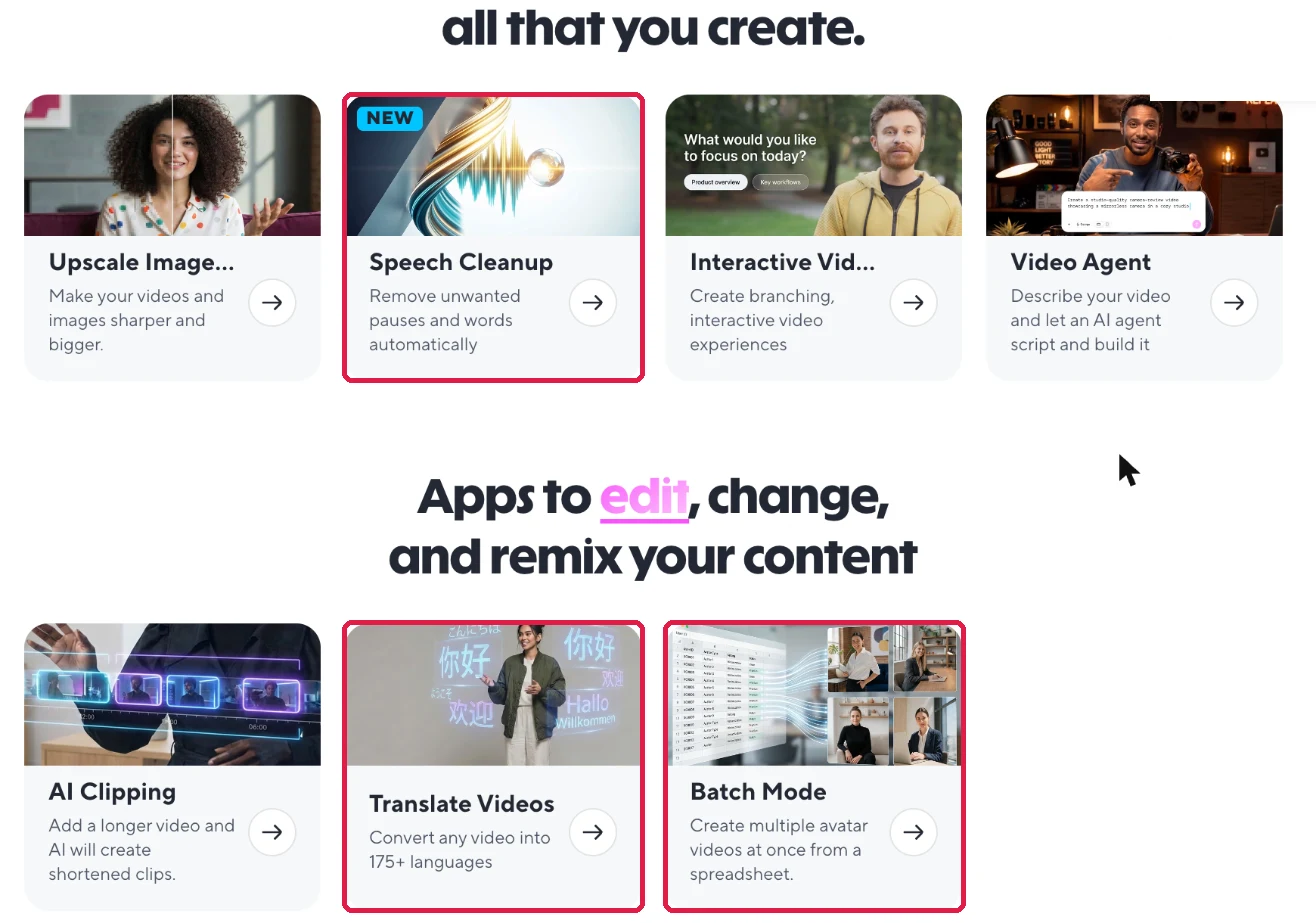
| Video translation with lip sync | No | Yes: Translate Videos app (1-minute videos on free) |
| Editor, scenes, captions, music | No: face video only | Yes: AI Studio with scenes, captions, music, brand kit |
| Output size | 256 or 512 face; 1024 with GFPGAN; “full” keeps the source frame | 720p free; 1080p on Creator; up to 4K on Pro |
| Max video length | Limited only by your GPU and time | 1 minute free; 30 minutes on paid plans |
| Automation | Yes: Python CLI, ComfyUI, scripts | API and Batch Mode from a spreadsheet |
| Data location | Stays on your machine | HeyGen cloud |
| Branding on export | None | Tiled HeyGen watermark on the free plan |
07 / BEYOND TALKING HEADS
What only HeyGen does
SadTalker does one job: make a portrait talk. HeyGen wraps that job in a full production suite. These are the extra tools we found in the app, none of which SadTalker has.
Look Studio
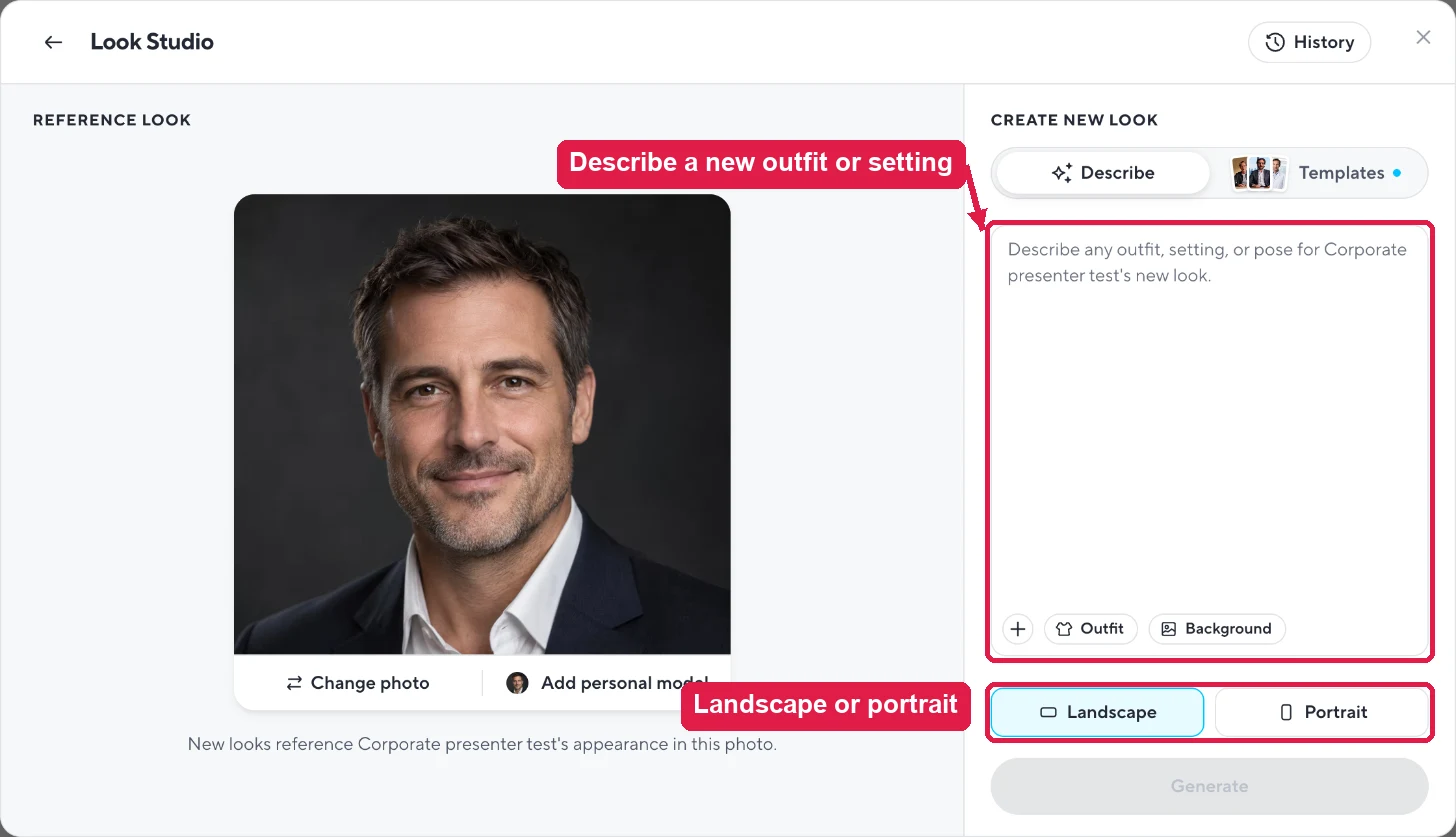
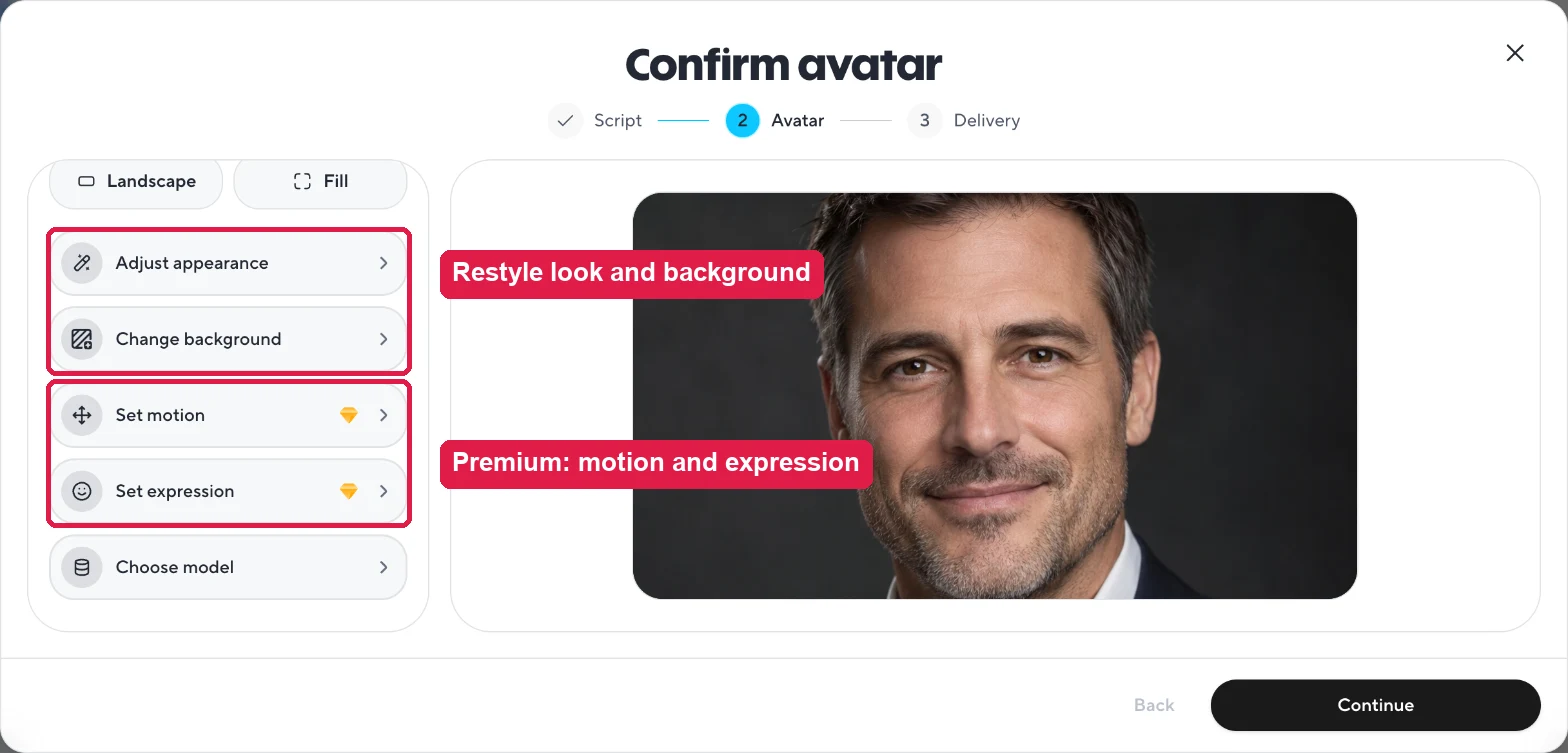
Type an outfit, setting or pose and get a new “look” of the same avatar. The free plan includes 40 look generations a month.
Voice design, cloning and imports
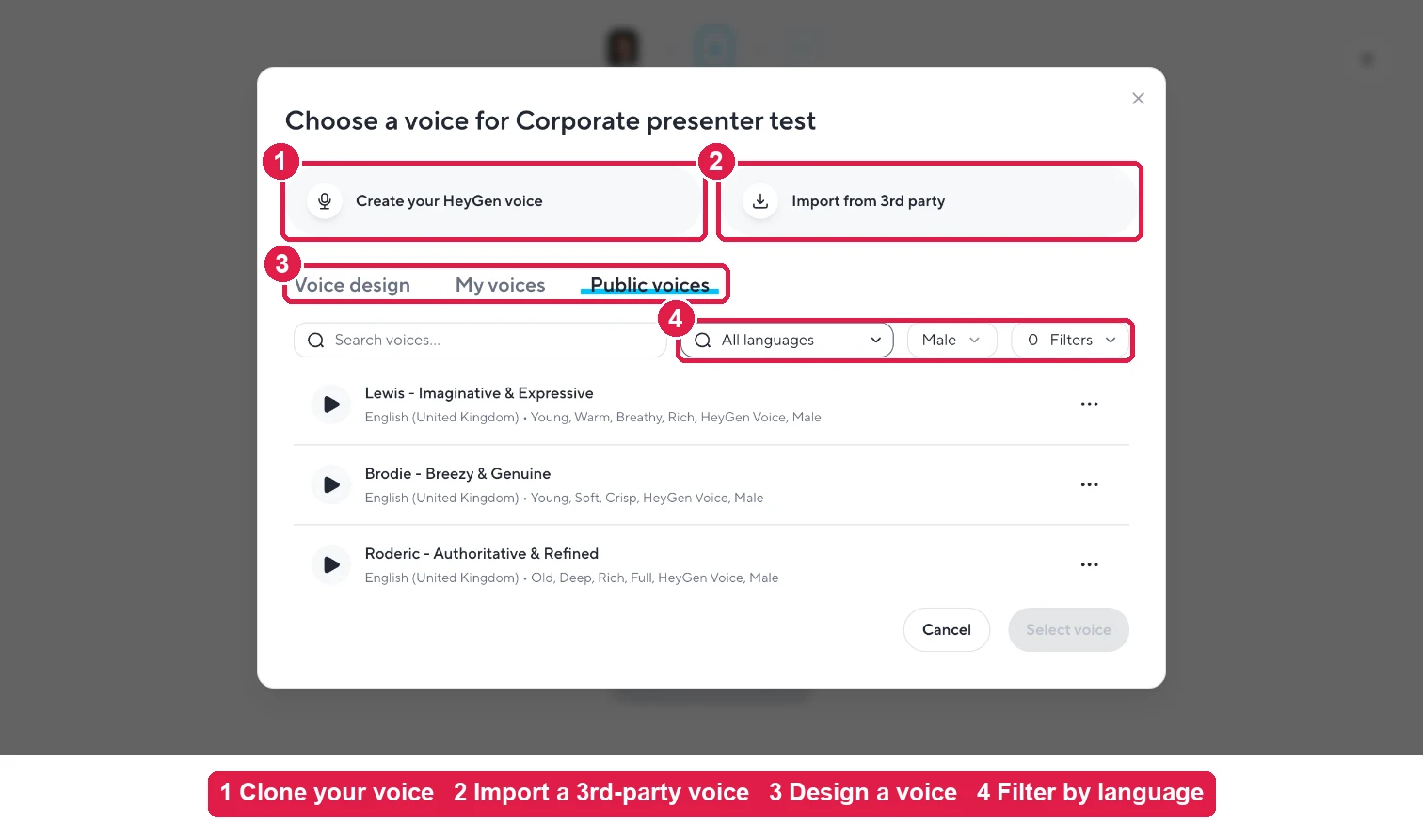
Design a new voice, clone your own, or import one from a third-party service. 1,000+ ready-made voices with language filters.
Motion engines
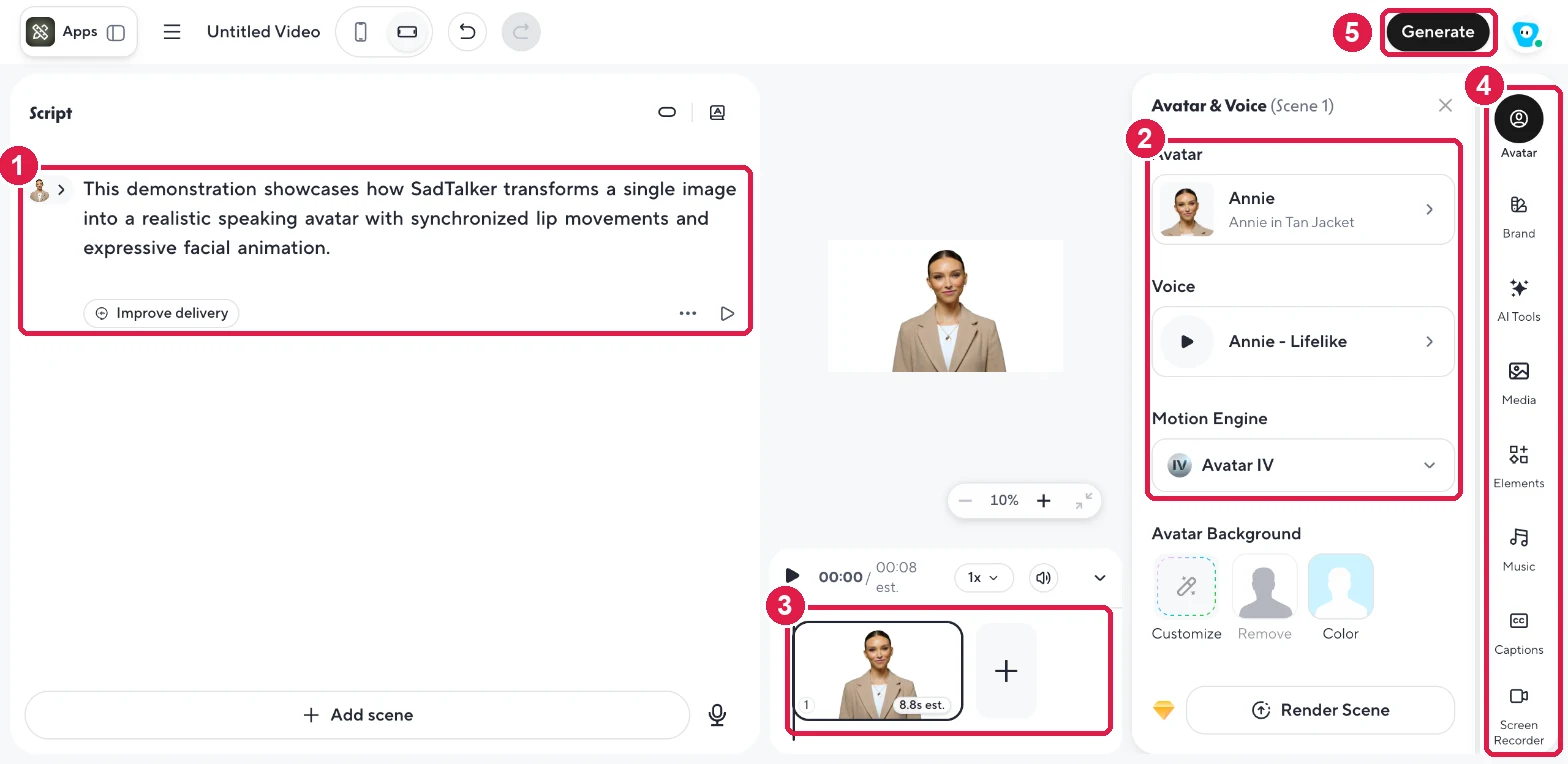
AI Studio offers Avatar III (lip sync), Avatar IV (motion that follows the script) and Avatar V (consistent motion style, locked on free).
AI Studio editor
Script panel, scenes timeline, avatar and voice settings, background, brand kit, media, captions, music and a screen recorder.
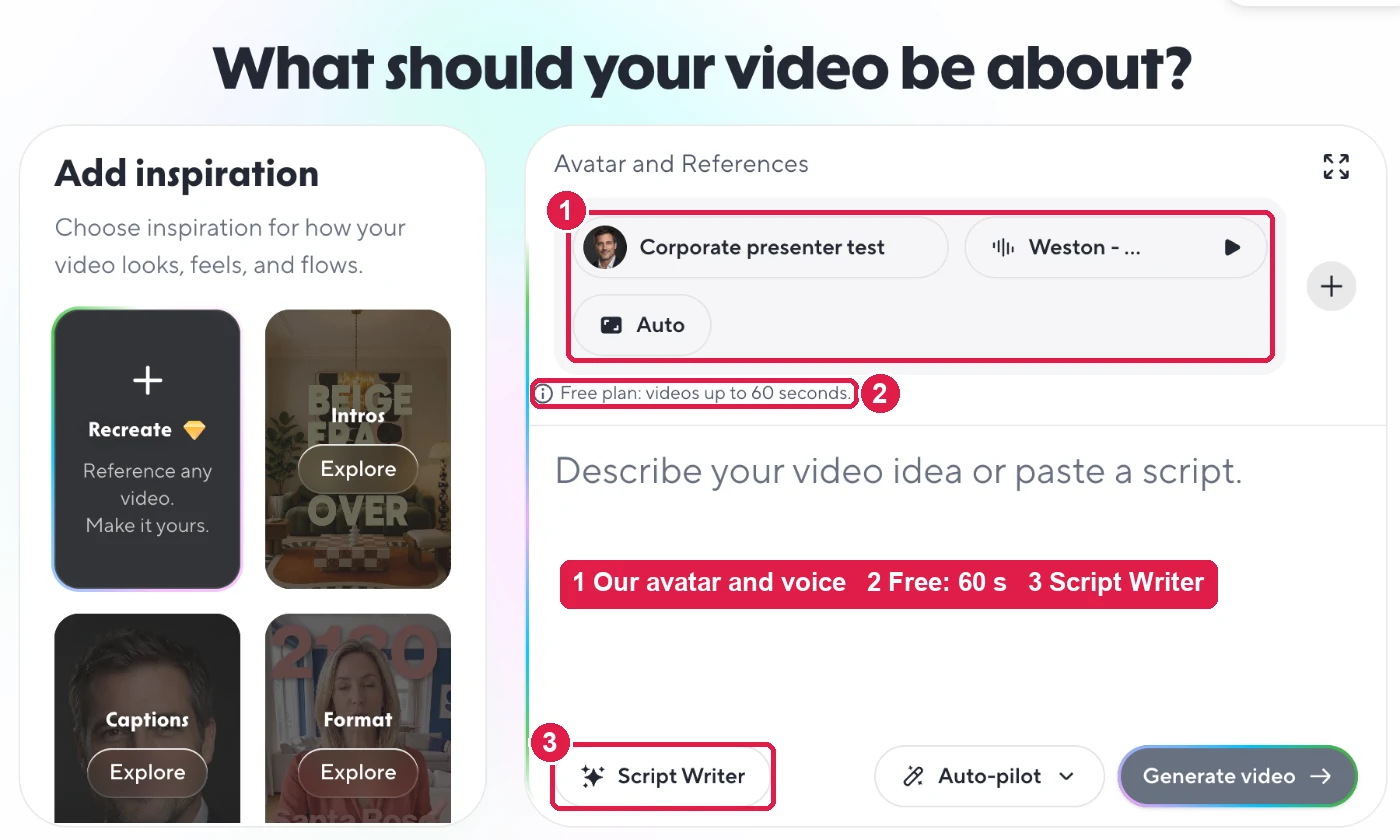
Video Agent
Describe a video in one line or paste a script; the agent plans and builds the video with your avatar and voice. Up to 60 seconds on free.
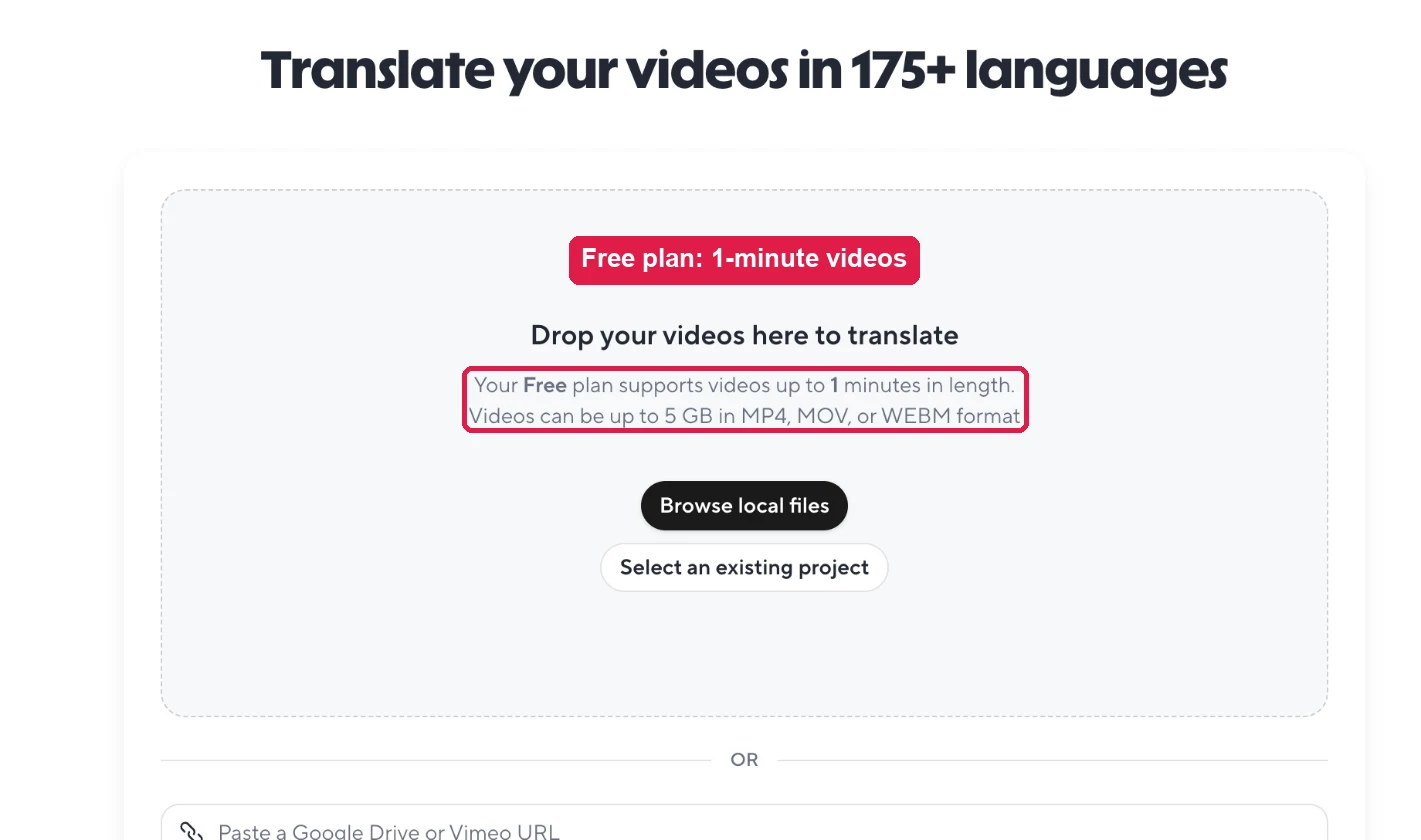
Translate Videos
Upload any video and get it dubbed with lip sync in 175+ languages. Free plan: videos up to 1 minute, files up to 5 GB.
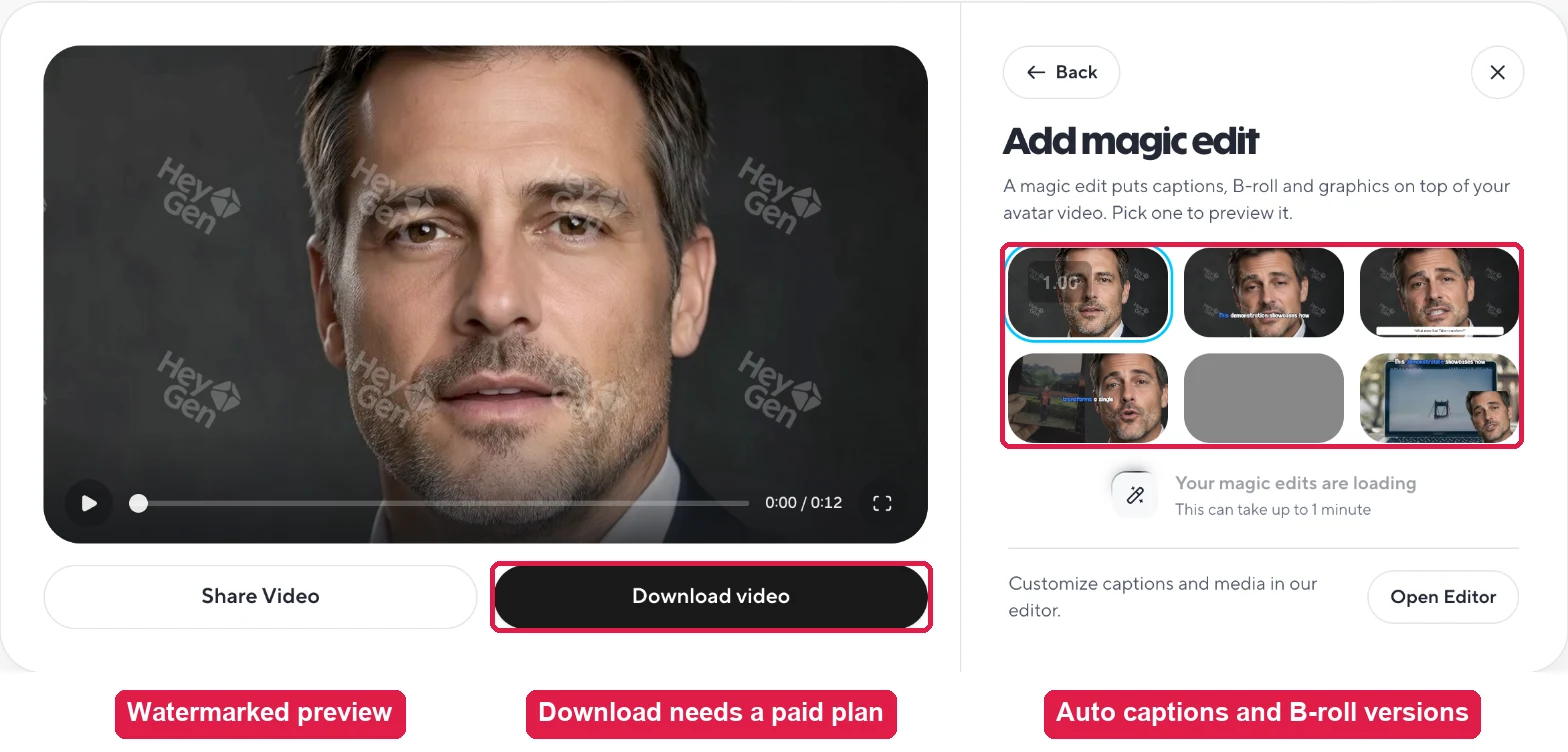
Magic edit
After a render, HeyGen offers ready versions with animated captions, B-roll and graphics on top of your avatar video.
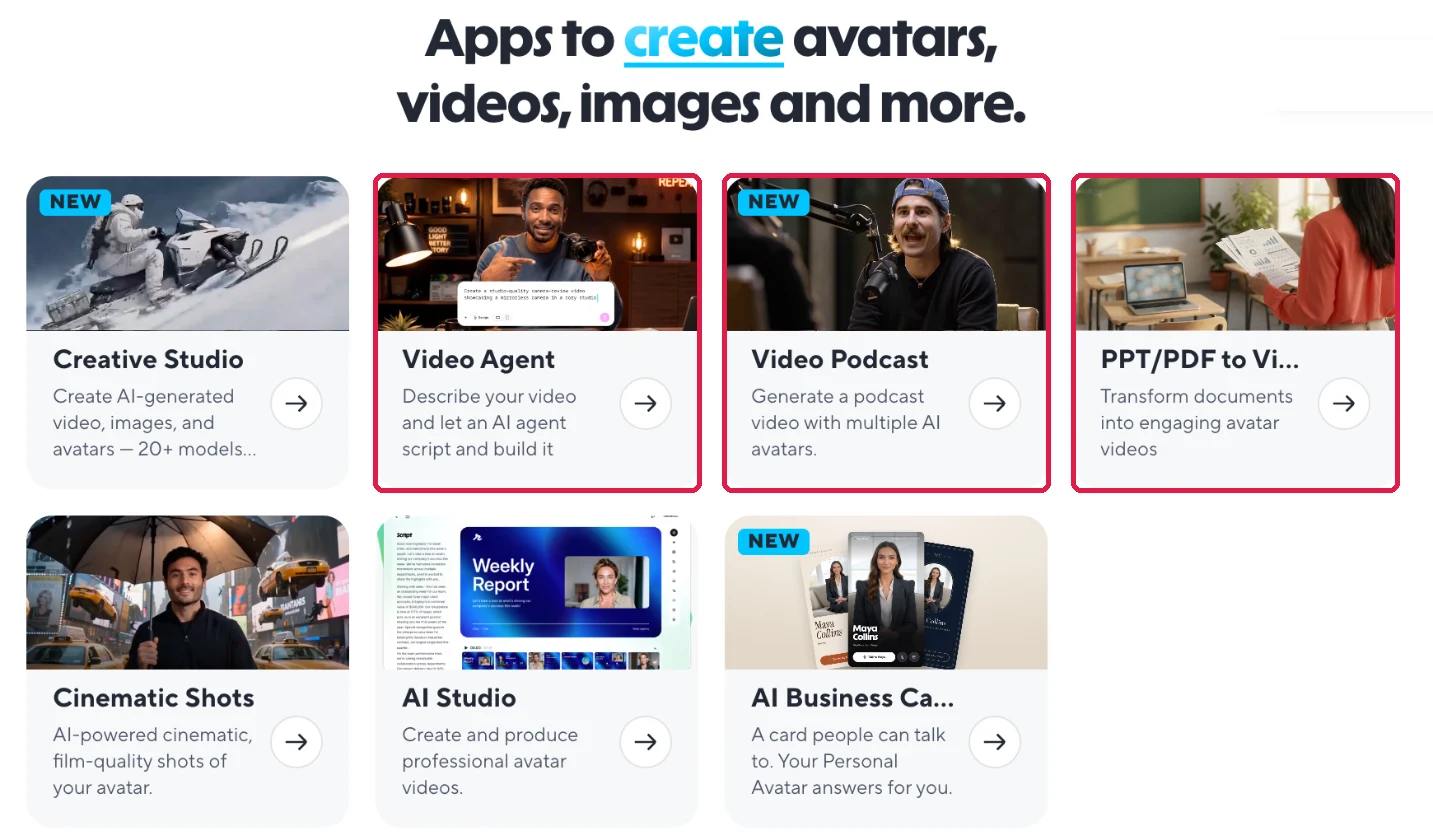
More apps
Creative Studio (20+ image and video models), Video Podcast, PPT/PDF to video, Cinematic Shots, AI Business Card, Upscale, Speech Cleanup, Interactive Video, AI Clipping and Batch Mode.
08 / HEAD TO HEAD
10 areas compared
1. Video quality and realism
SadTalker: Sharp face at 512 px, and 1024 px with GFPGAN. Lip shapes follow the audio, but motion is small and the face looks stiff. No hand gestures; check jaw and neck edges.
HeyGen: Clearly more lifelike in our test: head turns, eyebrow raises and full mouth shapes. Free output is 720p with a watermark; paid plans go to 1080p and 4K.
2. Generation speed
SadTalker: About 28 s (256) to 117.7 s (512 + GFPGAN) for an 11-second clip on an RTX 4090. Slower GPUs take longer, and first-time setup adds time.
HeyGen: Under 4 minutes for our 12.8-second clip on the free plan, with standard processing. Paid plans list fast and faster processing. No GPU needed.
3. Avatar from your own photo
SadTalker: Any clear, front-facing portrait. No account or waiting.
HeyGen: Avatar → Create avatar → A new character → upload photo → pick a voice. Our PNG worked and the avatar was ready in about a minute. Up to 3 photo avatars free, unlimited on paid plans.
4. Voice, audio and languages
SadTalker: No voice generation. Record or create the audio elsewhere; SadTalker lip-syncs it in any language.
HeyGen: Upload MP3, WAV, M4A or AAC, record in the browser, or type a script for 1,000+ voices. HeyGen auto-transcribed our WAV. 30+ languages free, 175+ on paid plans.
Need non-English audio with SadTalker? See our Hindi audio test.
5. Models and motion control
SadTalker: One model. Control comes from settings: pose style, expression scale, still mode, preprocess and enhancer.
HeyGen: Free: Turbo (Avatar 6). Pro: Avatar 6 Pro. AI Studio adds Avatar III, IV and V motion engines, plus motion and expression controls.
6. Editing, scenes and templates
SadTalker: None. The output is the face video only. Add titles, slides and music in a video editor.
HeyGen: AI Studio with scenes, backgrounds, captions, music, media and brand kit; 75+ templates; PPT/PDF import; Video Agent; magic edits with B-roll.
7. Exports and resolution
SadTalker: An MP4 on your disk, free. 256, 512 or 1024 square with crop, or the source dimensions with “full”.
HeyGen: Free plan: watch in the app only; download is locked. Paid: 1080p on Creator, up to 4K on Pro, plus WebM with a transparent background.
8. Setup and ease of use
SadTalker: Moderate. Use the demo or Colab, or install Python, PyTorch and the checkpoints locally. Our guides cover each route.
HeyGen: Easy. A guided three-step wizard (script, avatar, delivery) produced our video without touching the editor.
9. Privacy, control and scaling
SadTalker: Everything stays local. Apache 2.0 code you can read and change. Batch with Python or ComfyUI at no extra cost.
HeyGen: Cloud processing on HeyGen’s servers. Scales with credits, API access, Batch Mode, team workspaces and admin controls.
10. Pricing and cost
SadTalker: $0 for the software. A long clip costs only the GPU time it takes.
HeyGen: Free preview only. Creator $29/mo ($24 yearly) with 600 credits. Pro from $49/mo with 1,000 credits, up to $4,300/mo for 100,000. Business $149/mo plus $20 per seat.

09 / DECIDE FAST
Pick by scenario
On a small screen, swipe the table sideways.
| If you need… | Choose | Why |
|---|---|---|
| The most realistic talking video of your own face | HeyGen | Natural head motion and expressions from one photo. |
| A presenter video from a script, no recording | HeyGen | 500+ stock presenters and 1,000+ voices. |
| The same video in many languages | HeyGen | Translate Videos dubs and lip-syncs into 175+ languages. |
| A finished video with captions, scenes and music | HeyGen | AI Studio, Video Agent and magic edits do it in one place. |
| No GPU and no technical setup | HeyGen | Everything runs in the browser. |
| Many short clips with no budget at all | SadTalker | No subscription or credits; batch it on your GPU. |
| Footage that must stay on your own computer | SadTalker | Nothing is uploaded. |
| Research or a custom pipeline | SadTalker | Open code you can read, change and automate. |
Quality
Need it to look real? HeyGen. A rough talking photo is enough? SadTalker.
Budget
Can pay $24–29 a month? HeyGen. Must be $0? SadTalker.
Voice
Need voices or translation? HeyGen. Already have the audio and no budget? SadTalker.
Data
Files must stay offline? SadTalker. Cloud is fine? HeyGen.
10 / MOVING BETWEEN THEM
Switching guide
SadTalker → HeyGen
You gain
- Much more natural motion
- Voices, cloning and 175+ languages
- Editor, captions and apps
You lose
- Free, unlimited renders
- Offline privacy
- Model-level control
How
- Create an avatar from your portrait
- Upload your WAV or MP3 in the script step
- Upgrade to download in 1080p without a watermark
HeyGen → SadTalker
You gain
- No credits or subscription
- Local files and open code
- No watermark
You lose
- Lifelike head and face motion
- Built-in voices and translation
- Editor, templates and apps
How
- Export your narration as audio
- Check the files with our input checker
- Start with the settings finder
11 / FINAL VERDICT
Which one wins?
On a small screen, swipe the table sideways.
| Category | Winner | Why |
|---|---|---|
| Realism and motion | HeyGen | Head turns, eyebrows and full mouth shapes; SadTalker looks stiffer. |
| Lip sync | HeyGen | Wider, clearer mouth shapes in every frame we checked. |
| Voices and languages | HeyGen | 1,000+ voices, cloning, 175+ languages on paid plans. |
| Editing and finished video | HeyGen | AI Studio, captions, B-roll, music, templates. |
| Extra tools | HeyGen | Translation, Video Agent, Look Studio, podcasts, batch mode. |
| Ease of use | HeyGen | Photo + audio to video in a few clicks, no install. |
| Output resolution | HeyGen | Up to 4K on Pro; SadTalker makes a 512 face, 1024 with GFPGAN. |
| Teams and scale | HeyGen | Workspaces, brand kits, API and batch mode. |
| Cost | SadTalker | Free software; HeyGen’s free plan blocks downloads. |
| Privacy and control | SadTalker | Local files, open code. |
HeyGen wins, clearly
- HeyGen is the better tool for almost everyone. From the same photo and audio it produced a far more natural presenter, and it surrounds that with voices, translation, editing and dozens of apps.
- SadTalker is the free, open alternative. Choose it only when cost, privacy, unlimited batches or code access matter more than realism.
No budget yet? Start with SadTalker
Make a free SadTalker preview with your own photo and voice. When you need publish-ready realism, voices or translation, move to a paid HeyGen plan.
12 / QUICK HELP
Frequently asked questions
Is HeyGen better than SadTalker?
For almost everything, yes. In our test HeyGen’s photo avatar moved and spoke far more naturally than SadTalker, and HeyGen adds voices, translation, an editor and dozens of apps. SadTalker only wins if you need free, offline, unlimited renders or open code.
Is HeyGen free?
HeyGen has a free plan: 3 watermarked videos a month, up to 1 minute each (pricing page, checked 20 November 2026). Our free account was blocked after one 13-second video, and the free plan could not download the result. Creator costs $29 a month, or $24 a month billed yearly.
Can I download HeyGen videos on the free plan?
Not in our test. The video played in the app with a watermark, but “Download video” opened an upgrade screen for Creator ($29/mo) or Pro ($49/mo).
Can HeyGen animate my own photo like SadTalker?
Yes. Avatar → Create avatar → A new character → upload a photo → pick a voice. Our PNG portrait was accepted and the avatar was ready in about a minute. The free plan allows up to 3 photo avatars.
Can I use my own voice recording in HeyGen?
Yes, on the free plan too. In the script step, switch to Audio and upload MP3, WAV, M4A or AAC, or record in the browser. HeyGen transcribed our WAV automatically.
Is SadTalker free?
Yes. The official code is open source under Apache 2.0. You need a GPU: your own, Google Colab or a rented cloud GPU.
Which one is faster?
Our SadTalker steady-presenter preset took about 117.7 seconds of execution time on an RTX 4090 for an 11-second clip. HeyGen returned the same clip in under 4 minutes on the free plan, with no GPU of your own. The two were measured differently.
Can I sell videos made with these tools?
Check the licenses yourself. SadTalker’s code is Apache 2.0; also review the model and dependency licenses. HeyGen use is governed by its subscription terms, and the free plan adds a watermark. Always use faces and voices you have permission to use.
SOURCES
- Hands-on HeyGen test on the free plan, 20 November 2026 (screenshots and frames on this page)
- HeyGen public pricing page and plan comparison table, checked 20 November 2026
- Our SadTalker evidence: still mode test, 256 vs 512, GFPGAN test and GPU benchmark
- SadTalker official repository and documentation
Also compare SadTalker vs Colossyan, SadTalker vs Elai.io, SadTalker vs MuseTalk and SadTalker vs LivePortrait.