ComfyUI guide · Tested 4 October 2026 · RTX 4090
SadTalker 256 vs 512: quality, time and VRAM
Compare the base face renderer at 256 and 512 on the same portrait, narration and RTX 4090. GFPGAN is OFF in the main comparison, so restoration does not hide the original rendering differences.
Same input, two base render sizes
Only size changes in the main pair. Both use crop, still OFF, enhancer none, batch size 2, expression scale 1.0 and pose style 0. The synchronized player shows 256 on the left, 512 on the right and uses one audio track.
Size 256 · GFPGAN OFF
Size 512 · GFPGAN OFF
Narration transcript
This demonstration showcases how SadTalker transforms a single image into a realistic speaking avatar with synchronized lip movements and expressive facial animation.
Shared test narration; English captions are available in every player.
Inspect eyes, skin, mouth and face edges
In the sampled close-ups, the 256 render looks softer around the eyes, beard and skin texture. The 512 render shows finer-looking facial texture at this enlarged display size. Mouth shape, blinking and head position also differ between the independent runs, so those differences cannot be attributed to resolution alone. Neither sample establishes objectively better lip sync or identity accuracy.
Look across the whole clip, especially around teeth, eye shape, facial hair and the jaw boundary. These are visual observations from one input, not scored identity, lip-sync or temporal-consistency measurements.
Measured render time and sampled VRAM
We rendered four combinations once each to cover both questions with minimal GPU time. There were no extra warm-ups or repeated trials. The node starts a new worker for every render; model-loading time is included. Values are individual measurements, not medians or a universal speed ranking.
Swipe the table sideways to view time, resolution and VRAM.
| Size / enhancer | Render time | Final video | GPU baseline | Sampled GPU peak | Peak above baseline |
|---|---|---|---|---|---|
| 256 · OFF | 27.88 s | 256 × 256 | 396 MiB | 4799 MiB | 4403 MiB |
| 512 · OFF | 55.41 s | 512 × 512 | 396 MiB | 10047 MiB | 9651 MiB |
| 256 · ON | 77.22 s | 512 × 512 | 396 MiB | 4895 MiB | 4499 MiB |
| 512 · ON | 119.39 s | 1024 × 1024 | 396 MiB | 10207 MiB | 9811 MiB |
With GFPGAN OFF, 256 took 27.88 s and 512 took 55.41 s: 512 was 1.99× the elapsed time in these runs. The sampled whole-GPU peak rose from 4,799 MiB to 10,047 MiB. The final unenhanced videos are 256 × 256 and 512 × 512.
memory.used about every 0.5 seconds. It includes the worker, ComfyUI, driver and any other GPU allocations. “Above baseline” is the observed device peak minus the measurement immediately before that run. Sampling can miss short peaks; these values are not PyTorch allocator peaks or guaranteed minimum card requirements.Server execution_start → execution_success timing includes input loading, worker/model startup, rendering and export; queue wait and provisioning are excluded. Fresh filenames invalidate input caching, and successful outputs were checked for video/audio streams and hash integrity.
Also compare 256 and 512 with GFPGAN ON
GFPGAN produces 512 × 512 from the 256 run and 1024 × 1024 from the 512 run. The base renderer still differs. An enhanced 256 output and an unenhanced 512 output can have the same final dimensions while containing different generated detail.
Exact setup, sampled data and evidence
- GPU
- NVIDIA GeForce RTX 4090, 24564 MiB, 580.95.05
- Worker
- Python 3.10.21 · PyTorch 2.1.2+cu121 · CUDA 12.1
- CPU thread limits
- OMP, MKL, OpenBLAS and NumExpr limited to 4 each in the isolated worker.
- Inputs
- 1117 × 1034 source portrait; 11.26-second narration; identical bytes for every run.
- Run order
- 256 OFF → 512 OFF → 256 ON → 512 ON
- SadTalker revision
- cd4c0465ae0b54a6f85af57f5c65fec9fe23e7f8
- Custom node revision
- 4c231660fea4e1f2748d03dcf38ea438fd9f884f
- ComfyUI revision
- 73c9bad4d21e7addbe1d13bc92eee0f1431b017d
- Seed
- Not exposed by the template; expressions and blinking can vary.
Get times, VRAM samples and hashesGet original outputs, workflows and logs
Use the four-thread worker launcher instructions to match these CPU limits. The workflow alone does not set worker CPU threads.
Reproduce the comparison in ComfyUI
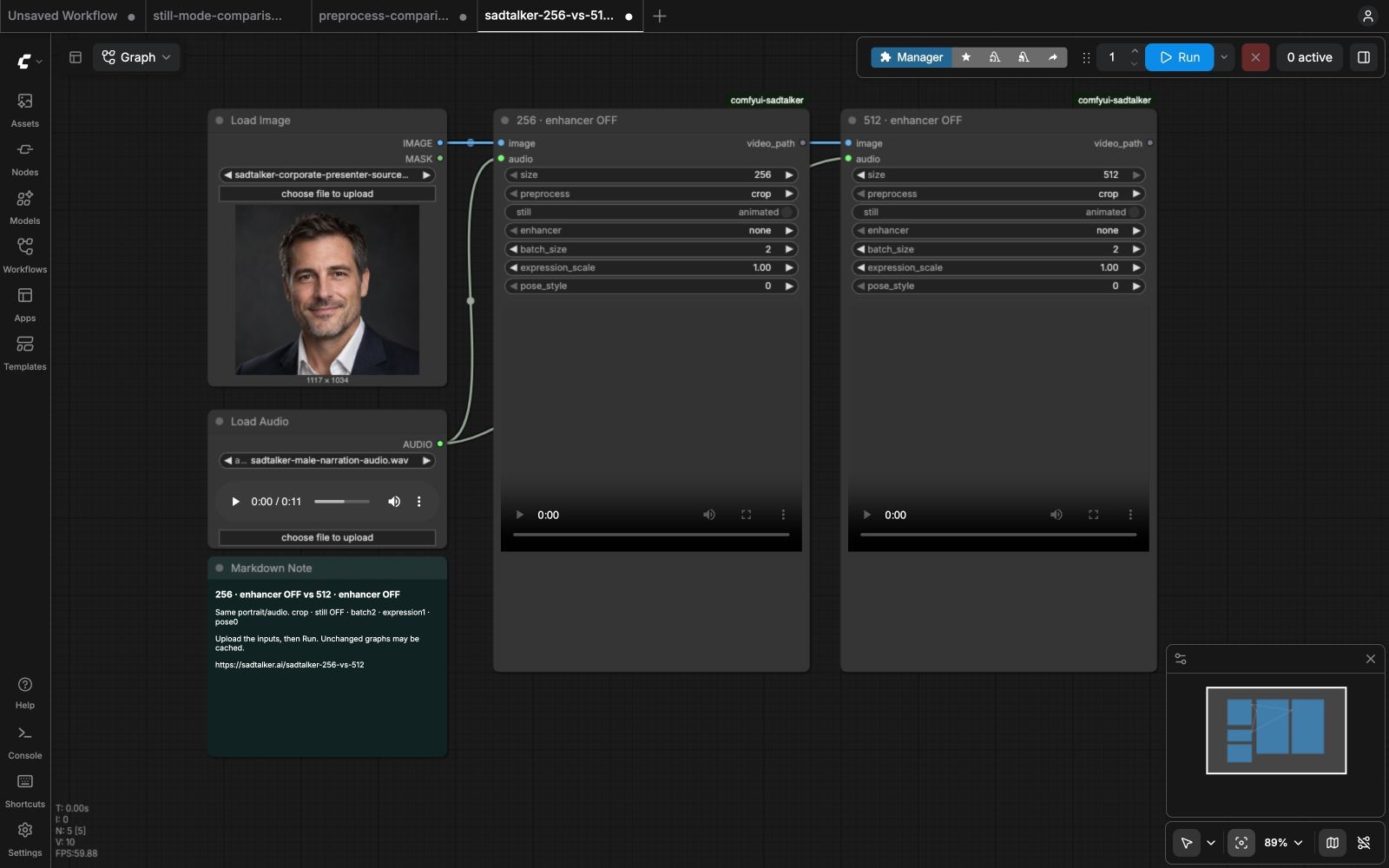
Start with our ComfyUI setup guide. This workflow extends its LoadImage / LoadAudio template with two SadTalker nodes sharing the same inputs.
- Get the comparison workflow and drag it into ComfyUI.
- Upload the portrait and the narration. Both nodes share them.
- Set the left node to
size = 256and the right tosize = 512. Keepenhancer = noneon both. Keep crop, still OFF (displayed as animated), batch 2, expression 1.0 and pose 0. - Click Run. Generated MP4s and logs are saved under
ComfyUI/output/sadtalker/<run-id>/. Repeating an unchanged workflow can return cached results.

ComfyUI API commands
Get the two API graphs, place the supplied portrait/audio filenames in ComfyUI’s input folder, then queue them:
256-off API graph512-off API graph
for file in 256-off-api.json 512-off-api.json; do
  python -c 'import json,sys; print(json.dumps({"prompt":json.load(open(sys.argv[1]))}))' "$file" > prompt.json
  curl -X POST http://127.0.0.1:8188/prompt -H 'Content-Type: application/json' --data-binary @prompt.json
done
Use your actual server address. The rented machine runs internally on port 18188; 8188 is the usual local example. Fresh input filenames were used in the benchmark to avoid cached timings.
Which render size should you use?
256: previews and smaller displays
Try it for draft narration, timing checks and small talking-head layouts. Review fine mouth and eye detail at the actual display size. The smaller base frame may be easier on time and memory, but this single run is not a guarantee for every setup.
512: larger face presentation
Try it when the face is displayed large or you need closer inspection of facial detail. Use a sharp source portrait and review whether the extra pixels improve the final clip. A larger base setting does not guarantee better lip sync or eliminate face-edge artifacts.
Judge base size and enhancement separately
A 512 × 512 file can be a native 512 render or a 256 render upscaled by GFPGAN. Use the performance table and base-size labels to distinguish them. See the GFPGAN comparison before treating enhanced sharpness as original detail.
Limits and failed runs
4 of 4 configurations completed successfully. No render errors occurred in these four runs. This is one portrait, one narration and one rented GPU. There are no repeat-trial error bars, scored lip-sync or identity metrics, or out-of-memory boundary tests.
GFPGAN OFF and ON are separate SadTalker runs. The template has no seed control, so part of a frame-level difference may come from expression, blinking or head motion. This is an end-to-end ComfyUI toggle comparison; it does not isolate restoration by processing the exact same generated frame twice.
If a render fails or memory runs out, inspect its worker log and reduce batch size to 1. That setting was not tested here. Changing batch size, preprocessing, still mode, hardware or worker CPU threads makes the timings less directly comparable.
Implementation references: the tested enhancement/upscaling code, GFPGAN’s official restoration project, and the tested ComfyUI node.