01 / BEST PICKS
Best tool for each job
On a small screen, swipe the table sideways.
| Job | Best tool | Why |
|---|---|---|
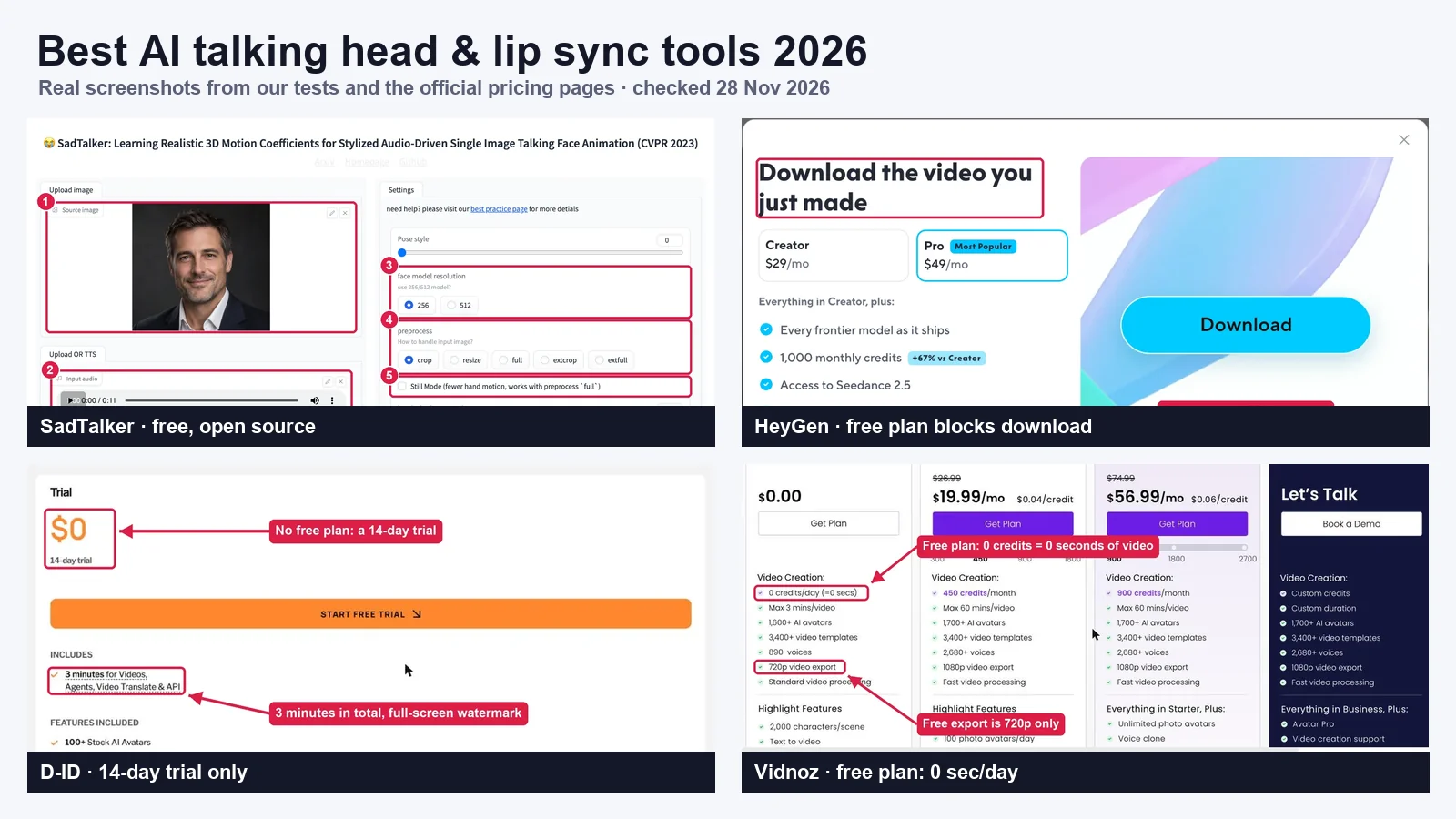
| Free talking photo, no watermark | SadTalker | One photo + audio, whole-head motion, Apache 2.0 |
| Most realistic result | HeyGen | Most lifelike face in our test; $29/mo to download |
| Cheapest paid photo + audio | D-ID | $5.90/mo personal use; $29/mo commercial |
| Business training videos | Synthesia or Colossyan | Stock presenters, scenes, captions, many languages |
| Lip-sync an existing video, free | MuseTalk | MIT licence, keeps original motion, real-time capable |
| Copy your own acting onto a photo | LivePortrait | Uses a webcam video instead of audio |
| Paid dubbing of real footage | Sync Labs | From Wav2Lip’s authors, commercial licence |
02 / COMPARE
All 12 tools compared
On a small screen, swipe the table sideways.
| Tool | Best for | Your photo + your audio | Free option | Watermark on free | Sign-up | Paid from | How we checked |
|---|---|---|---|---|---|---|---|
| SadTalker | Free talking head from one photo | Yes | Free, unlimited (Colab, Space or your GPU) | None | No (Space) · Google account (Colab) | Free, Apache 2.0 | Hands-on |
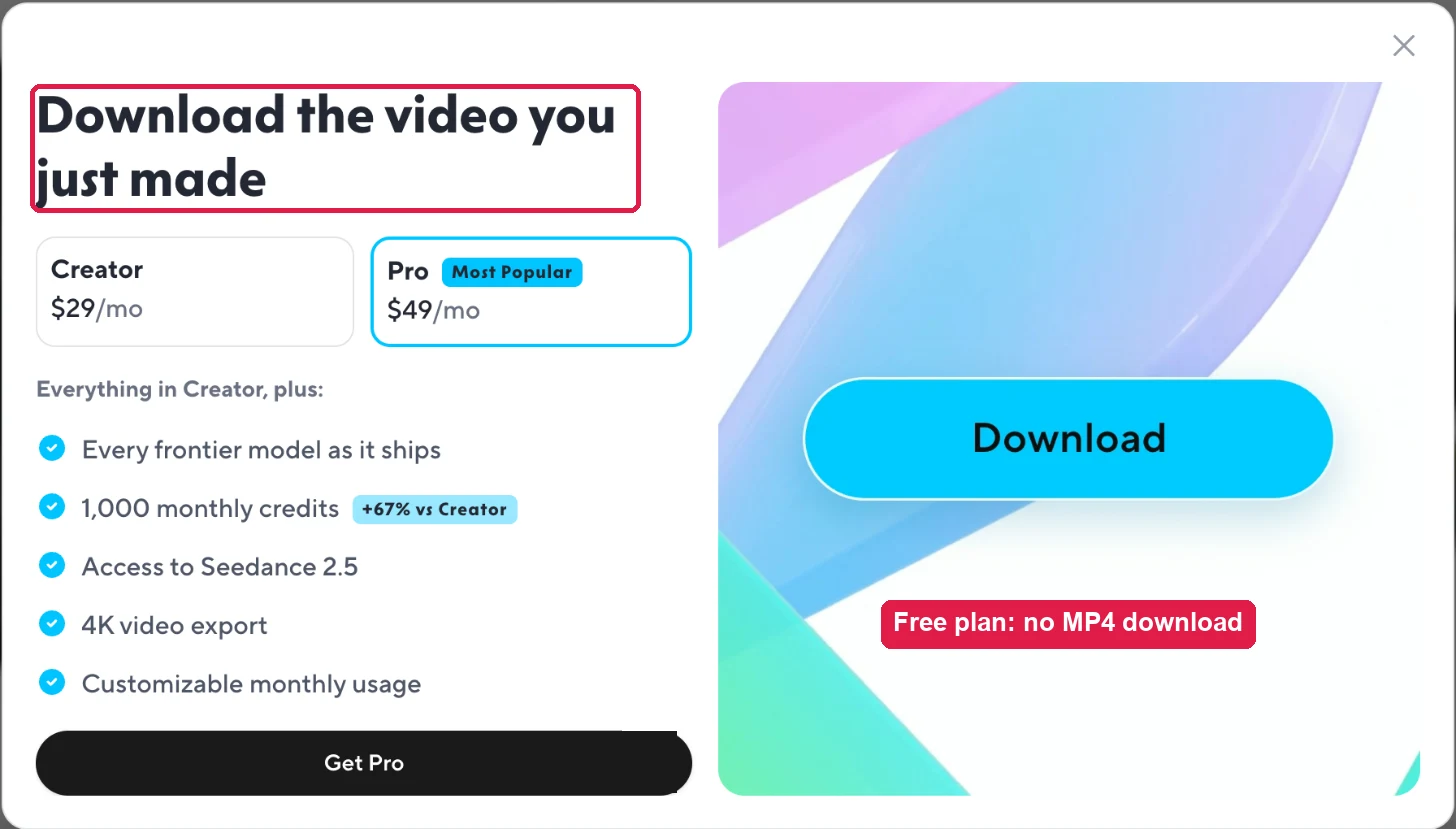
| HeyGen | Most realistic paid avatar | Yes (photo avatar + audio upload) | 3 videos/mo, up to 1 min | Yes; download blocked in our test | Yes | $29/mo ($24 yearly) | Hands-on |
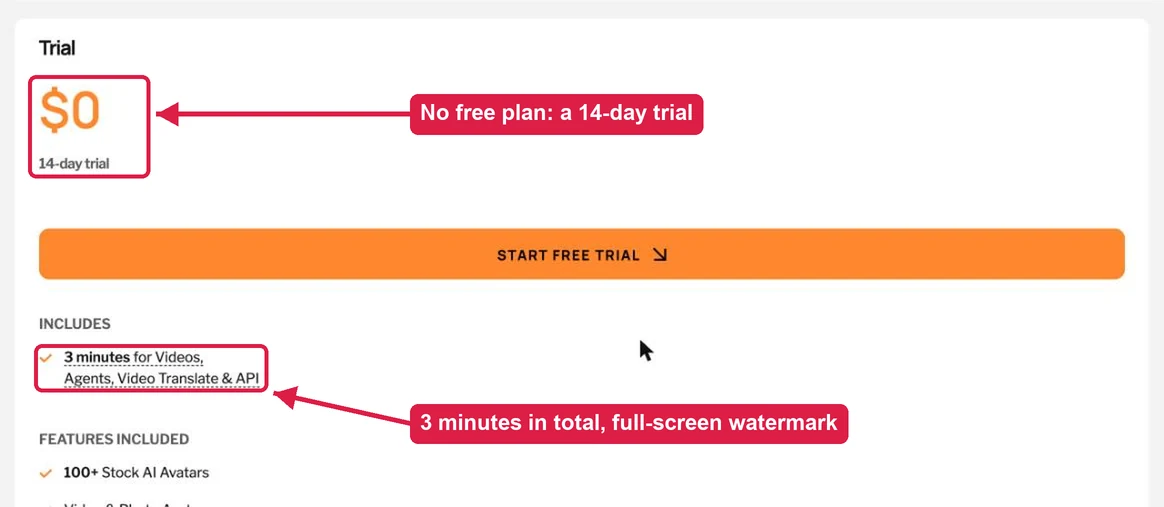
| D-ID | Cheap photo + audio, API | Yes (photo avatars, audio upload) | 14-day trial, 3 min total | Full-screen | Yes | $5.90/mo personal · $29/mo commercial | Official page |
| Colossyan | Business training videos | Yes (JPG photo + audio) | 20 min/mo Starter plan | Badge on our trial export | Yes | $89/mo ($59 yearly) | Hands-on |
| Synthesia | Corporate presenter videos | Stock/personal avatars + voiceover upload | Basic: 10 min/mo studio video | Yes; MP4 download on paid only | Yes | ₹1,499/mo yearly (India price) | Official page |
| Elai.io | Script-to-presenter videos | No instant photo avatar; audio upload paid | 1 min in total | Yes | Yes | $29/mo ($23 yearly) | Hands-on |
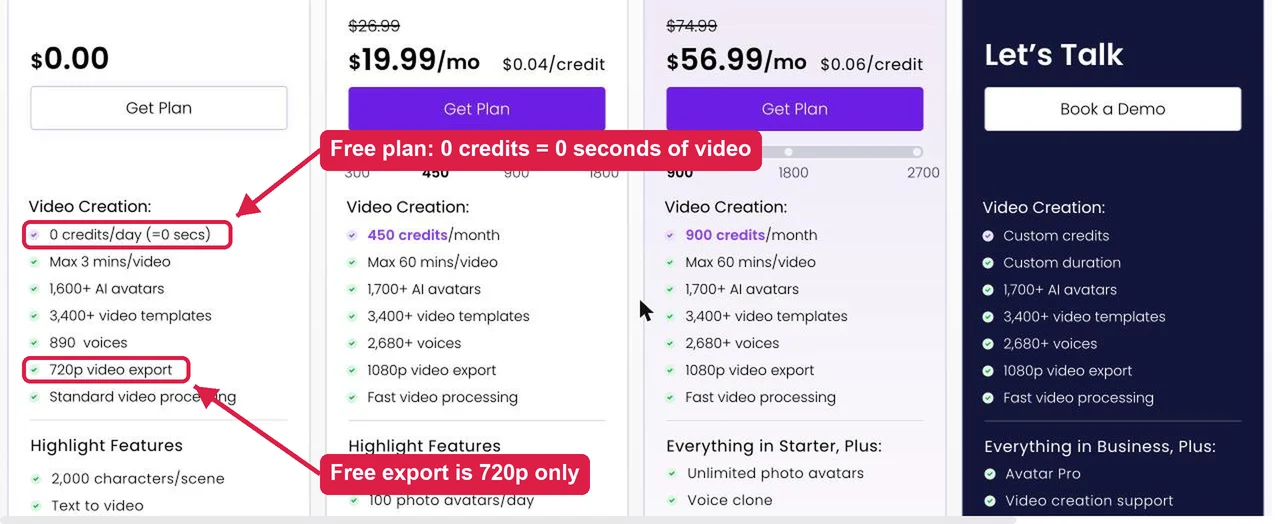
| Vidnoz | Template videos | Photo avatars on paid plans | Pricing page lists 0 credits/day | 720p, watermark on free | Yes | $19.99/mo yearly ($26.99 monthly) | Official page |
| Hedra | Character videos | Not verified | Not shown without sign-in | Not verified | Yes | Shown only after sign-in | Official page |
| Wav2Lip | Lip-sync an existing video, free | Yes (mouth only) | Free (your GPU or Colab) | None | No | Free, non-commercial licence | Hands-on |
| MuseTalk | Real-time lip sync, open source | Yes (photo or video + audio) | Free (your GPU) | None | No | Free, MIT | Hands-on |
| LivePortrait | Copy a real performance onto a photo | No: photo + driving video | Free (your GPU) | None | No | Free, MIT | Hands-on |
| Sync Labs | Paid dubbing of real video | Video + audio | No free plan | Yes on Hobbyist | Yes | $5/mo + per second | Official page |
“Hands-on” means we ran the tool ourselves between 18 and 24 November 2026; the link opens that test. “Official page” means we read the vendor’s pricing page on 28 November 2026 but did not generate a video. Synthesia showed rupee prices for our India location; your currency may differ.
03 / FREE PLANS
What “free” really means
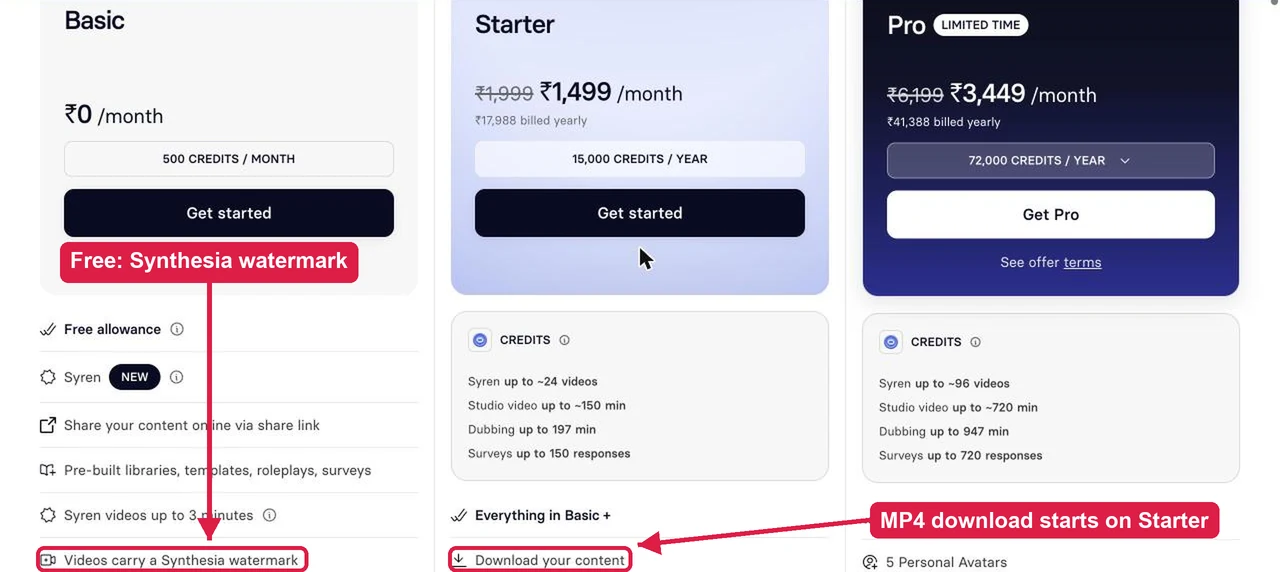
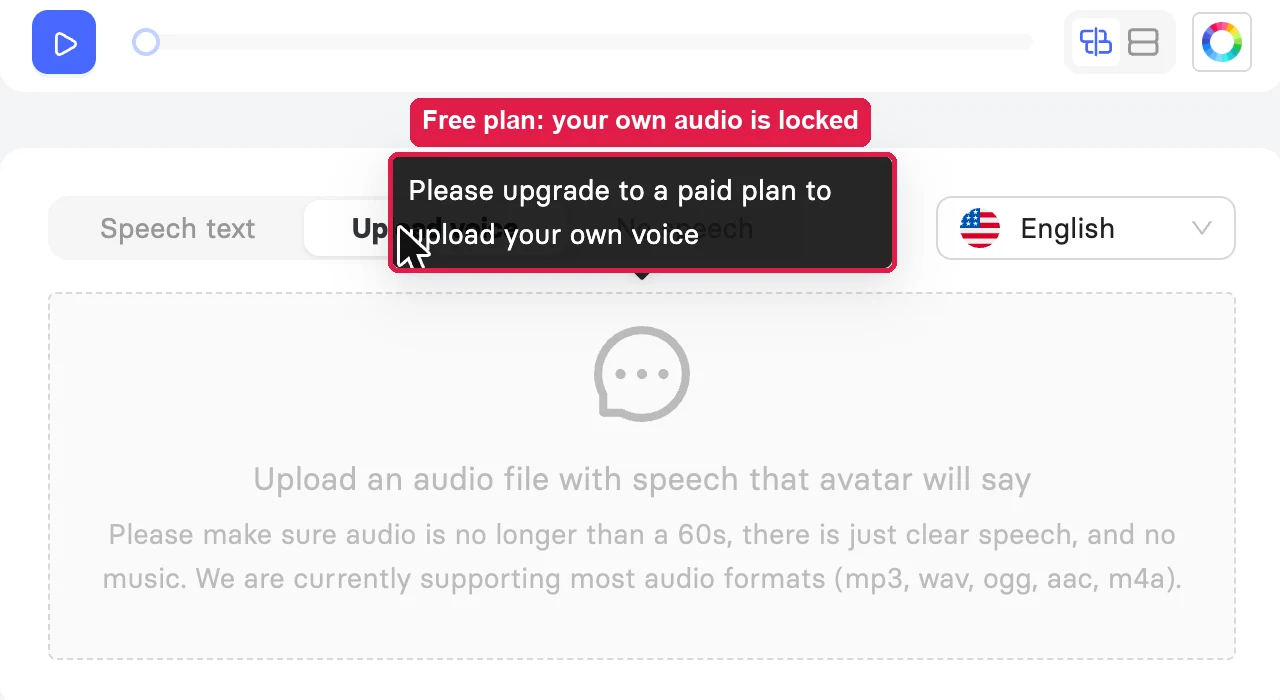
Only the open-source tools are free without limits. Here is what the free options of the cloud tools look like.
04 / OPEN SOURCE VS PAID
Open source vs paid online tools
On a small screen, swipe the table sideways.
| Open source (SadTalker, MuseTalk, LivePortrait, Wav2Lip) | Paid online (HeyGen, D-ID, Synthesia, Colossyan…) | |
|---|---|---|
| Cost | Free software; you pay only for GPU time | $5.90–$89+ a month |
| Watermark | None | On free and trial plans |
| Setup | Colab notebook or local install | Browser only |
| Hardware | NVIDIA GPU (8 GB+) or free Colab T4 | None |
| Realism | Good; smaller mouth shapes, simpler motion | Higher; best in HeyGen in our test |
| Privacy | Files stay on your machine (local) | Uploaded to the vendor |
| Length limit | Your time and GPU | 1–60 min per video by plan |
Same photo, same audio: SadTalker vs Wav2Lip
Both open-source tools on one free Colab T4 with the same 11.3-second narration.
05 / TOOL BY TOOL
Each tool in short
FREE · OPEN SOURCE
SadTalker
Best for: You have one photo and a voice recording and want a free video with no watermark.
- Animates the whole head: lips, blinks, expression and head motion.
- On a free Colab T4, an 11.3-second clip took 113 s at 256 px (3.2 GB GPU memory) and 540 s at 512 px + GFPGAN (8.5 GB).
- Weak spot: smaller mouth movements and a less lifelike face than HeyGen.
PAID · MOST REALISTIC
HeyGen
Best for: Realism matters more than price.
- Free plan: 3 watermarked videos a month, up to 1 minute each, up to 3 photo avatars.
- Our test: own WAV upload worked on the free plan, but “Download video” opened an upgrade screen, and the account was blocked after one 13-second video.
- Creator $29/mo ($24/mo yearly) removes the watermark and allows 1080p.
PAID · LOW ENTRY PRICE
D-ID
Best for: You need photo + audio videos or an API on a small budget.
- No free plan: a 14-day trial with 3 minutes in total, a full-screen watermark and a personal-use licence.
- Lite $5.90/mo is personal use with a D-ID watermark. Commercial use starts at Pro, $29/mo ($16/mo yearly).
- Upload audio and photo avatars are included on every plan.
PAID · BUSINESS
Synthesia
Best for: Company training and presenter videos with stock avatars.
- Free Basic plan: Synthesia watermark, Syren videos up to 3 minutes, 9 stock avatars.
- MP4 download is listed from Starter. In India the page showed ₹1,499/mo billed yearly (Black Friday price at the time).
PAID · BUSINESS
Colossyan
Best for: Branded business videos with scenes, captions and many voices.
- Starter plan: 20 minutes a month. Professional: $89/mo or $59/mo yearly.
- Our test: photo avatar accepted JPG only (PNG was rejected), and the trial export carried a Colossyan badge.
PAID
Elai.io
Best for: Typed scripts read by stock presenters.
- Free plan: 1 minute in total. Uploading your own voice is locked on free.
- No instant photo avatar: a Selfie Avatar costs $199/yr and takes 5–7 business days.
PAID
Vidnoz
Best for: Template-based marketing videos.
- The Free card on the pricing page lists “0 credits/day (=0 secs)” and 720p export, while its FAQ still says a free plan exists. Expect no usable free video time.
- Starter $19.99/mo yearly ($26.99 monthly): no watermark, 1080p, 100 photo avatars a day.
FREE · NON-COMMERCIAL
Wav2Lip
Best for: Re-voicing an existing clip for personal use.
- Fastest in our T4 test: 53 s, but 10.7 GB GPU memory.
- Mouth only, at 96 px: the lower face turns soft and the eyes and head stay still.
- Licence: personal, research or non-commercial use only.
FREE · MIT
MuseTalk
Best for: Lip-syncing video, including real-time use.
- On an RTX 3090, an 8-second clip took about 34 s (SadTalker: 92 s), peaking at 7.6 GB.
- Changes the lips only; keeps the original motion.
FREE · MIT
LivePortrait
Best for: You can act the lines yourself on a webcam.
- Needs a driving video, not audio. The photo copies your expressions and head pose.
- Our RTX 3060 test: 4.5 GB GPU memory, 77 s for a 17.8-second driving video.
NOT TESTED · PRICES BEHIND SIGN-IN
Hedra
Hedra’s public pricing page now covers GPU compute and model work. Its creator app (Hedra Play) has Video and Speech tools, but plan prices appear only after you sign in, so we have not listed them.
06 / HOW TO
Easiest way to make a character talk from one image and an audio file
Free: SadTalker
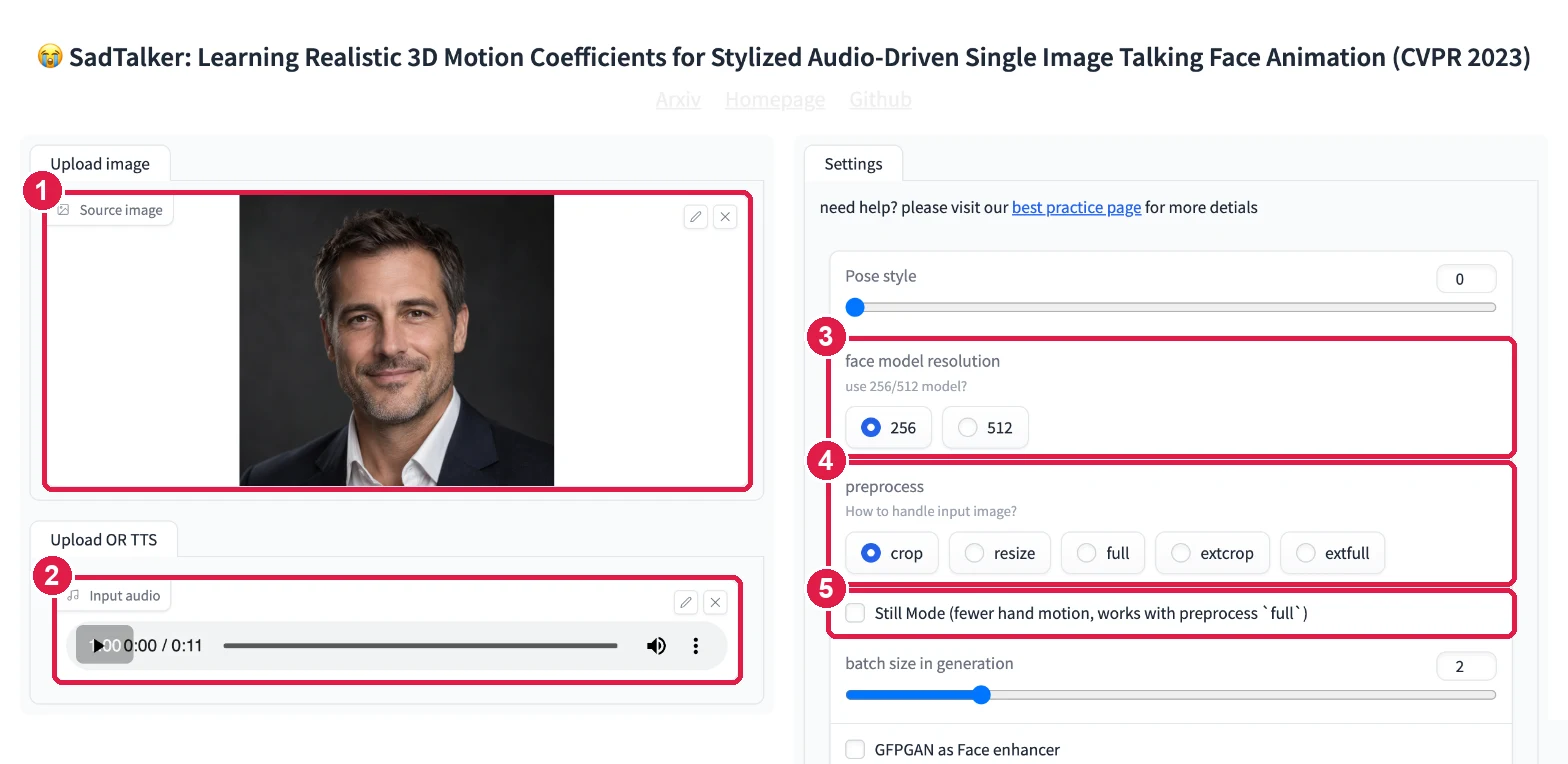
- Prepare: a clear front-facing photo and a clean WAV or MP3 of 5–15 seconds.
- Open SadTalker on Google Colab (most reliable) or a Hugging Face Space (no sign-up, but a shared queue).
- Upload the image (1) and the audio (2).
- Start with 256, crop, still mode off. Switch to 512 + GFPGAN for a sharper final.
- Generate and download the MP4. No watermark.
Paid: HeyGen
- Avatar → Create avatar → A new character → upload the photo.
- In the script step switch to Audio and upload MP3, WAV, M4A or AAC.
- Generate. Downloading the MP4 needs Creator ($29/mo) in our test.
More settings: SadTalker best settings · still mode · 256 vs 512.
07 / METHOD
How we tested
- Hands-on (7 tools): SadTalker, Wav2Lip, MuseTalk and LivePortrait on Colab T4, RTX 3060 and RTX 3090; HeyGen, Colossyan and Elai.io on their free plans or trials, with the same portrait and narration. Each result links to its full test.
- Official pages (5 tools): D-ID, Synthesia, Vidnoz and Hedra checked on 28 November 2026; Sync Labs on 24 November 2026. We did not generate videos with these.
- Not paid by anyone: no affiliate links and no sponsored placements.
08 / QUICK HELP
Frequently asked questions
What is the best AI tool to make a photo talk from an audio file?
For free with no watermark: SadTalker. It takes one photo and one audio file and animates the whole head. For the most realistic result, HeyGen’s photo avatar with an uploaded audio file looked best in our test, but its free plan did not let us download the video; Creator costs $29/mo.
What is the easiest AI tool to make a character talk from one image?
HeyGen is the easiest if you can pay: upload a photo, upload audio, generate. For free, open our SadTalker Google Colab notebook, upload the image and the audio, and run it; it needs only a Google account.
Which talking head AI tools are free without a watermark?
The open-source ones: SadTalker, MuseTalk, LivePortrait and Wav2Lip. They run on your own GPU or on Google Colab and add no watermark. Every cloud tool we checked (HeyGen, D-ID, Synthesia, Colossyan, Elai, Vidnoz) watermarks or limits its free option.
Is there a free AI lip sync tool with no sign-up?
Yes. A public Hugging Face Space running SadTalker needs no account, but free Spaces share a queue; ours sat at position 60. Running SadTalker on Colab needs only a Google account.
Which tool has the best lip sync?
Among paid tools, HeyGen gave the most lifelike mouth and face in our test. Among free tools, Wav2Lip opened the mouth most clearly but blurred the lower face; SadTalker looked sharper with smaller mouth shapes.
Can I use these videos commercially?
SadTalker is Apache 2.0; MuseTalk and LivePortrait are MIT; Wav2Lip is non-commercial only. D-ID’s trial and Lite plan are personal use; Pro and up are commercial. Always use faces and voices you have permission to use.
Do I need a GPU?
Not for cloud tools. For open-source tools, use Google Colab’s free T4 or an NVIDIA GPU with at least 8 GB of memory; 12 GB is comfortable.
SOURCES
- Our tests: Wav2Lip (T4), MuseTalk (RTX 3090), LivePortrait (RTX 3060), HeyGen, Colossyan, Elai.io, free SadTalker routes
- Official pricing pages checked 28 November 2026: heygen.com/pricing, d-id.com/pricing/studio, synthesia.io/pricing, vidnoz.com/pricing.html, hedra.com/pricing
- Licences: OpenTalker/SadTalker (Apache 2.0), TMElyralab/MuseTalk (MIT), KwaiVGI/LivePortrait (MIT), Rudrabha/Wav2Lip (non-commercial)