SadTalker Hugging Face: Online Demo, Queues & Errors Explained
Want to try SadTalker without local installation? Generate talking head videos right now in our embedded Hugging Face Space. Learn why queues get backed up, why Runtime Errors occur, how to duplicate the Space, and check your inputs before uploading.
Live SadTalker Hugging Face Generation Space
Powered by kevinwang676/SadTalker on Hugging Face Spaces infrastructure.
Before-Upload Checklist: Optimize Your Inputs
Most generation artifacts, warped mouths, and landmark failures happen due to suboptimal input photos. Check your image before submitting.
Audio Quality Rules for Natural Lip Synchronization
Clean solo vocal narration, minimal background reverberation, 16kHz or 44.1kHz sampling rate.
5 to 15 seconds is optimal for Hugging Face web spaces. Inputs over 20s often hit worker timeouts.
Loud background music or heavy beats distort the mel-spectrogram parser, leading to unnatural mouth twitching.
Why Does Hugging Face Fail? The Questions Nobody Answers
When beginners search for SadTalker on Hugging Face, they frequently encounter confusing errors, long queues, or sudden crash screens. Here is what is actually happening under the hood:
What is a Hugging Face Space & How Does It Work?
A Hugging Face Space is an isolated container that runs the SadTalker Python backend with a Gradio web interface. When you submit an image and audio file, your request is sent to a remote cloud worker where PyTorch generates the 3D coefficients, renders the video, and streams the MP4 back to your browser.
Who Pays for the GPU Compute?
Public demo Spaces rely on community hardware sponsored by Hugging Face (such as ZeroGPU or basic T4 instances) or donated compute from research labs. Because these GPUs are shared freely with thousands of concurrent global visitors, compute resources are strictly rationed.
Why is the Queue Sometimes 15 to 30 Minutes?
Public Spaces typically operate on a single concurrency queue. Generating a 10-second video with the GFPGAN enhancer takes roughly 60 to 90 seconds. If 15 users submit jobs ahead of you, your job must wait in line for 15 to 22 minutes before the GPU starts processing your inputs.
Why Does "Runtime Error" or Crash Occur?
Runtime Errors occur primarily due to CUDA Out-Of-Memory (OOM) or worker timeouts. When users submit 512px resolution inputs or long audio tracks, the GPU memory spikes past the container limit (16GB), causing Linux to terminate the worker process instantly.
Why Does "Build Error" Appear?
When the Space maintainer updates dependencies or when Hugging Face updates its underlying Docker image base, cached packages can break (such as the legacy torchvision.transforms.functional_tensor bug). Until the Dockerfile is recompiled, visitors see a Build Error screen.
How Does Hugging Face Compare to Local RTX 4090?
On Hugging Face, you share limited GPUs and wait in queues for up to 30 minutes. On a dedicated GPU (such as an RTX 4090), the entire end-to-end inference and 512px GFPGAN enhancement finishes in 40.49 seconds with zero queues and unlimited duration.
How to Duplicate the Space for Private, Queue-Free Generation
If you want to use the Hugging Face web interface without waiting in public queues, you can duplicate the Space into your personal Hugging Face account in 4 simple steps.
Open the Source Space
Navigate to the public space at huggingface.co/spaces/kevinwang676/SadTalker and log into your free Hugging Face account.
Click "Duplicate this Space"
Click the options icon (three vertical dots) next to the Space title in the upper right header, then select Duplicate this Space from the menu.
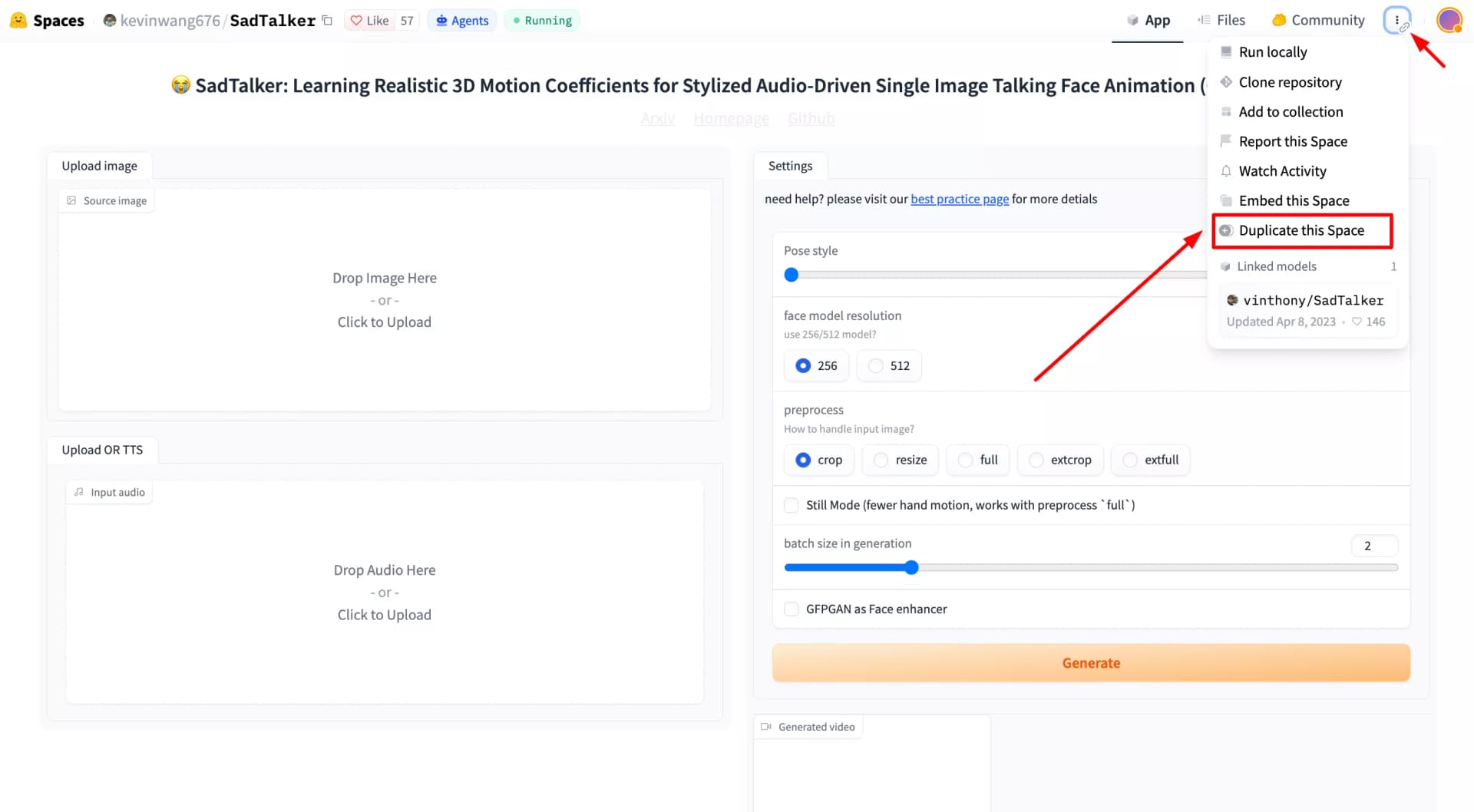
Clicking Duplicate this Space in the Hugging Face options menu
Select Hardware Tier
Choose between the free CPU tier (slow but free) or upgrade to an hourly GPU tier (such as Nvidia T4 for ~$0.60/hr or A10G for faster 512px rendering). Set your privacy to Private if you want your generated videos hidden from the public.
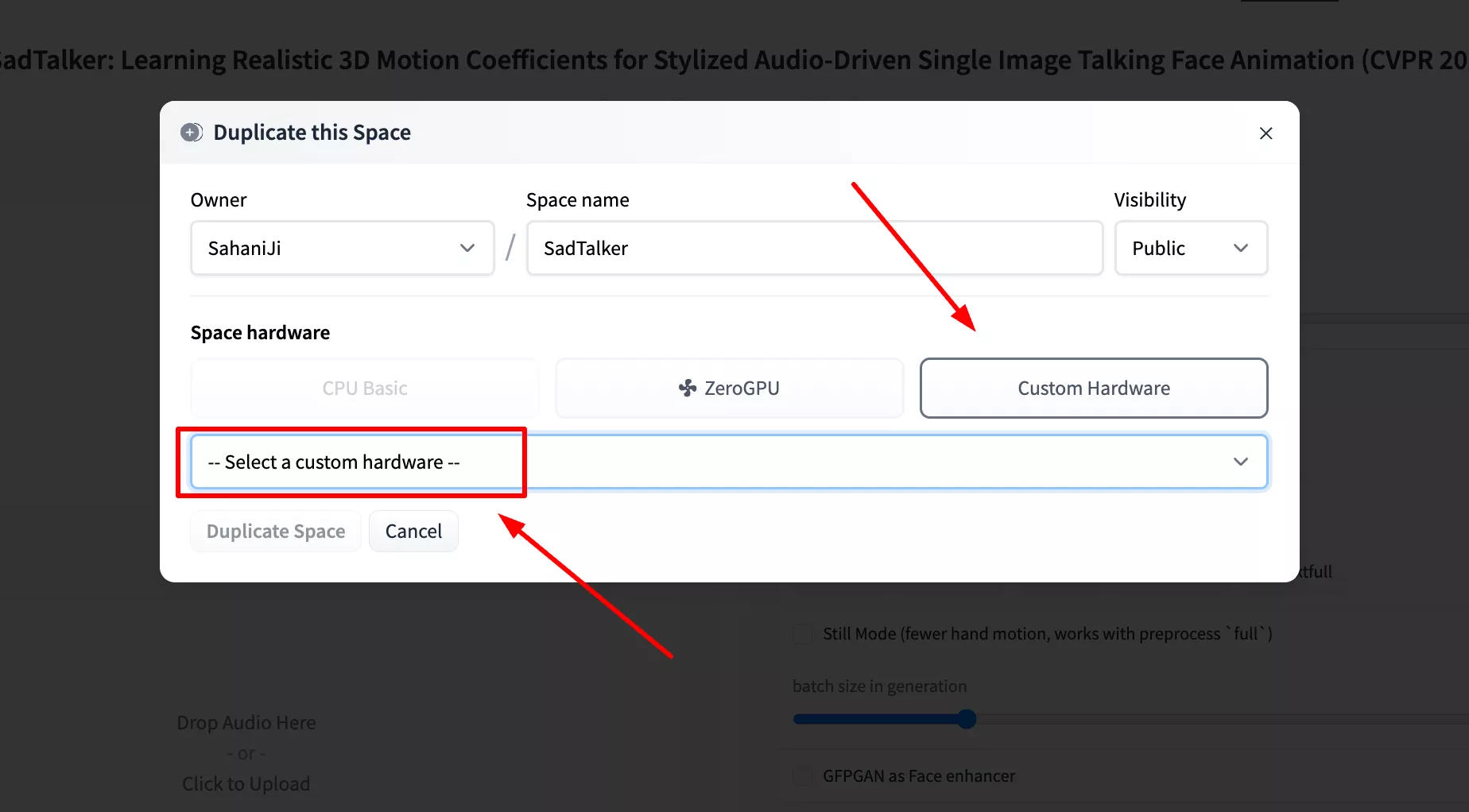
Selecting hardware compute tier and setting Space visibility to Private
Start Private Generation
Hugging Face will automatically build the container. Once initialized, your personal Space has zero public queue wait time and processes only your requests.
Best Settings for Hugging Face Web Generation
These are starting points for community Spaces, whose hardware, exposed controls and time limits can vary. They do not guarantee freedom from memory errors or timeouts. Compare the Best Settings master guide for controlled ComfyUI evidence:
| Setting | Recommended Value | Impact on Stability |
|---|---|---|
| Preprocess Mode | crop | Focuses compute strictly on the facial bounding box; avoids background rendering lag. |
| Still Mode | Checked (Enabled) | Reduces generated head motion; mouth animation continues. Inspect neck edges rather than expecting guaranteed wobble removal. |
| Face Resolution | 256 (Speed) or 512 (Quality) | 256 is a useful preview starting point; 512 uses a larger base renderer. Runtime and memory depend on the Space and input; no fixed cloud timings are established here. |
| Face Enhancer | gfpgan | Optional restoration may sharpen facial detail, but can alter likeness and adds processing. Compare OFF/ON before keeping it. |
| Audio Duration | 5 - 15 seconds | Use a short clip to check the result first. Check the current Space’s own time limit; there is no universal timeout established by these tests. |
Need Faster Generation Without Queue Limits?
When web spaces are backlogged, switch to dedicated options that provide unlimited durations, instant processing, and full 512px rendering control.
Local Workstation Install
Install on Windows, Ubuntu, or macOS. Full access to batch CLI inference and local Gradio.
GitHub Setup & RTX 4090
Read our complete repo manual with real 40.49-second RTX 4090 benchmarks and bug fixes.
1-Click Vast.ai PyTorch
Rent an RTX 4090 cloud instance for ~$0.47/hr with CUDA 12.4 pre-installed and zero queues.
Frequently Asked Questions (Hugging Face Spaces)
Answers to the most common questions regarding SadTalker on Hugging Face.