ComfyUI guide · Tested 4 October 2026 · RTX 4090
SadTalker preprocess: full vs crop vs resize
Preprocessing determines what goes into the face renderer and how the output is framed. Compare all three modes with the same portrait and narration, then reproduce the test in ComfyUI.
Same input, three framing choices
The order is full → crop → resize. Only preprocess changes. All three use size 512, still OFF, GFPGAN, batch size 2, expression scale 1.0 and pose style 0. The synchronized comparison uses one audio track.
full
crop
resize
Narration transcript
This demonstration showcases how SadTalker transforms a single image into a realistic speaking avatar with synchronized lip movements and expressive facial animation.
The same sample narration is used for all three modes. English captions are available in each player.
What changed visually?
- full
- The jacket and original surrounding frame remain visible. The animated face moves within that scene; inspect the jaw and neck transition as the head turns. The larger final image does not mean the face model rendered more detail than the other modes.
- crop
- The automatic crop produces a square close-up of the face, removing most shoulders and the wider source composition. Mouth, eyes and head movement remain visible. At the same display width the face appears larger, which also makes small mouth and edge artifacts easier to inspect.
- resize
- The output retains the wider portrait without pasting the face back into a static source frame. The face and nearby collar/shoulder area are rendered as part of that image. It completed on this portrait; that does not establish that resize will work well when a face occupies a much smaller part of the source.
Compare the jaw and neck boundary, face shape, teeth, eyes and background motion. These are visual observations from one portrait, not scored lip-sync or identity measurements. The template does not expose a seed, so expressions and blinking can vary between runs.
Measured results on the same RTX 4090
Each mode had one warm-up and three measured runs. We rotated the order between measured rounds: full/crop/resize, crop/resize/full, then resize/full/crop. Timing uses ComfyUI’s server execution events and includes input loading, worker/model startup, inference and video export; queue wait, installation and warm-ups are excluded.
Swipe the table sideways to compare all three modes.
| Setting | full | crop | resize |
|---|---|---|---|
| Measured runs | 218.93 s / 217.21 s / 218.55 s | 117.34 s / 120.08 s / 118.13 s | 116.53 s / 116.05 s / 116.08 s |
| Median time | 218.55 s | 118.13 s | 116.08 s |
| Final output | 2240 × 2080 25 fps · 11.24 s | 1024 × 1024 25 fps · 11.24 s | 1024 × 960 25 fps · 11.24 s |
| Portrait runs completed | 4 completed, including warm-up | 4 completed, including warm-up | 4 completed, including warm-up |
Full took about 1.85× the crop median in this test. Crop and resize were close: their medians differ by 2.05 seconds. This setup combines full-image compositing with GFPGAN enhancement of a larger frame; it does not isolate the cost of preprocessing alone. Choose framing first, then check speed on your own inputs.
size = 512 is the base face-rendering setting, not a guarantee of a 512 × 512 final video. Full pastes the animated face into the source frame; the tested GFPGAN stage also upscales by 2×. Resize output dimensions can be affected by the source aspect ratio and video encoding. The table reports actual files, not inferred resolutions.
Exact setup and test evidence
- GPU
- NVIDIA GeForce RTX 4090, 24564 MiB, 580.95.05
- Worker
- Python 3.10.21 · PyTorch 2.1.2+cu121 · CUDA runtime 12.1
- CPU threads
- OMP, MKL, OpenBLAS and NumExpr limited to 4 each in the isolated worker.
- Input
- 1117 × 1034 portrait; 11.26-second narration. Same source bytes for every portrait run.
- SadTalker revision
- cd4c0465ae0b54a6f85af57f5c65fec9fe23e7f8
- Custom node revision
- 4c231660fea4e1f2748d03dcf38ea438fd9f884f
- ComfyUI revision
- 73c9bad4d21e7addbe1d13bc92eee0f1431b017d
- Cache control
- Identical bytes under fresh filenames for every timing run; checked unique output folders and no cached SadTalker execution.
- Timing
- execution_start → execution_success; the node starts a new worker for every render, including after warm-ups.
Get run data and hashesGet outputs, workflows and logs
To match the worker CPU settings, follow the four-thread launcher instructions from our still-mode test. This page uses the same machine, custom node and worker versions. Default cloud CPU thread counts can produce different timings.
Reproduce it in ComfyUI
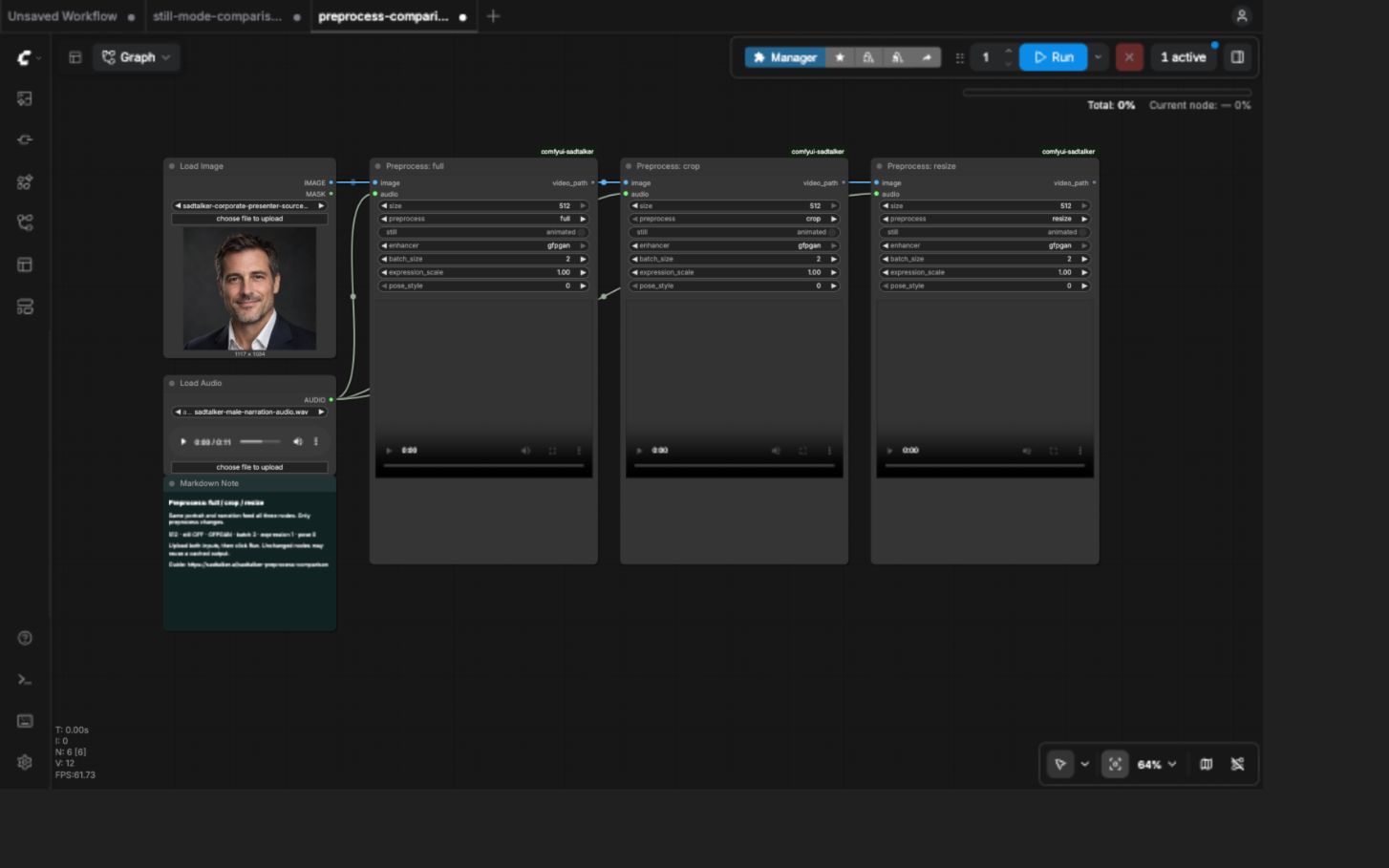
Use our ComfyUI setup guide to install the isolated SadTalker node. The comparison extends the guide’s LoadImage / LoadAudio template with three SadTalker nodes.
- Get the three-mode workflow and drag the JSON into ComfyUI.
- Upload the test portrait and the narration into LoadImage and LoadAudio. Both feed all three nodes.
- Set
preprocessto full, crop and resize respectively. KeepstillOFF (the widget displaysanimated) and all other settings identical. - Click Run. Videos appear in the nodes and are saved under
ComfyUI/output/sadtalker/<run-id>/. An unchanged graph may return cached outputs; fresh input filenames were used for the timing tests.

ComfyUI API commands
Get each API graph and place the portrait and narration in ComfyUI’s input folder with their supplied filenames. These commands queue all three modes sequentially; ComfyUI runs the queue on the same GPU.
full API workflowcrop API workflowresize API workflow
for mode in full crop resize; do
  python -c 'import json,sys; print(json.dumps({"prompt":json.load(open(sys.argv[1]))}))' "$mode-api.json" > prompt.json
  curl -X POST http://127.0.0.1:8188/prompt \
    -H 'Content-Type: application/json' \
    --data-binary @prompt.json
done
Replace the address with your running server. The rented instance uses internal port 18188; the command shows the usual local port 8188. These graphs reproduce settings, but repeats may be cached and their filenames do not automatically invalidate the cache.
Which preprocess mode should you use?
Crop: a face-focused talking head
A useful starting point for headshot videos and face-focused layouts. Face detection and alignment choose the crop; shoulders and the original composition may be cut away. Check the crop before committing to a long narration.
Full: retain the source scene
Use when the jacket, body or background needs to remain in the frame. It pastes the animated face back into the original image. Check the jaw/neck boundary and brightness changes. Consider still mode if generated head motion makes the pasted region distracting.
Resize: test an already suitable face framing
It skips the automatic face crop and feeds the whole resized image to the renderer. Try it on a portrait already framed around the face. On wider compositions, reducing the entire image gives the model fewer pixels for the face and can animate areas you intended to keep static. Inspect this page’s result before using it for a presenter scene.
Failure cases and practical limits
Observed no-face errors and limits
All twelve portrait renders produced video and audio successfully. A separate uniform gray image (1117 × 1034, no face) with a two-second narration excerpt failed in both full and crop. Both logs point to missing source landmarks and end with “TypeError: exceptions must derive from BaseException.” Further probe work was stopped at the owner’s request; no verified resize failure-probe result is included. These probes are excluded from the portrait medians.
The installed crop/full preprocessing requires detectable facial landmarks. If face detection fails, use a clear, front-facing portrait and inspect the worker log. Resize skips the automatic crop, but that does not make a missing or very small face usable. The two no-face errors are observed results; the resize advice is based on the implementation, not a tested success rate.
Get the no-face fixtureGet the two failure records

What this test cannot establish
- All twelve main portrait renders completed, but successful execution does not guarantee clean face edges, accurate lip sync or stable identity.
- One portrait, one narration and one GPU do not establish universal quality or speed rankings. Very small faces, profile poses, occlusion and multiple-face selection were not tested.
- GFPGAN was enabled for every mode. Enhancement can alter facial detail and adds processing, particularly when the resulting frame is larger.
- If you hit an out-of-memory error, try size 256 and batch size 1 for all three modes. Those settings were not benchmarked here.
Implementation references: input preprocessing, output framing and enhancement, and the tested ComfyUI node.