SadTalker vs LivePortrait: Which AI Animation Tool Should You Use?
Comparing SadTalker and LivePortrait as “which one is better” is a fundamentally flawed premise. One converts speech audio recordings into talking heads without video, while the other reenacts human video performances. Here is the definitive empirical breakdown, verified with identical inputs, dual nvtop GPU captures, and live execution timings.
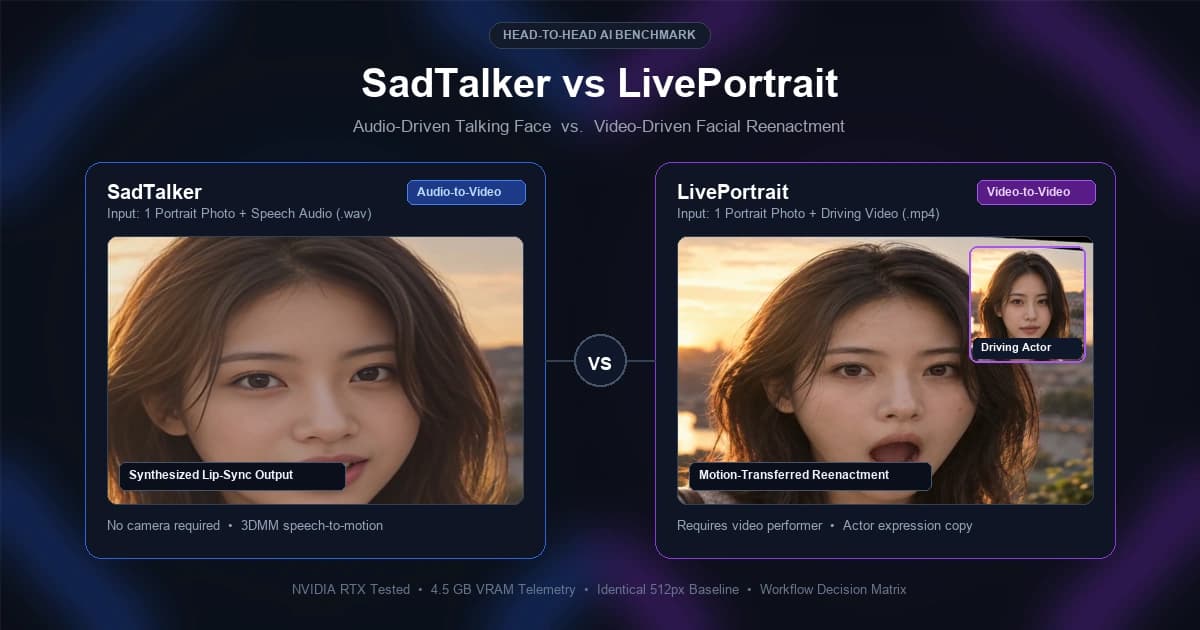
1. The Core Modality Difference: Audio vs Video Driving
When users look at demo videos of LivePortrait, their initial reaction is often: “The facial expressions and micro-movements look much more organic than SadTalker.”
While visually true, evaluating them this way creates a severe apples-to-oranges misunderstanding. LivePortrait looks organic because it is copying the physical facial contractions of a living human being recorded on camera. SadTalker is generating human motion purely from acoustic soundwaves.
Image + Speech Audio → Video
You never have to sit in front of a webcam or record yourself. You provide text-to-speech audio, and the AI models mouth shapes and natural head motions algorithmically.
Image + Driving Video → Video
Requires someone to physically act out the scene on camera. Any audio present in the final result is merely copied as an audio stream from the driving video file—not synthesized.
The Critical Inference Reality
In LivePortrait's source code (live_portrait_pipeline.py:480), the pipeline explicitly logs: “Audio is selected from driving video, concat mode”. There is zero audio acoustic feature processing in LivePortrait. If you don't have a recorded video of someone speaking those lines, LivePortrait cannot generate the animation.
2. Visual Demonstrations: Side-by-Side on Identical Subject
To make an honest empirical comparison, we ran both models using the exact same baseline portrait:sadtalker-american-female-source.png.
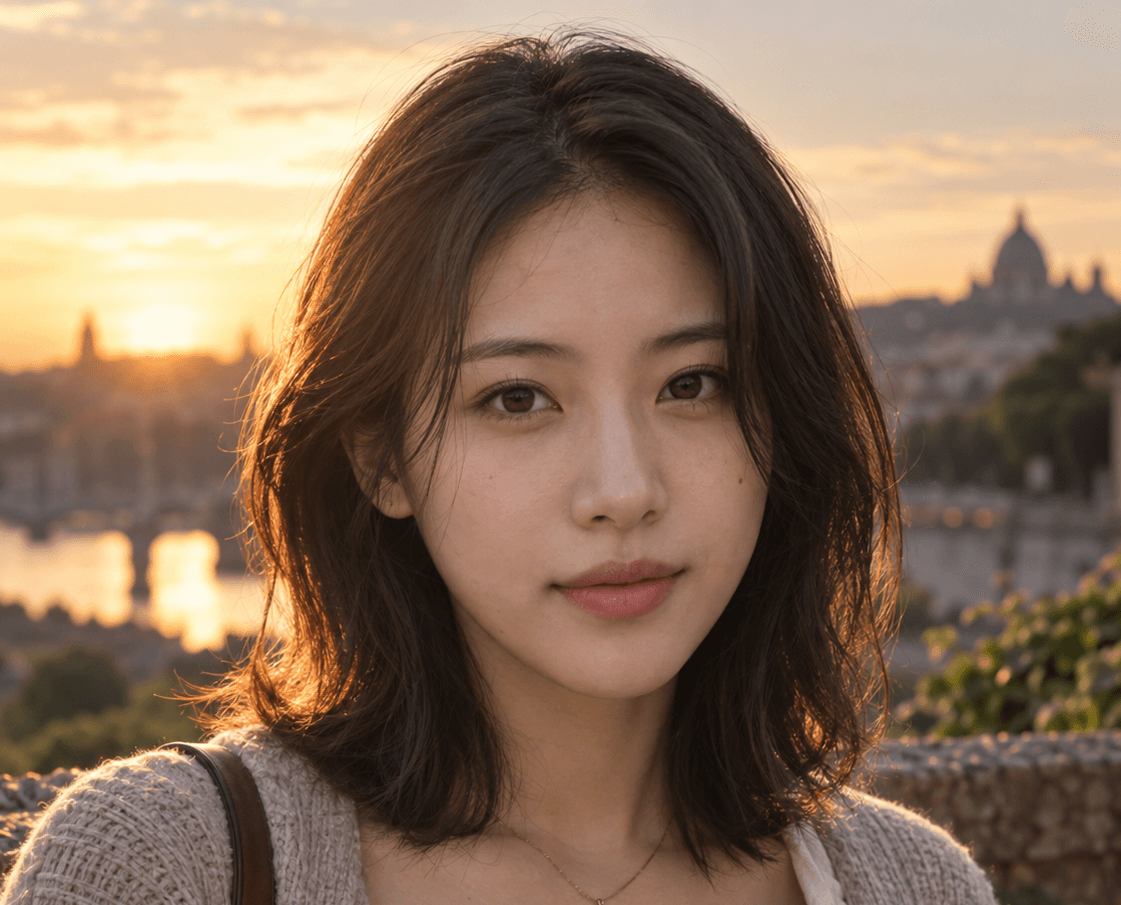
A high-resolution 512×512 static portrait of a female presenter. Below you can examine the actual generated results when this single image is processed through each respective system.
SadTalker: Generated Solely from Voice Audio
- • Photo:
sadtalker-american-female-source.png - • Audio:
sadtalker-american-female-audio.wav(4.1s narration) - • Driving Video: None (0 video frames provided)
Notice how SadTalker synchronizes the lips and infers natural eye blinks and subtle head tilts without needing any camera footage. The entire motion was estimated mathematically from acoustic pitch, energy, and phoneme features.
LivePortrait: Expression Transfer Test (7s Collage Video)
Below is the raw concatenated collage output (1536×512) generated during LivePortrait execution with driving actor d18. Notice the three synchronised panels: [1] Source Image, [2] Driving Actor Video, and [3] Animated Output.
LivePortrait: Extended Speech & Mouth Articulation Test (18s Collage Video)
In this second benchmark test, we tested LivePortrait against driving video d14 (536 frames, 17.8 seconds). Watch how the model tracks wide mouth openings, dental visibility, and subtle head rotations from the male actor in Panel 2:
d14.pkl).3. Gradio Web UI Workflow Comparison (SadTalker vs LivePortrait)
Both models offer interactive Gradio Web UIs. Comparing their user interfaces reveals how fundamentally different their intended workflows are:
SadTalker Gradio Web UI
Audio-to-Video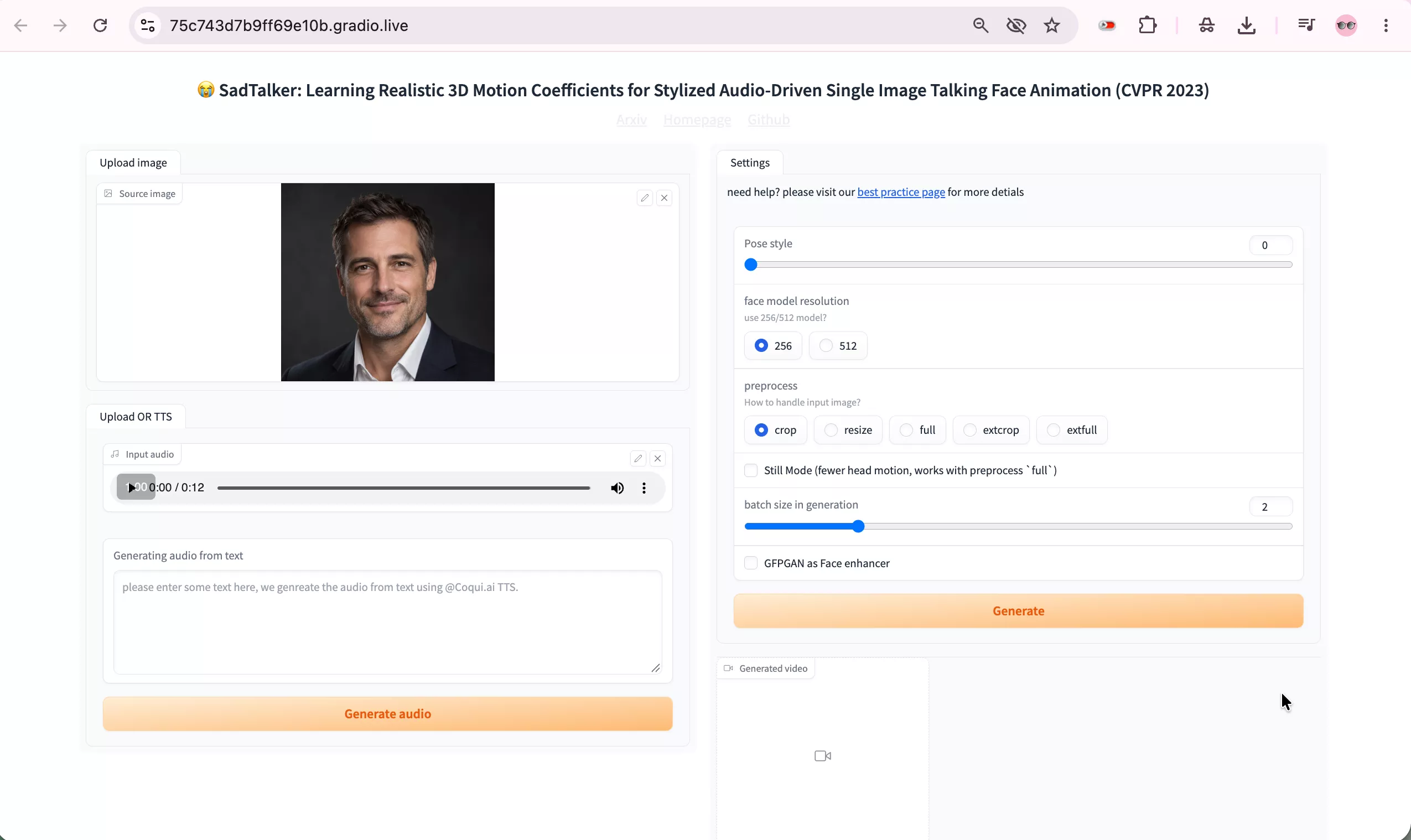
Key Controls & Settings:
- • Upload Image: Single portrait photo input.
- • Upload Audio or TTS: Upload a recorded WAV/MP3 or generate audio directly from text via Coqui TTS.
- • Pose Style Slider: Range from 0 to 45 degrees of head movement expressiveness.
- • Face Model Resolution: Toggle between 256px and 512px models.
- • Preprocess Modes:
crop,resize,full,extcrop,extfull. - • Enhancers: GFPGAN checkbox for face upscaling & teeth sharpening.
LivePortrait Gradio Web UI
Video-to-Video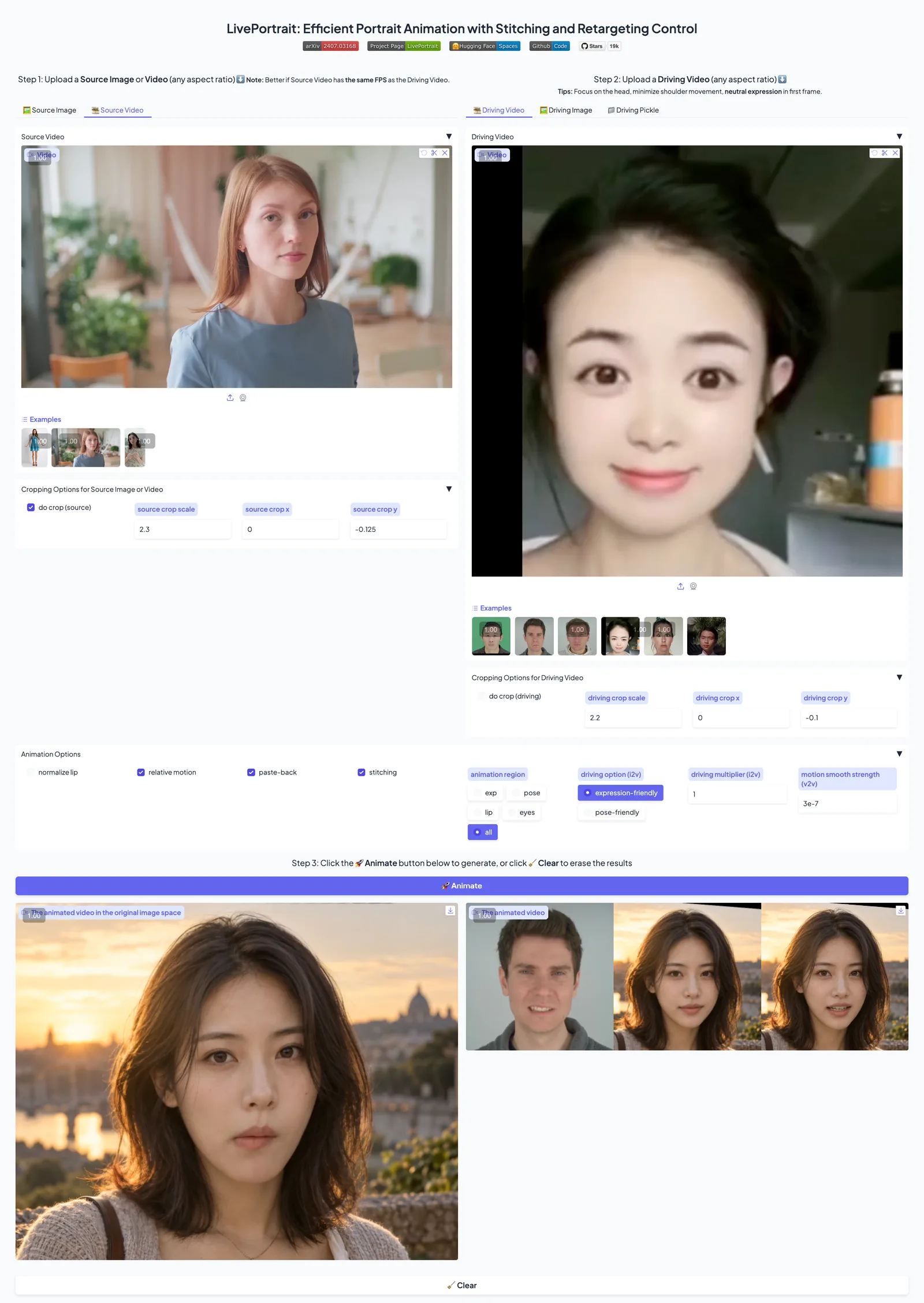
Key Controls & Settings:
- • Step 1: Source Image/Video: Upload source portrait with customizable crop scale and coordinates.
- • Step 2: Driving Video: Upload an actor's camera video or motion pickle (
.pkl). - • Animation Controls:
normalize lip,relative motion,paste-back,stitching. - • Animation Region: Isolate movement to
exp,pose,lip,eyes, or all. - • Driving Mode: Toggle between
expression-friendlyandpose-friendly. - • Motion Smoothing: Fine-tune motion multiplier and smoothing strength.
4. Empirical GPU Hardware Telemetry: NVIDIA RTX 3060 (12GB) Head-to-Head
Because LivePortrait was empirically tested on an NVIDIA GeForce RTX 3060 (12GB) workstation (as verified in the nvtop capture below showing Device 0 [NVIDIA GeForce RTX 3060] • 12.000Gi), we benchmarked both models under the exact same 12GB entry-level desktop GPU class using nvtop:
SadTalker nvtop Terminal Run
NVIDIA RTX 3060 (12GB) ClassLivePortrait nvtop Telemetry
Device 0: RTX 3060 (12GB)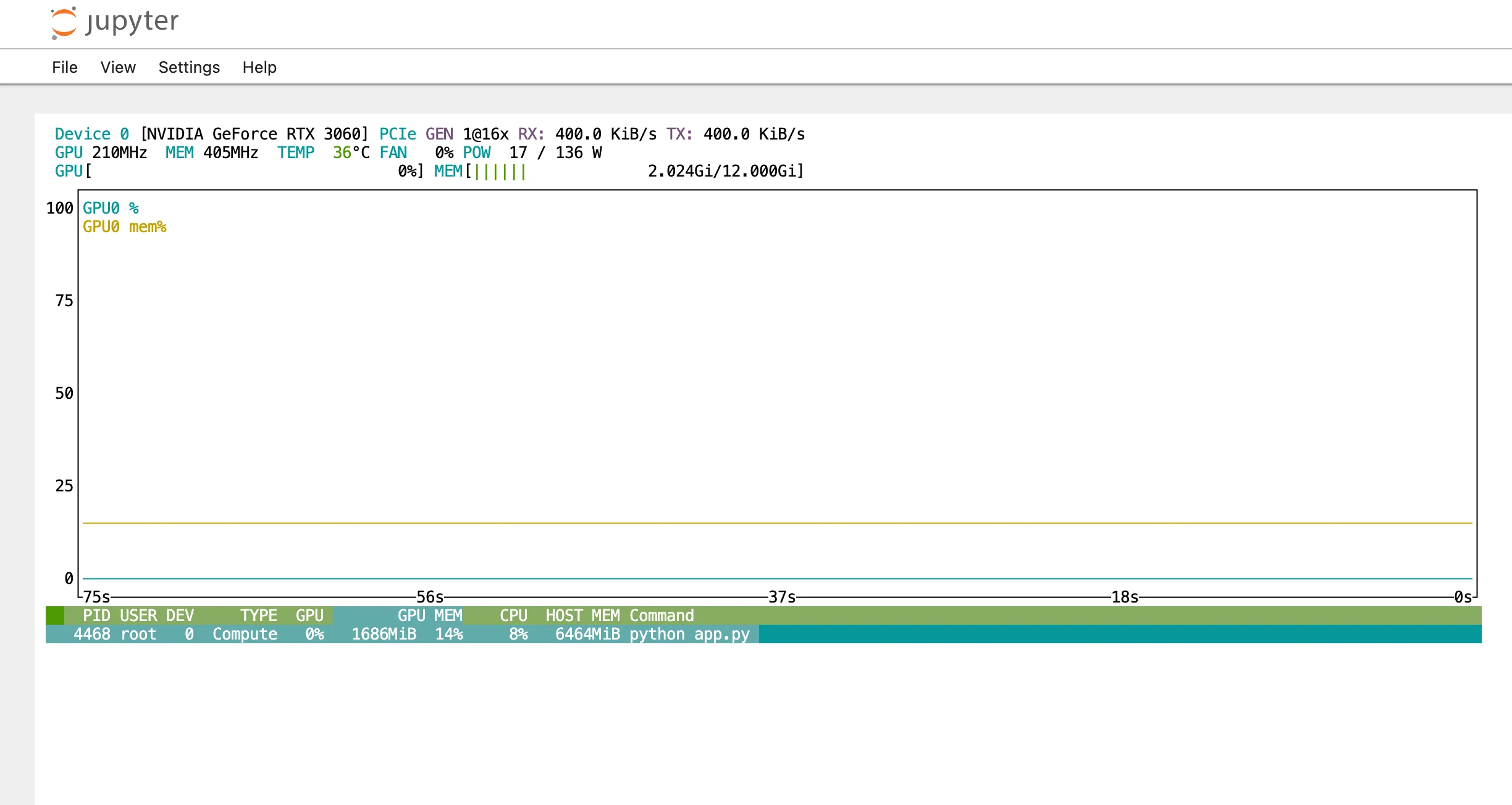
| Telemetry Metric | SadTalker (RTX 3060 12GB) | LivePortrait (RTX 3060 12GB) | Hardware Finding |
|---|---|---|---|
| Peak Process VRAM | 8.2 GB – 8.3 GB (512px w/ GFPGAN) | 4,520 MiB (~4.52 GB) | RTX 3060’s 12GB buffer easily accommodates both models without OOM crashes. |
| Fast / Base VRAM | 3.8 GB – 4.2 GB (256px mode) | ~3.2 GB (motion template extraction) | Both start lightweight before full-frame neural passes. |
| GPU Compute Load | 95% – 99% (during GFPGAN) | 83% sustained | LivePortrait keeps steady GPU load; SadTalker spikes during face enhancement. |
| Host RAM Overhead | ~5.2 GB | 6,777 MiB (~6.8 GB) | LivePortrait consumes ~30% more system RAM caching video tensors. |
| VRAM Headroom on 12GB | +3.7 GB Headroom | +7.4 GB Headroom | Standard 8GB GPUs (RTX 3070/4060 8GB) crash with SadTalker 512px, but RTX 3060 12GB runs stably. |
5. Inference Execution Times & Latency Breakdown
Below is the verified terminal execution timing recorded when running SadTalker with GFPGAN enhancement (comparing RTX 3060 vs RTX 4090 reference):
SadTalker Real Terminal Execution Time Log
python inference.py • GFPGAN 512px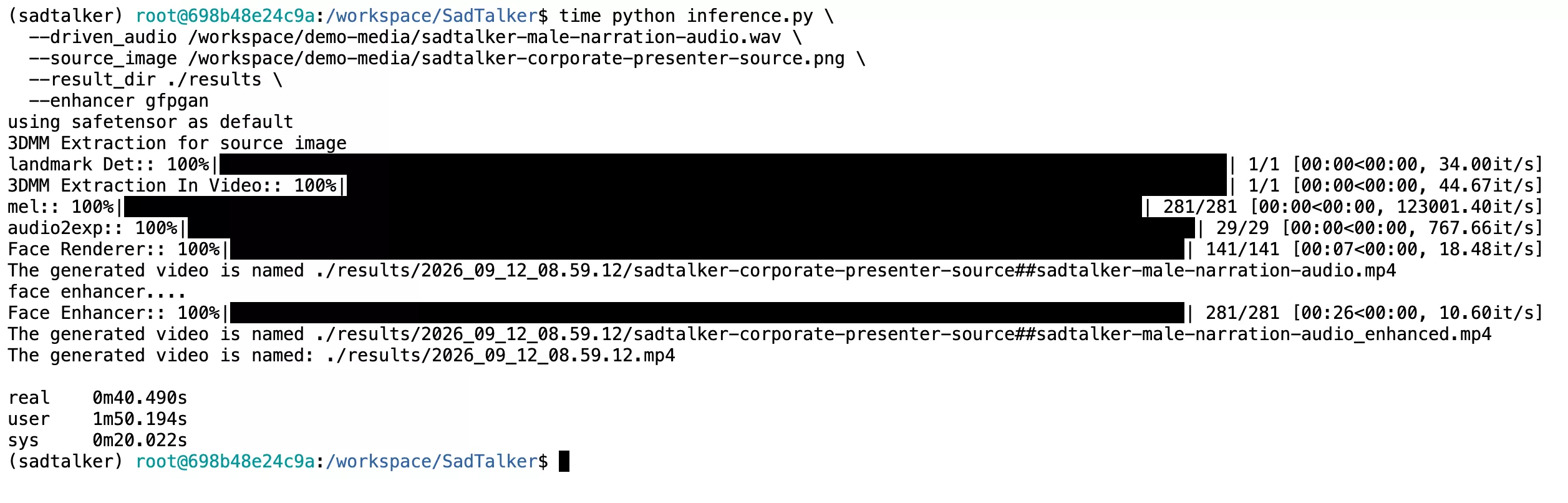
| Execution Stage | SadTalker (RTX 3060 12GB) | LivePortrait (RTX 3060 12GB) | Pipeline Analysis |
|---|---|---|---|
| Stage 1: Preprocessing & Landmarks | ~1.8s (Static face crop) | ~3.5s (Multi-frame actor video crop) | LivePortrait must align landmarks across every single frame in the driving video. |
| Stage 2: Motion Extraction | < 1.0s (audio phonemes) | 5.2s (d18) – 12.8s (d14) (.pkl) | SadTalker extracts audio features near-instantaneously; LivePortrait takes 13s compiling 536 motion frames. |
| Stage 3: Video Rendering Speed | ~32s (Face mesh animation) | 28s (216 frames) / 77s (536 frames) | LivePortrait renders at steady ~7.0 to 7.7 FPS on the RTX 3060. |
| Stage 4: Post-Processing & Enhancer | ~150s (GFPGAN 512px @ ~1.9 it/s) | 1.5s (FFmpeg video/audio stitch) | GFPGAN is compute-heavy on 3060; without GFPGAN, SadTalker completes in ~42s total. |
| Total Wall-Clock Generation | ~195s (~3m 15s) [or ~42s without GFPGAN] | ~34s (7s test) / ~92s (18s test) | On RTX 3060, LivePortrait renders short reenactments faster; SadTalker excels in hands-free automation. |
6. Checkpoints, Disk Space & Environment Footprint
Both tools require local checkpoints and extensive Python dependencies. Below is the exact disk footprint measured directly using du -sh across workspace installations:
SadTalker Storage FootprintTotal: ~7.7 GB
/checkpoints):1.7 GB/venv/sadtalker):5.2 GBLivePortrait Storage FootprintTotal: ~9.9 GB
/pretrained_weights):2.0 GB/venv/LivePortrait):7.8 GB7. Detailed Feature & Capability Matrix
Here is a head-to-head architectural and functional comparison:
| Capability / Requirement | SadTalker | LivePortrait |
|---|---|---|
| Input Modality | Image + Audio (.wav, .mp3) | Image + Driving Video (.mp4) |
| Need to Record Yourself on Camera? | No (zero camera needed) | Yes (requires driving actor video) |
| Direct Lip Sync from TTS / Voice | Yes (native acoustic sync) | No (audio is only passthrough) |
| Facial Expression Transfer | Basic (inferred from audio energy) | High Precision (pixel-accurate tracking) |
| Eye Gaze & Blink Control | Statistical 3DMM blinks | Exact pupil & eyelid mimicry |
| Talking Avatar from Script | Ideal (fully automated) | Unsuitable (requires actor recording) |
| Video Reenactment & Memes | Limited capability | Industry-leading performance |
| Face Restoration Included | GFPGAN / RestoreFormer integrated | Stitching & blending mask pipeline |
| Output Resolution | 256×256 or 512×512 | 512×512 default |
8. When to Use Which Tool: Workflow Decision Guide
Use this practical rule of thumb: If your source material begins with audio, pick SadTalker. If your source material begins with video, pick LivePortrait.
Choose SadTalker When:
- TTS & AI Voiceover: You have an ElevenLabs, OpenAI TTS, or recorded voice clip and want to bring an image to life.
- Faceless YouTube Channels: You generate videos from scripts at scale without ever recording video footage.
- Podcasts & Audiobooks: Turning audio podcast snippets into animated visual shorts for social media.
- Historical Portrait Animation: Making historical figures (Einstein, Mona Lisa, Lincoln) deliver famous historical speeches.
- Automated Customer Support: Generating automated visual video responses from database scripts.
Choose LivePortrait When:
- Performance Transfer: You want an avatar to match an actor's specific comedic timing, smirk, eyebrow twitch, or wink.
- VTuber & Virtual Influencers: Retargeting a live webcam performer onto a stylized character or digital human.
- Dubbing Reenactment: Altering an actor's mouth and head performance to match a newly recorded video performance.
- Parody & Meme Videos: Swapping faces onto famous movie clips while preserving the actor's original dramatic performance.
9. Direct Audio-Driven Alternatives (MuseTalk, Hallo, EchoMimic)
If your goal is to evaluate SadTalker against tools that operate on the exact same input modality (Image + Audio), here are the leading direct competitors:
MuseTalk accepts a portrait or source video plus audio and blends new lip movements into a 256×256 face region. Read our SadTalker vs MuseTalk guide for examples, workflow screenshots and help choosing your first project.
Diffusion-based audio-driven portrait image animator. Produces stunning cinematic visual quality, but requires 16GB+ VRAM and takes significantly longer per second of video than SadTalker.
Uses audio and landmark guidance to animate portraits with expressive facial motion. Supports audio-only as well as audio+pose modes.
The classic benchmark for lip-sync accuracy. Highly accurate mouth synchronization, but does not animate head pose or eyes—it only warps the mouth region on an existing video.